PDF standards narrow the broad PDF specification to what one job needs, then forbid the features that could put that job at risk.
That job might be long-term archiving, print production, document accessibility, engineering exchange, variable-data printing, or georeferenced map use.
The important point is that a standard is not just a label. It is a conformance target that a file claims, and that claim has to be declared inside the PDF and proven by validation.
This is where the main PDF standards split into practical roles.
PDF/A is for preservation. PDF/X is for reliable print exchange. PDF/UA is for accessibility. PDF/E is for engineering documents. PDF/VT is for variable-data print. GeoPDF is what many readers mean when they talk about map-aware PDFs, but it is not an ISO subset.
That distinction matters. PDF/A, PDF/X, PDF/UA, PDF/E and PDF/VT are ISO subsets. GeoPDF is TerraGo’s trademarked implementation of georeferencing, while the ISO route is the geospatial feature set inside ISO 32000-2.
The history is stranger than the neat standards list suggests. PDF/X-1 became an ISO standard in 2001 as ISO 15930-1, and PDF/A-1 followed in 2005 as ISO 19005-1. The base PDF format itself did not become ISO 32000-1 until 2008.
So the constrained print and archive profiles were standardized before the base format they constrained. Standards, apparently, enjoy arriving before the thing they are organizing.
This guide explains what a PDF standard is, why the base PDF format needs subsets, and how standards differ from PDF versions.
It also covers the ISO standard families and PDF-related standards developed outside ISO, along with how a PDF declares conformance, how validation checks that claim, and what happens when validation fails.
Finally, you will learn how conforming PDFs are created, whether multiple standards can be combined, how editing can break conformance, and how to choose the right PDF standard for a particular document.
What Are PDF Standards?
A PDF standard is a published subset of the base PDF specification that requires some features and forbids others so the file behaves predictably for one defined job.
That job may be archiving, print production, accessibility, engineering exchange, variable-data print, or geospatial reference.
The key word is file. Conformance belongs to the PDF itself, not to the software that created it. A tool can write a conforming file, but the file is what carries the claim and has to pass the check.
So a standard is a conformance target, not a quality setting, a paper size, or a design preset.
A conforming file is still an ordinary PDF. Any normal PDF reader can open it, but a validator, archive, press workflow, or accessibility checker may treat it differently because it claims a specific standard.
An ISO subset is defined as much by what it forbids as by what it requires. PDF/A, for example, restricts risky long-term features such as encryption and external dependencies. PDF/X cares about print exchange rules. PDF/UA cares about structure that assistive technology can read.
| What a PDF standard controls | What it does not control |
|---|---|
| Which PDF features are allowed | Page size |
| Whether fonts must be carried inside the file as an embedded font | File size |
| Which metadata or identifiers must be present | Visual design |
| Which color data or output information must be included | Which application opened it |
| Whether document structure must be present and usable | Whether the layout looks attractive |
The specification vocabulary has changed too. ISO 32000-1:2008 spoke about a conforming writer and a conforming reader. ISO 32000-2 replaced that wording with PDF writer, PDF reader, and interactive PDF processor.
The historical order is easy to miss. PDF/X-1 became ISO 15930-1:2001, and PDF/A-1 became ISO 19005-1:2005. The base PDF format itself did not become ISO 32000-1 until 2008.
So ISO standardized the constrained print and archive profiles of Adobe’s PDF specification before it standardized the base specification itself.
Why Does the Base PDF Format Need Subsets at All?
Because ISO 32000 is permissive by design. A file can use encryption, reference fonts it does not carry, run JavaScript, embed video, stack layers, rely on transparency, and still be a valid PDF.
That flexibility is useful for general documents, but it becomes dangerous when the file has one strict job.
A PDF can be valid and still fail its real destination.
A missing external font reference can break an archive years later if the font no longer exists on any machine that opens the file.
An RGB image sent to a press with no output intent can leave the printer guessing what color the ink should actually produce.
An untagged scan may look readable to a person but be announced as an empty page by a screen reader.
That is why “valid PDF” and “fit for purpose” are two different tests. The base format checks whether the file is allowed to exist as a PDF. A standard checks whether the file is safe for one specific job.
| Features the base format allows | Why it breaks archiving | Why it breaks print | Why it breaks accessibility |
|---|---|---|---|
| External font references | The future system may not have the font. | Text may reflow or substitute unexpectedly. | Text can become harder to map or read correctly. |
| Encryption | Archives may not be able to preserve or inspect the file. | Production systems may be blocked from processing it. | Assistive technology may not be allowed to access the content. |
| Transparency | Long-term rendering can depend on processor behavior. | Flattening can change color or edges at press time. | Layered visual effects may not expose meaningful structure. |
| Optional content group layers | Hidden or visible layers may not survive future workflows predictably. | The wrong layer can print or fail to print. | Hidden content can confuse the reading order. |
| Embedded multimedia | Audio or video may stop working as software changes. | Multimedia has no useful press output. | Non-text media may be invisible without proper alternatives. |
Subsets remove that optionality. PDF/A narrows the file for preservation, PDF/X narrows it for print exchange, and PDF/UA narrows it for accessibility.
The wider standards landscape proves the point. The PDF Association lists eleven ISO standard families around PDF, plus PAdES at ISO 14533-3. Search results often show only a smaller handful, while the AI Overview names just four.
That gap exists because PDF is not one narrow format. It is a broad specification with many possible jobs, and each serious job needs its own conformance target.
How Do PDF Standards Differ From PDF Versions?
A version says which features a file may use. A standard says which features it must use and must not use.
PDF 1.7 and PDF 2.0 are versions. PDF/A-2b and PDF/X-4 are conformance targets.
Every PDF has exactly one version, but it can carry zero, one, or several conformance claims on top of that version.
The version is stored in places such as the file header, where the first line may look like %PDF-1.7, and in the document catalog. A conformance claim is stored separately, usually in the file’s XMP packet.
| Question | Version | Standard |
|---|---|---|
| What it declares | Which PDF feature set the file may use | Which restricted rule set the file claims to meet |
| Where it is stored | File header and document catalog | XMP metadata packet |
| How many a file can have | Exactly one effective version | Zero, one, or several conformance claims |
| Who sets it | The PDF writer or processor that saves the file | The export tool or workflow that applies a conformance target |
| What changes if you ignore it | Some readers may handle features differently | Archives, printers, or validators may reject the file |
Subsets are built on versions. PDF/A-2 sits on PDF 1.7, while PDF/A-4 sits on PDF 2.0.
A newer version is not automatically a higher standard. A PDF 2.0 file with no conformance claim is less restricted than a PDF 1.7 file that claims PDF/A-1b.
The other detail people miss is that an ISO edition can be withdrawn. “PDF 2.0” can point to ISO 32000-2:2017, which was withdrawn, or ISO 32000-2:2020, which replaced it.
The same kind of edition problem appears elsewhere. PDF/UA-1 started as a 2012 edition and was replaced by ISO 14289-1:2014. PDF/X-2, published as ISO 15930-5:2003, was withdrawn and never replaced.
So “the latest PDF standard” is not answered by a bare family number. You need the family, part, edition, and year, because a withdrawn standard may still appear in old files, export menus, or printer instructions.
Which PDF Standards Has ISO Published, and What Is Each One For?
ISO publishes the base specification, ISO 32000, plus a family of PDF subsets and companion standards for jobs the base format is too broad to guarantee by itself.
The main families are PDF/A for archiving, PDF/X for print exchange, PDF/UA for accessibility, PDF/E for engineering, PDF/VT for variable-data print, PDF/R for raster scans, and PDF/VCR for variable content replacement.
| Standard | ISO number | Current part and year | The one job it exists for | Read more |
|---|---|---|---|---|
| ISO PDF specification | ISO 32000 | ISO 32000-1:2008 and ISO 32000-2:2020 | Defines the base PDF format: PDF 1.7 and PDF 2.0. | ISO 32000: The PDF Specification and How to Get It Free |
| PDF/A | ISO 19005 | ISO 19005-1:2005, ISO 19005-2:2011, ISO 19005-3:2012, ISO 19005-4:2020 | Preserves PDFs for long-term archiving. | What Is PDF/A and Why Governments Require It |
| PDF/X | ISO 15930 | ISO 15930-1:2001 through ISO 15930-9:2020 | Exchanges print-ready files for professional production. | What Is PDF/X and How to Export One |
| PDF/UA | ISO 14289 | ISO 14289-1:2014 and ISO 14289-2:2024 | Makes PDF content usable by assistive technology. | What Is PDF/UA and How to Check Compliance |
| PDF/E | ISO 24517 | ISO 24517-1:2008 | Exchanges engineering and technical documents. | What Is PDF/E and How to Create One |
| PDF/VT | ISO 16612 | ISO 16612-2:2010 and ISO 16612-3:2020 | Handles variable-data print jobs. | What Is PDF/VT and Variable Data Printing |
| PDF/R | ISO 23504 | ISO 23504-1:2020 | Packages raster scanned documents as PDFs. | PDF/R routing article |
| PDF/VCR | ISO 16613 | ISO 16613-1:2017 | Supports variable content replacement workflows. | PDF/VCR routing article |
This table is the routing layer, not the full standards manual. Each family gets one job here because the detailed requirements belong in the spoke articles.
It also fixes three common gaps.
First, GeoPDF is not in this ISO table because it is not an ISO PDF standard. GeoPDF is TerraGo’s trademarked implementation, while the ISO route is geospatial PDF support inside ISO 32000-2.
Second, PDF/R and PDF/VCR are real ISO PDF standards even though many PDF standards lists skip them.
Third, PDF/E, PDF/VT, and GeoPDF are often missing from short AI-style summaries, even though readers searching this topic regularly mean those too.
So the clean answer is ISO owns the base PDF specification and the main PDF subset families, but not every PDF-related label people use is an ISO subset.
Which PDF Standards Come From Bodies Other Than ISO?
Not every PDF conformance target is an ISO standard. Some PDF-related standards come from industry groups, national bodies, or signature frameworks, then sit on top of an ISO PDF subset rather than replacing it.
| Name | Who publishes it | Is it ISO? | What it rides on top of |
|---|---|---|---|
| PDF/H | Healthcare PDF best-practice groups | No | An industry best practice for healthcare PDF exchange |
| PAdES | ETSI, with long-term profiles appearing in the PDF Association index as ISO 14533-3:2017 | Partly, depending on the profile | PDF digital signatures and long-term signature validation |
| ZUGFeRD | German e-invoicing bodies | No | PDF/A-3 with an embedded file |
| Factur-X | French and German e-invoicing bodies | No | PDF/A-3 with an embedded structured XML invoice |
PDF/H is often listed beside PDF/A and PDF/X in “types of PDF standards” articles, but it never became an ISO subset. It is better understood as a healthcare best-practice guide for using PDF in medical and health-document workflows.
PAdES is different because it has two homes. It began with ETSI as a framework for advanced PDF signatures, and long-term signature profiles also appear in the PDF Association’s standards index as ISO 14533-3:2017.
ZUGFeRD and Factur-X are e-invoicing profiles. They let one PDF carry both a human-readable invoice and a machine-readable structured invoice inside the same file.
The reason that works is PDF/A-3. PDF/A-3, published as ISO 19005-3:2012, is the PDF/A part that permits arbitrary embedded files.
That single allowance lets a strictly archival PDF carry a structured XML invoice inside it. Without PDF/A-3’s embedded-file rule, ZUGFeRD and Factur-X would not work the same way.
So the ISO-only definition of PDF standards is common, but incomplete. ISO publishes the main PDF subsets, while PDF/H, PAdES, ZUGFeRD, and Factur-X show that important PDF conformance work also happens around ISO, beside ISO, and sometimes on top of ISO.
How Does a PDF Declare Which Standard It Conforms To?
A PDF declares its standard with an identifier written into the file’s XMP metadata packet.
For PDF/A, that usually means pdfaid:part and pdfaid: conformance. For PDF/UA, it means pdfuaid:part. For PDF/X, the file adds a GTS_PDFXVersion key and an embedded OutputIntent with an ICC profile.
The claim is not a hidden switch buried beyond human understanding. It is a few lines of readable metadata inside the file.
A simple way to inspect it is:
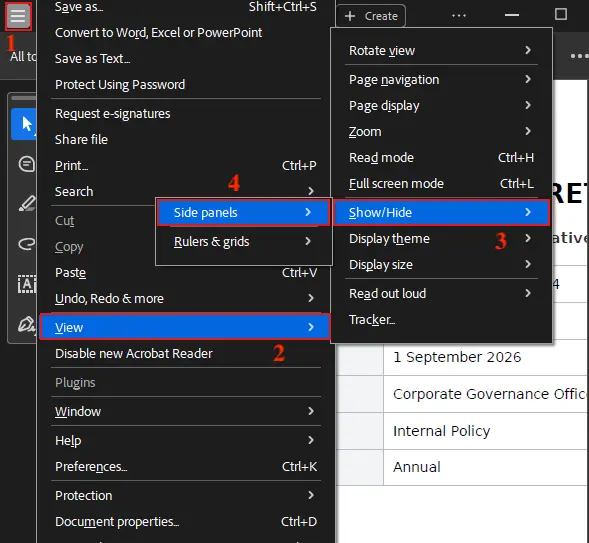
➤ Open the PDF in Adobe Acrobat, then click the Menu icon in the top-left corner.
➤ Go to View > Show/Hide > Side panels.
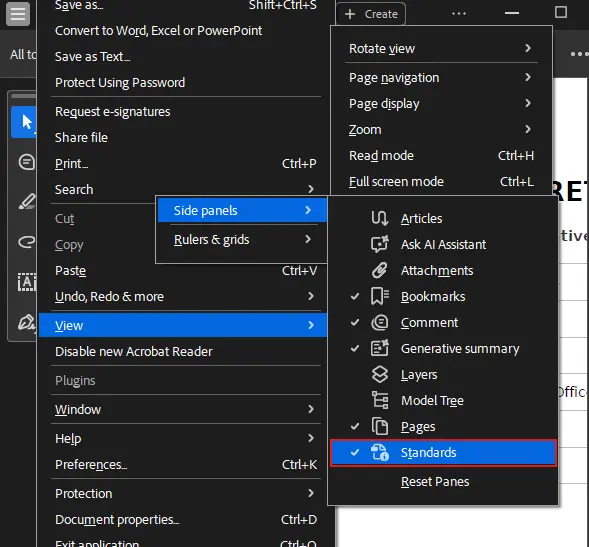
➤ From the side-panel options, select Standards.
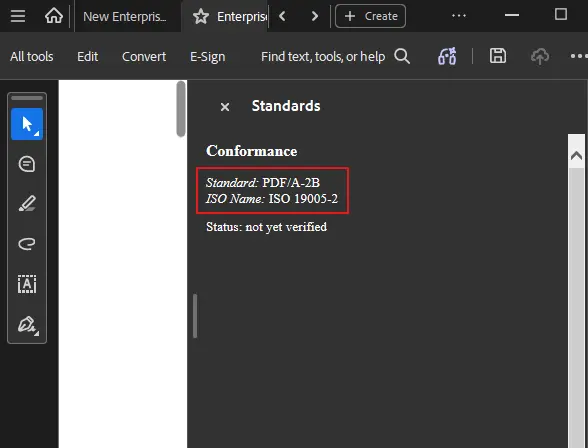
The Standards panel will open on the right side of Acrobat and display the PDF’s declared conformance information.
The producing software usually writes this identifier at export time. When someone chooses “PDF/A compliant,” “PDF/X,” or “apply PDF standards” in an export dialog, the writer tries to create a restricted file and then writes the matching identifier into the metadata.
But the identifier and the requirements are not the same thing.
Removing the identifier does not change a single mark on the page. Adding the identifier does not magically make the file conform. It only changes what the file claims.
That is why two PDFs can look identical and still be treated differently by an archive, accessibility checker, or print workflow. One may carry a conformance identifier, and the other may not.
Many people first meet PDF standards through validator errors rather than through the specification. Messages like “PDF/UA identifier missing,” “fonts are embedded,” or “table header has associated cells” are how the standard becomes visible in real work.
How Do You Check Whether a PDF Actually Meets a Standard?
A normal PDF reader checks whether the file can be opened and displayed. A validator checks whether the file satisfies the specific rules of the standard it claims.
For PDF/A and PDF/UA, veraPDF is the main validation tool. It checks PDF/A-1 through PDF/A-4, plus PDF/UA-1 and PDF/UA-2.
For PDF/X, the check usually happens through a preflight profile inside a print application or production workflow.
A validation report is not just a yes-or-no badge. It usually lists named rule failures, the affected object or page, and the clause reference behind the failure.
That detail matters because the file can look fine and still fail a rule. A font may not be embedded. A required identifier may be missing. A tag may exist but be attached to the wrong structure. A color profile may be absent where the print workflow expects one.
There is also a limit to what machines can prove.
A validator can confirm that alt text exists. It cannot judge whether the alt text is accurate, useful, or meaningful to a person using a screen reader.
That is why PDF/UA needs a human accessibility pass after the machine pass. PDF/A and PDF/X validation can catch many file-level problems, but PDF/UA has meaning-level requirements that software cannot fully understand.
The useful thing is that validation is not locked away behind vendor magic. veraPDF is free and open source, dual-licensed under GPLv3+ and MPLv2+. It is led by the Open Preservation Foundation together with the PDF Association, and it was first funded through the European Commission’s PREFORMA project.
So, do not trust the label, the export setting, or the fact that the file opens. Run the validator, read the rule names, check the conformance level, and fix the source file or export workflow before claiming the PDF meets the standard.
What Happens If a PDF Does Not Meet the Standard It Claims?
Nothing visible may happen. The PDF can open normally, look correct, and still fail the standard it claims.
The problem usually appears downstream.
- An archive ingest system may refuse the file.
- A printer may send it back.
- A procurement portal may block the upload.
- An accessibility audit may list it as non-compliant months after the file was published.
A true claim can become false after the file leaves the export workflow.
- A later edit can remove required structure.
- Font substitution during a re-save can break self-containment.
- A non-conforming writer can rewrite the file without preserving the standard’s rules.
- A cleanup workflow can strip the metadata that held the identifier.
The uncomfortable part is that the PDF may still look fine. The page content can remain visible while the conformance claim is no longer true.
That makes a mislabeled file worse than an unlabeled one. An unlabeled PDF is judged on what it does. A mislabeled PDF is judged on what it promised, and downstream systems may trust the identifier before anyone runs full revalidation.
So the error can travel further before anyone catches it. The eventual result is downstream rejection, not always at the moment the file is created.
In practice, archives and presses check these claims most consistently. Web portals check them sometimes. Ordinary readers, email clients, and casual file viewers usually do not check them at all.
There is also the opposite frustration: a genuinely conforming PDF/A file may open in read-only mode inside an editor. That does not mean the file is broken. It means the editor is trying not to modify a file that claims archival conformance.
If a claimed standard fails, revalidate the file first. Then go back to the source document and export it again with the correct conformance target.
Patching the finished PDF is the weaker route, because a patch cannot reliably restore what was already lost, especially fonts, structure, metadata, or reading order.
How Do You Create or Convert a PDF So It Meets a Standard?
Choose the standard at export time, in the application that produced the document. That is the point where the file still has access to the fonts, color data, headings, image settings, structure, and source information a later PDF conversion may not be able to recover.
There are three routes, and they are not equal.
| Do you still have the source document? | Route to take | What survives | What is lost for good |
|---|---|---|---|
| Yes | Export or save as PDF with the right conformance target selected | Fonts, structure, color settings, metadata, and intended layout have the best chance of surviving correctly | Usually little, unless the source file already lacks structure or proper assets |
| No, but the PDF is mostly complete | Convert the existing PDF with a validator-backed tool | Some metadata, font embedding, color profiles, and basic restrictions may be repaired | Missing source structure, author intent, and some layout relationships may not be recoverable |
| No, and the PDF has structure problems | Use manual remediation | Tags, headings, tables, reading order, and alt text can be repaired by hand | Original author intent may still be uncertain if the document was poorly built or scanned |
The best route is export or save-as with the required standard selected. In a generic export dialog, an option such as “PDF/A compliant” or “apply PDF standards” tells the PDF writer to work in a restricted mode.
That restricted mode does two things. It tries to build a file that follows the selected standard, and it writes the conformance identifier into the metadata.
It may also refuse, warn about, or silently alter content it cannot make conform.
- Fonts may be embedded.
- External links may be handled differently.
- Unsupported media may be removed.
- Color data may be normalized.
The exact behavior depends on the writer and the selected standard.
Converting an existing PDF is weaker because the finished PDF may not contain everything needed to prove the standard properly. A converter can embed a font it can find on the machine and attach a color profile, but it cannot always rebuild the meaning that was never stored in the file.
That problem is clearest with PDF/UA. Accessibility tagging is not just decoration added after export. It is semantic structure.
A tag says what the author meant a block of content to be: a heading, a paragraph, a list item, a table cell, or a figure. That meaning has to be authored, checked, and corrected.
Auto-tagging an untagged scan may create a file that passes several machine checks and still reads as nonsense to a screen reader. The software may see tags. The person listening may hear chaos.
That is why PDF/UA needs a human pass after machine validation, while PDF/A usually depends more on file-level checks such as embedded fonts, metadata, encryption restrictions, and self-containment.
So, build the document correctly first, export to the right standard last, then validate the finished file before sending it anywhere that will enforce the claim.
Can One PDF Comply With More Than One Standard at a Time?
Yes. The current generation of PDF subsets is written so one file can satisfy several standards at once.
The standard pairing is PDF/A with PDF/UA. That combination is common for public-sector documents that must be both archived and accessible.
Each claim needs its own conformance identifier in the XMP metadata, and each claim must be validated separately. Two standards mean two claims and two validation checks, not one magic badge doing all the work.
Some standards sit together cleanly. Others work only under conditions. Some conflict because one standard allows or needs something the other forbids.
| Standard pairing | Compatibility | Why |
|---|---|---|
| PDF/A + PDF/UA | Works | A file can be both archival and accessible if it is self-contained and properly tagged. |
| PDF/A + PDF/X | Conditional | PDF/X requires an output intent, which PDF/A can accept, but the file must still obey PDF/A restrictions. |
| PDF/X + PDF/VT | Works | PDF/VT is built on PDF/X, so the relationship is structural rather than optional. |
| PDF/A + PAdES | Conditional | PDF/A-4 supports a PAdES signature natively, but older archival workflows may need careful validation. |
| PDF/A + embedded files | Conditional | PDF/A-3 permits an embedded file, while PDF/A-2 is stricter about embedded-file use. |
| PDF/A + encryption | Conflicts | PDF/A forbids encryption, so an encrypted archive-style PDF/A claim cannot stand. |
| PDF/A + external references | Conflicts | PDF/A depends on self-containment, so an external reference breaks the archive promise. |
PDF/A and PDF/UA usually pair well because they protect different things. PDF/A protects the file’s future rendering. PDF/UA protects the document’s usable structure.
PDF/X and PDF/A can also sit together when the print file carries the right output intent and still remains self-contained enough for archival use.
PDF/VT is different because it is built on PDF/X. It is not a random second badge placed beside print conformance; it extends the print-exchange model for variable-data production.
The important change is that combining standards is normal, not exotic. Current standards are designed so that multi-conformant files can be produced without much extra effort when the source document and export workflow are set up correctly.
PDF/A-4 made one combination especially important. Since ISO 19005-4:2020 supports PAdES signatures natively, archival conformance and long-term digital signatures no longer have to fight each other the way older workflows often made them do.
In short, combine standards only when the destination actually requires more than one claim; then validate each claim separately.
How Does Editing or Compressing a PDF Break Its Conformance?
Most routine PDF edits can silently invalidate the standard claim. Image downsampling, font subsetting, font removal, layer flattening, metadata stripping, or a simple re-save in a non-conforming editor can remove something the standard requires.
The awkward part is that the identifier may stay in the file. The PDF can still claim PDF/A, PDF/X, or PDF/UA even after the file no longer satisfies the rules behind that claim.
| Operation | What it removes | Which standard it breaks | How to recover |
|---|---|---|---|
| Image downsampling | Original image data or color fidelity | PDF/X, especially when print output depends on a specific output intent | Go back to the source file, export again for print, then revalidate |
| Font subsetting or font removal | Full font data needed for reliable reuse or future rendering | PDF/A, because it weakens self-containment | Re-export with proper font embedding from the source document |
| Layer flattening | Optional content, layer behavior, or object relationships | PDF/E, PDF/X, or any workflow that depends on layered content | Flatten only before final export, then validate the finished file |
| Re-tagging or content reordering | Structure, hierarchy, and reading order | PDF/UA, because assistive technology depends on the structure tree | Repair tags manually, check reading order, then validate again |
| Metadata stripping | The conformance identifier and supporting metadata | Any claimed standard | Restore from the source workflow and re-export with the correct conformance target |
| Re-saving in a non-conforming writer | Required restrictions, identifiers, fonts, structure, or color data | Any claimed standard | Treat the file as no longer trusted and run validation again |
Compression is one common trap. Downsampling an image may make the file smaller, but it can also change print-relevant image data or disturb the conditions a PDF/X workflow expected.
A cleanup tool can create the same kind of problem. It may remove unused objects, strip metadata, subset fonts, flatten content, or rewrite the file in a way that keeps the pages visible but breaks the conformance claim.
This means conformance is a snapshot, not a permanent state. A PDF is conforming when it passes validation at that point in the workflow. A later edit can end that state.
Many teams get the order backwards. They convert a file to PDF/A early, treat it like a safe working container, then keep editing inside it.
The claim survives because the identifier often stays in the metadata. The conformance does not survive if the edits remove required structure, fonts, metadata, or self-containment.
The rule is simple: edit first, conform last. Make every content change before applying the standard. Then export to the required conformance target and revalidate after any change, even one that looks cosmetic.
Which PDF Standard Should You Use for a Given Document?
Pick by destination, not by preference. Where the file is going decides the standard, and for most everyday documents the correct answer is no subset at all.
Start with two questions: who receives this file, and what will they do with it?
If the answer is “a client will read it,” “a recruiter will open it,” “a teacher will download it,” or “a team will view it in chat,” the default choice is usually a normal PDF with no extra conformance claim.
An invoice emailed to a client, a CV, a school circular, and a report shared in a chat do not automatically need a standard. Claiming one creates a conformance obligation the file then has to keep through every future edit.
An unlabeled file is judged on what it does. A mislabeled file is judged on what it promised.
| Where the file is going | Standard to target | Where to read the detail |
|---|---|---|
| Digital archive or government preservation workflow | PDF/A | What Is PDF/A and Why Governments Require It |
| Print house or professional press workflow | PDF/X | What Is PDF/X and How to Export One |
| Public-sector upload or accessibility-controlled publication | PDF/UA, often with PDF/A | What Is PDF/UA and How to Check Compliance |
| Engineering, architecture, construction, or technical-document exchange | PDF/E | What Is PDF/E and How to Create One |
| Transactional print, bills, statements, or direct-mail production | PDF/VT | What Is PDF/VT and Variable Data Printing |
| Map sheet, survey file, or coordinate-aware PDF | Geospatial PDF or GeoPDF workflow | What Is a GeoPDF and How It Differs From Geospatial PDF |
| Standards research or version-level questions | ISO 32000 | ISO 32000: The PDF Specification and How to Get It Free |
| Version identification or PDF 1.7 versus PDF 2.0 questions | PDF version check, not a subset choice | PDF 1.7 vs PDF 2.0: What Changed |
| Choosing between PDF/A, PDF/X, and PDF/UA | Compare the destination, failure cost, and mandate | PDF/A vs PDF/X vs PDF/UA: Which to Use |
| Everyday sharing by email, chat, download, or internal review | No subset | No standards article needed unless the receiver asks for one |
Use PDF/A when the document has to survive as a record, not just look right today.
Use PDF/X when the receiver is a print workflow that needs predictable color and production behavior.
Use PDF/UA when people using assistive technology must be able to understand the document structure, not just see the page.
Use PDF/E for engineering drawings and technical exchange. Use PDF/VT for variable-data print. Use GeoPDF wording only when the receiver specifically expects that map-aware workflow; technically, the neutral standard-side term is geospatial PDF.
Use ISO 32000 when the question is about the base PDF specification itself, and use the PDF 1.7 versus PDF 2.0 route when the issue is version identification rather than conformance.
For the large majority of files, use no subset unless the receiver, archive, portal, press, law, or contract asks for one. Standards solve specific enforcement problems. Adding one without a destination requirement mostly gives the file another promise to break.
Which Standard Should You Use for Long-Term Archiving?
Use PDF/A, the archiving subset published as ISO 19005 in four parts from 2005 to 2020.
PDF/A is built for a digital archive because it tries to make the PDF a self-contained file: every required embedded font, color detail, metadata item, and document dependency should travel inside the file instead of relying on someone’s future computer to supply it.
The exact PDF/A part and conformance level, such as PDF/A-1b, PDF/A-2u, PDF/A-3a, or PDF/A-4, should come from the receiving archive, not personal preference; the part tells you which PDF generation it is built on, while the level tells you how much structure and Unicode support the file carries.
For the deeper requirements and government-use cases, read What Is PDF/A and Why Governments Require It.
Which Standard Does the Printing Industry Ask For?
Use PDF/X, the print exchange subset published as ISO 15930, with subtypes running from PDF/X-1 in 2001 to PDF/X-6 in 2020.
A print house usually asks for a specific subtype, not just “PDF/X,” because the subtypes differ on color space, transparency, and whether external references are allowed.
Every PDF/X file must carry an output intent, usually with an ICC profile, so the press knows what color the ink is supposed to produce instead of guessing from whatever happens to be on someone’s screen.
One warning is worth keeping: PDF/X-2, published as ISO 15930-5:2003, was withdrawn and never replaced. If a printer’s spec sheet still asks for PDF/X-2, that sheet is quoting a standard that no longer exists.
For the subtype requirements and export steps, read What Is PDF/X and How to Export One.
Which Standard Makes Documents Accessible?
Use PDF/UA, the accessibility subset published as ISO 14289: PDF/UA-1 in ISO 14289-1:2014 and PDF/UA-2 in ISO 14289-2:2024.
PDF/UA is built on tagged PDF, where a structure tree names headings, lists, tables, figures, and other content so assistive technology can understand the document instead of guessing from the visual layout.
A screen reader reads that structure, not the page design itself, so a file that looks clean can still fail accessibility conformance if the tags, order, or relationships are wrong.
PDF/UA sits alongside WCAG rather than replacing it. WCAG describes broader accessibility expectations, while PDF/UA defines how those expectations are expressed inside a PDF file.
The useful update is PDF/UA-2. It is the first PDF/UA part built on PDF 2.0 rather than PDF 1.7, so a file can now be both PDF 2.0 and accessibility-conformant without the version compromise PDF/UA-1 forced.
For the tagged-PDF requirements and compliance checks, read What Is PDF/UA and How to Check Compliance.
Which PDF Standard Covers Engineering Drawings?
Use PDF/E, the engineering subset published as PDF/E-1 in ISO 24517-1:2008.
PDF/E is made for technical documentation such as plans, an engineering drawing, construction drawings, geospatial content, and 3D content that must move between engineering, architecture, and construction teams.
Its practical job is CAD exchange when the sender and receiver do not share the same CAD application but still need a reliable PDF package for technical review.
PDF/E is also one of the least-used ISO PDF subsets, which is why many PDF tools do not offer it as an export target.
One detail keeps it from being dismissed as outdated. PDF/E-1 has had no second part since 2008, so an old date here means a settled standard rather than a superseded one.
For the PDF/E definition, use cases, and creation steps, read What Is PDF/E and How to Create One.
Which PDF Standard Handles Variable Data Printing?
Use PDF/VT, the variable data printing subset published as ISO 16612: ISO 16612-2:2010 for PDF/VT and ISO 16612-3:2020 for PDF/VT-3.
PDF/VT exists for transactional print and direct mail jobs such as statements, bills, policy documents, personalized letters, and mailers where every copy may contain different names, numbers, images, or offers.
It is built on PDF/X, so it inherits the print-exchange rules instead of competing with them.
Its special job is performance. PDF/VT marks which page objects repeat across many records, so a press can use page object caching instead of rasterizing the same logo, background, or layout element a hundred thousand times.
A related standard, PDF/VCR in ISO 16613-1:2017, covers variable content replacement, but PDF/VT is the one to know when the destination is high-volume personalized print production.
For the PDF/VT types and creation workflow, read What Is PDF/VT and Variable Data Printing.
Which Standard Puts Map Coordinates Into a GeoPDF?
Strictly, no ISO subset “puts coordinates into a GeoPDF.” Georeferencing is a feature set inside the base specification, ISO 32000-2, while GeoPDF is a trademarked implementation rather than an ISO subset.
A georeferenced page carries a coordinate system, so a viewer can report a real-world latitude and longitude for a point on the map instead of treating the page as ordinary artwork.
Survey, mapping, and defence agencies use this kind of map sheet distribution when field users need portable PDF maps that still know where their points are.
The neutral term for the ISO-side capability is geospatial PDF, not GeoPDF.
The PDF Association’s standards index has no GeoPDF entry, which is the clearest sign that GeoPDF is a product name rather than an ISO PDF standard.
For the full GeoPDF-versus-geospatial-PDF distinction, read What Is a GeoPDF and How It Differs From Geospatial PDF.
Where Can You Read the ISO 32000 PDF Specification?
Read it in ISO 32000, the base specification for PDF: ISO 32000-1:2008 covers PDF 1.7, and ISO 32000-2:2020 covers PDF 2.0.
Every subset on this page is a set of restrictions on that same base document. PDF/A, PDF/X, PDF/UA, PDF/E, and PDF/VT all narrow ISO 32000 for different jobs instead of replacing it.
ISO 32000-1:2008 was not written from nothing. It standardized Adobe’s existing PDF 1.7 reference, which is why the first ISO edition of the base PDF specification arrived after PDF/X and PDF/A were already standardized.
There is also a legitimate free route to reading Part 2 rather than buying it, but the steps belong in the dedicated ISO 32000 article, not this routing paragraph.
For the parts, editions, and free reading route, read ISO 32000: The PDF Specification and How to Get It Free.
How Do You Tell PDF 1.7 and PDF 2.0 Apart in a File?
Check the file header and the document catalog. The first line of a PDF begins with %PDF- followed by a version number, such as %PDF-1.7 or %PDF-2.0.
The header is the quick clue, but it is not always the final answer. If the header version and catalog version disagree, the catalog wins.
That disagreement can happen when a file is edited by different applications over time. One tool may preserve the old header while another updates the catalog, so the same PDF can appear to report two versions depending on where the checker looks.
The version matters here because it limits which conformance targets are available. PDF/A-4 and PDF/UA-2 are built on PDF 2.0, while PDF/A-1 through PDF/A-3 and PDF/UA-1 sit on earlier PDF versions, including PDF 1.7 workflows.
For the feature-by-feature version comparison, read PDF 1.7 vs PDF 2.0: What Changed.
How Do the Three Most-Requested PDF Subsets Compare?
PDF/A, PDF/X, and PDF/UA are the three PDF subsets readers are most likely to be asked for, and they differ by what they protect: the file’s future, its color, or its readability.
The mandate also changes: archives and public-sector preservation workflows ask for archival conformance, printers ask for print conformance, and accessibility policies or procurement rules ask for accessibility conformance.
The failure cost changes with it: a bad PDF/A can be rejected by an archive, a bad PDF/X can misprint, and a bad PDF/UA can exclude readers who depend on assistive technology.
For the full side-by-side comparison, read PDF/A vs PDF/X vs PDF/UA: Which to Use.