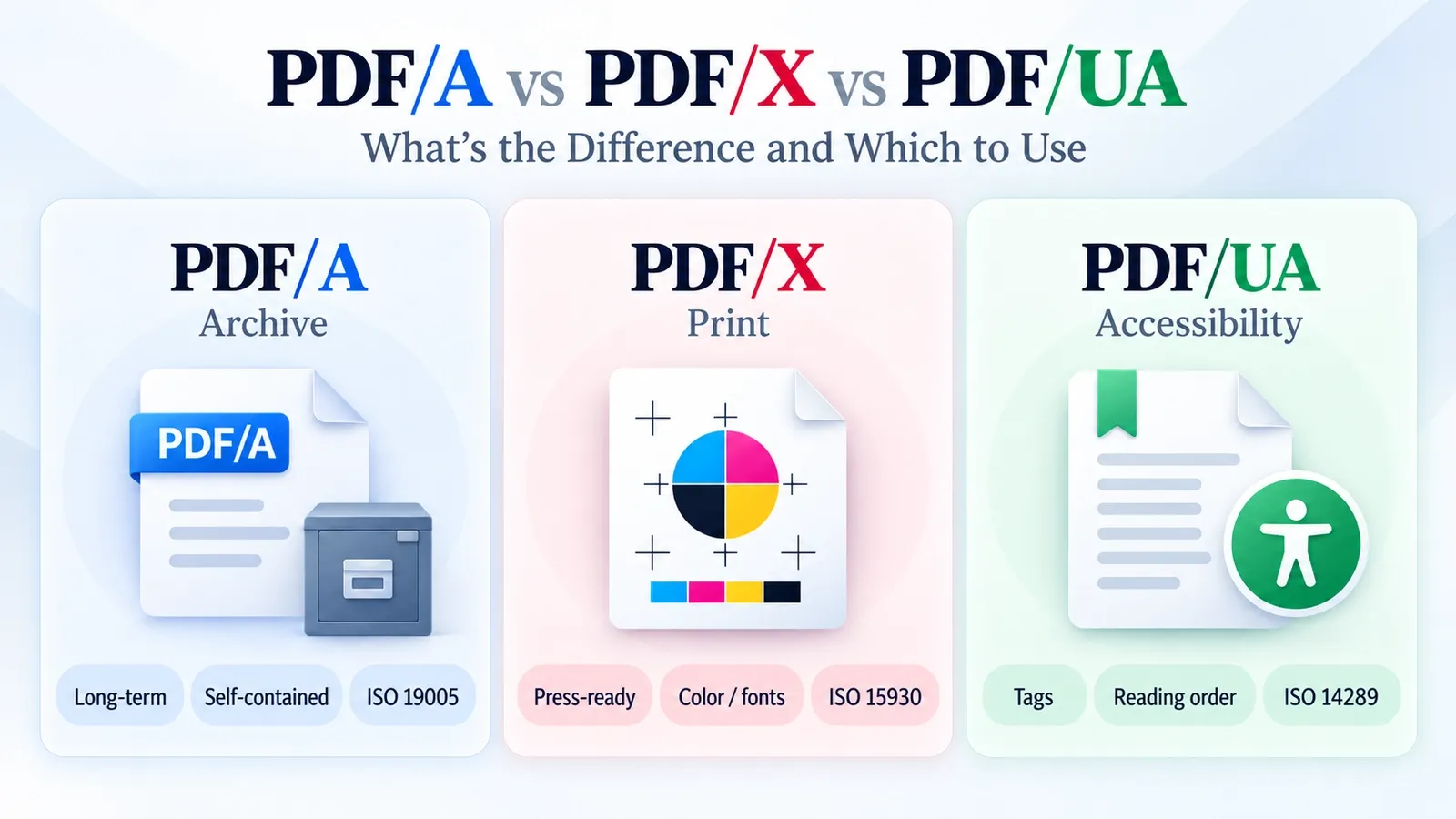
The right PDF subtype depends on the document’s final purpose, so choose PDF/A for archiving, PDF/X for print, and PDF/UA for accessibility.
These three PDF subtypes are not competing versions of the same thing. They solve different problems. PDF/A is built for archiving, PDF/X is built for predictable print production, and PDF/UA is built so assistive technology can read the document structure properly.
A useful comparison should not only ask what each subtype is for. It should also ask what each one requires and forbids. PDF/A cares about long-term preservation, PDF/X cares about press-ready output, and PDF/UA cares about accessible structure, so their rules are different from the start.
This guide compares PDF/A, PDF/X, and PDF/UA side by side without re-teaching every detail from scratch. It also shows where PDF/E and PDF/VT fit, how the key restrictions differ, which standard to choose, and how to create and validate each format.
What Is PDF/A?
PDF/A is the archiving subtype of PDF that keeps a document readable and visually stable for long-term preservation by making the file self-contained.
A PDF/A file must carry the resources it needs inside the document. That usually includes embedded fonts, colour information, metadata, and other required elements, so the file does not depend on missing fonts, external files, scripts, or outside systems years later.
PDF/A is defined by ISO 19005, which makes it different from a regular PDF used for everyday sharing or editing. Its job is not to keep every interactive feature. Its job is to preserve the document so it can open correctly long after the original software is gone.
In this comparison, PDF/A matters because it answers the archive question. If the file must stay readable, unchanged, and reproducible over time, PDF/A is the subtype built for that purpose.
What Is PDF/X?
PDF/X is the print production subtype of PDF that locks the file’s fonts, colour, images, and output settings so it can print predictably at a professional press.
A PDF/X file is made for prepress workflows, where small file problems can become expensive print problems. If a font is missing, a colour is undefined, or an image is not prepared correctly, the final printed result may not match the approved proof.
PDF/X reduces those surprises by requiring embedded fonts, defined colour settings, and print-ready output information. A proper colour profile helps the printer understand how colours should be reproduced instead of guessing from incomplete file data.
PDF/X is defined by ISO 15930, and its rules are built around production reliability. It removes risky elements that can cause print errors and makes the file safer to send from designer to printer.
In this comparison, PDF/X matters because it answers the print question. If the file must go to a press and match the proof as closely as possible, PDF/X is the subtype built for that job.
What Is PDF/UA?
PDF/UA is the accessibility subtype of PDF that requires proper document structure so assistive technology can read and navigate the file correctly.
A PDF/UA file is not judged only by how it looks on screen. It must include a tagged PDF structure that explains what each part of the document is, such as headings, paragraphs, lists, tables, links, and figures.
The reading order also matters. A page can look perfect visually but still confuse a screen reader if the text, headings, columns, or table cells are not ordered correctly in the file structure.
PDF/UA also expects helpful alt text for meaningful images, so users who cannot see the image can still understand what it adds to the document. These rules are defined by ISO 14289, the accessibility standard for PDF/UA.
In this comparison, PDF/UA matters because it answers the access question. If the file must be usable by screen readers and other assistive tools, visual appearance alone is not enough; the PDF also needs machine-readable structure.
How Do PDF/A, PDF/X, and PDF/UA Compare?
Side by side, PDF/A, PDF/X, and PDF/UA differ by goal, what they need to embed, and what they forbid. PDF/A preserves files for archiving, PDF/X prepares files for print, and PDF/UA makes files accessible. Below is the comparison table to compare each subtype based on its purpose, main requirement, best use, and restrictions.
| Comparison point | PDF/A | PDF/X | PDF/UA |
|---|---|---|---|
| Purpose | Preserves documents for long-term archiving | Prepares documents for reliable print production | Makes documents accessible to assistive technology |
| Key requirement | Embeds fonts, metadata, colour information, and required resources | Embeds fonts and defines colour and output settings for print | Requires tags, reading order, alt text, and document structure |
| Best use | Legal records, government files, archives, and final reports | Brochures, magazines, packaging, ads, and press-ready files | Forms, reports, manuals, public documents, and accessible PDFs |
| What it forbids | External dependencies, encryption, scripts, and unstable features | Missing fonts, undefined colour, and risky print elements | Untagged content, broken reading order, and missing accessibility structure |
So the difference is not only what each format is for. The real separation comes from the restrictions. PDF/A removes things that can break preservation, PDF/X removes things that can break print output, and PDF/UA removes structure problems that can block accessibility.
What Are the Key Differences in Purpose and Restrictions?
The key difference is that each PDF subtype controls a different risk: PDF/A bans external dependencies and encryption, PDF/X bans undefined colour and missing fonts, and PDF/UA bans untagged content.
PDF/A is strict because archived files must stay readable far into the future. If a document depends on an outside font, a linked file, a script, or a password, the archive may not be able to reproduce it later. That is why PDF/A focuses on preservation and long-term conformance.
PDF/X is strict for a different reason. A print file can fail at the press if colours are not defined, fonts are missing, images are not prepared correctly, or output settings are unclear. PDF/X restrictions reduce those production surprises so the printed result can match the approved proof.
PDF/UA focuses on access. A file can look clean on screen but still fail PDF/UA if headings, paragraphs, tables, images, or reading order are not tagged properly. Its restrictions target structure problems that block screen readers and assistive technology.
These restrictions are independent. The same PDF can be valid PDF/X because it is ready for print, but fail PDF/A because it uses encryption or external resources. It can also fail PDF/UA if the file has no proper tags, even when the visual layout and print settings are correct.
So the purpose decides the restriction. PDF/A protects future readability, PDF/X protects print reliability, and PDF/UA protects accessibility.
Where Do PDF/E and PDF/VT Fit In?
PDF/E fit in for engineering and CAD documents and PDF/VT is for high-volume variable data printing.
PDF/E is used when technical documents need to carry engineering-focused information clearly. That can include CAD drawings, manufacturing documents, construction plans, maps, technical diagrams, and other files where precision and complex visual data matter.
PDF/VT belongs to print workflows, but it solves a different problem from PDF/X. It is built for variable-data jobs where many printed pieces share a layout but contain different names, addresses, account details, images, or offers.
That makes PDF/VT useful for transactional print, direct mail, billing statements, personalized marketing, labels, and other high-volume print jobs that change from one recipient to another.
So PDF/A, PDF/X, and PDF/UA cover the common archive, print, and accessibility needs, but PDF/E and PDF/VT show that the PDF standards family is wider. Engineering files and transactional print workflows have their own specialized formats too.
Which PDF Standard Should You Use?
You can choose PDF/A when you need to archive a document, PDF/X when the file must print predictably, and PDF/UA when accessibility is the main requirement. A file can also combine standards when it needs more than one guarantee.
Good subtype selection starts with the file’s final job. If the document is a legal record, government file, contract, or final report that must stay readable for years, PDF/A is the safer choice.
If the file is going to a professional printer, PDF/X is usually the right pick. It focuses on press-ready output, defined colour, embedded fonts, and fewer production risks.
If the file must be used by screen readers or meet accessibility requirements, PDF/UA is the right target. It focuses on tags, reading order, alt text, and document structure rather than only visual appearance.
The choice is not always either/or. A file can meet more than one standard when it needs multiple promises, such as an accessible archive that should satisfy both PDF/A and PDF/UA requirements.
Use the simple rule again when you are unsure. Archive with PDF/A, print with PDF/X, and make accessible documents with PDF/UA.
How Do You Create and Validate Each Format?
Create each PDF subtype by using an export option from a capable tool, then validate the final file with the right conformance checker for that standard.
For PDF/A, export the file as PDF/A from the source app or convert an existing PDF with a tool that embeds required resources and removes unsupported features. Then check the file with veraPDF to confirm that it meets the selected PDF/A version and conformance level.
For PDF/X, export the file with print-ready settings, including embedded fonts, defined colour, proper image handling, and the required output intent. Then run a print preflight check to catch missing fonts, undefined colour, low-resolution images, or other press risks before sending it to production.
For PDF/UA, export or fix the file with proper tags, reading order, alt text, headings, tables, links, and document structure. Then validate it with veraPDF or an accessibility-focused checker to confirm that the file meets PDF/UA requirements.
The validator should match the subtype. Use veraPDF for PDF/A and PDF/UA checks, and use print preflight for PDF/X. A generic “saved as PDF” message is not enough because each subtype has its own rules.
Where Can You Learn More About PDF/A?
PDF/A has the strictest and most commonly searched rules among these subtypes because it deals with long-term archiving, preservation, validation, conformance levels, and file versions.
This section only needs a short pointer because the full PDF/A explanation belongs in its own guide. That deeper article explains what PDF/A is, how its levels work, how versions differ, how validation works, and when PDF/A is the right choice.
For the full archiving breakdown, read what is PDF/A.
What Is the ISO 32000 Standard These Build On?
ISO 32000 defines the core PDF format, and each PDF subtype narrows that base standard for a specific purpose.
That means PDF/A, PDF/X, PDF/UA, PDF/E, and PDF/VT are not separate formats from PDF. They are controlled versions of PDF that add stricter rules for archiving, print, accessibility, engineering, or variable-data printing.
For the full explanation of the base PDF standard, read ISO 32000 explained, where the wider PDF specification and standards role are covered separately.