


Text to PDF Converter, Free and Online
Turn a .txt file into a proper PDF. The text stays selectable and searchable, fonts are embedded so the file looks the same everywhere, and non-Latin scripts render instead of turning into boxes. No sign-up. No watermark.
- Free text to PDF converter online. No account, no daily cap.
- Text files up to 10 MB, including notes, logs, scripts and exported chat.
- Converts in your browser. Your file is never uploaded to a server.

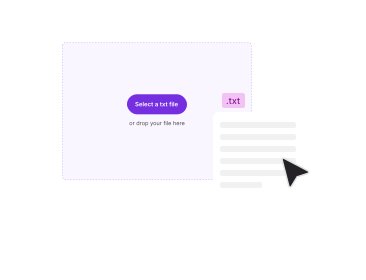
Drop your TXT file here
Up to 10 MB per file · .txt only · Free
Converted on your device. Your file is never uploaded, indexed or used to train AI.

Nothing Leaves Your Device
Converted in your browser, not on a server. Nothing is uploaded, stored or used to train AI.

Real Text, Not a Picture
Output is a text-based PDF you can select, search, copy and index.

Every Script Renders
Fonts are embedded, so Hindi, Bangla, CJK, Cyrillic and RTL survive.

No Sign-Up, No Watermark
Free. No trial. No email gate. No branding on your document.
How To Convert Text to PDF Online
Three steps to change TXT files to PDF with this online text to PDF converter, free, in your browser, with no installs, no accounts and no hidden limits.
Add Your TXT File
Drag and drop your .txt file into the box above, or pick it from your device. TXT files up to 10 MB are accepted, and the file name is shown back to you before anything runs. The file is read locally in your browser and is not uploaded. One file per conversion.
Check the File, Then Convert
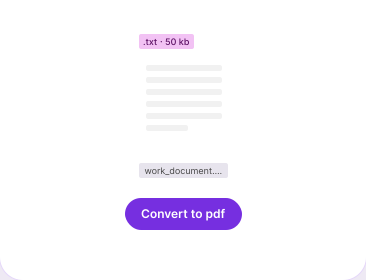
The file appears as a single card with a remove button, so you can swap it before committing. Click the Convert to PDF button. The character encoding is detected automatically, with Unicode UTF-8 as the fallback for anything ambiguous.
Download Your PDF
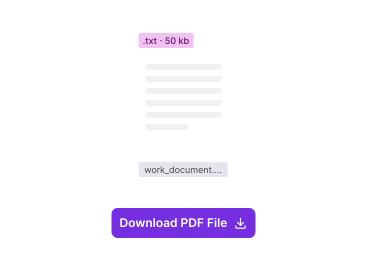
The converted PDF appears with its file size. Click the Download PDF button. The name follows your source file, so notes.txt comes back as notes.pdf and nothing has to be renamed.
Why Convert Text to PDF With PDFNoob?
What a text to PDF converter should tell you, and what most of them leave out.

Every Script Renders, Not Just English
Fonts are embedded in the output, so Devanagari, Bangla, Chinese, Japanese, Korean, Cyrillic and right-to-left text arrive intact rather than as rows of empty boxes. This is the single most common way a text to PDF conversion goes wrong, and almost no free converter mentions it.

Selectable, Searchable Text
The result is a text-based PDF, not an image of your text. You can select it, search inside it, copy out of it, and any indexer or screen reader can read it. Tools that rasterise, and the print-to-PDF route on some devices, quietly give you a picture instead.

Line Breaks Handled Sensibly
Single and double line breaks are kept, so paragraphs stay separated the way you wrote them. Runs of three or more blank lines are collapsed rather than left to push half a page of nothing into your document, and lines longer than the page wrap instead of running off the edge.

Tabs and Spacing Kept for Logs and Code
Plain text is often not prose. Tab stops and runs of spaces are preserved so a log file, a config dump or a code snippet still lines up in columns after conversion instead of collapsing into one ragged block.

10 MB Free, and No Daily Count
A whole text file up to 10 MB, not three megabytes and two conversions a day. Because the conversion runs on your own device there is no upload to wait for, no queue to skip and no upgrade prompt waiting at the end.

Privacy You Can Check
The conversion runs entirely in your browser. Your .txt file is read on your device and the PDF is written there too, so nothing is uploaded, nothing sits on a server, and there is nothing for us to index, keep or train AI on. Most free converters upload your file first; with a text file that may hold logs, passwords or private notes, that difference matters.
About Converting Text Files to PDF
Converting text to PDF is a typesetting job, not a fidelity job. A .txt file carries no layout at all: no page size, no margins, no font, no idea where one page should end and the next begin. Everything a PDF needs, the converter has to invent. That is why two text to PDF converters can hand you two documents that look nothing alike from the same input, and why the interesting questions here are about layout and character encoding rather than about quality loss. Portable Document Format was designed to lock a page down; plain text was designed to carry none of that, so the whole job is deciding what the page should look like before writing it out in PDF format.
Why a .txt File Loses Its Shape When You Share It
A text file is a stream of characters and line breaks. What it looks like depends entirely on whatever opens it. Notepad wraps at the window edge, a code editor might not wrap at all, a phone reflows it to a narrow column, and a colleague on a different operating system may see the line endings differently again. Nothing is corrupted; there is simply no layout stored to argue about. Converting text to PDF fixes a layout in place, so the page you send is the page the other person opens, on any device, with or without the same fonts installed. That is the whole reason people turn text documents into PDF files before sending them.
How the Layout Is Chosen When the Text Has None
The converter applies a fixed, readable layout: A4 pages with normal margins, a standard sans-serif body face at a comfortable reading size, and normal line spacing. This is a deliberate default rather than a menu. There is no page-size, font or margin picker in this version of the tool, and no header, footer or page-number fields, so the copy on this page does not pretend otherwise. If you need a specific typeface, a title block or running page numbers, convert first and then adjust the result in the PDF editor, or start from a Word file and use Word to PDF instead, where the styling is yours to set.
Hindi, Bangla and Other Non-Latin Text
This is where most free converters fail, and they fail silently. If the PDF does not carry a font that covers your script, the reader substitutes something that does not, and your Devanagari or Bangla paragraph becomes a row of tofu boxes or question marks. The fix is font embedding, and it happens here as a matter of course: the conversion detects the encoding, defaults to UTF-8 when a file is ambiguous or mixed, and embeds a face that covers the characters actually present, which for Unicode text means the whole range is available rather than a Latin subset. Chinese, Japanese, Korean, Cyrillic and right-to-left scripts are handled the same way. If you have ever emailed a Hindi PDF and been told it opened blank, this is the reason and this is the remedy.
Notepad Files, Logs and Code: What Survives
Plain text does far more than hold prose. Exported server logs, config files, SQL dumps, subscription lists, saved chat transcripts and code snippets all arrive as .txt, and all of them depend on horizontal alignment to be readable at all. A converter that treats every run of whitespace as a single space turns a neat table of log entries into a paragraph. Tabs and space runs are preserved here for that reason, and long lines wrap rather than disappear past the right margin. Converting a Notepad file to PDF is the same operation as any other .txt file; Notepad simply happens to be where most Windows users meet the format.
Text to PDF Is Not the Same as PDF to Text
The two are opposite directions and this page only covers one of them. Text to PDF takes a .txt file and builds a PDF around it. Going the other way, pulling the words out of an existing PDF so you can edit or reuse them, is PDF to Text. If the PDF you are starting from is a scan, the words are pixels rather than characters and neither converter will help until it has been through OCR first.
Related PDF Tools
Other tools you might need today.


Frequently Asked Questions
Ten straight answers about converting TXT to PDF, including the two things this tool cannot do yet.
How Do I Convert Text to PDF for Free?
Drop your .txt file into the converter at the top of this page, or pick it from your device. The file shows as a single card so you can check it, then press Convert to PDF. The finished document appears with its size and a download button. There is no account to make, no trial to start, and no watermark on the way out. It is a text to PDF converter online, free, and it stays that way whether you convert one file or fifty.
Can I Paste or Type Text Instead of Choosing a File?
Not in this version. The converter takes a .txt file, and there is no text box to type or paste into yet. If what you want to convert is on your clipboard, paste it into Notepad, TextEdit or any editor, save it as a .txt file, and choose that. It is one extra step and the result is identical. Several competing tools do offer a paste box, so this is a fair thing to want and we would rather say so than imply a feature that is not there.
How Do I Convert a Notepad File to PDF?
Exactly the same way as any other text file. Notepad saves plain .txt, so save your note, then add it here and convert. You do not need to open Notepad's print dialogue or install anything. Unlike printing to PDF from some applications, this online TXT to PDF conversion keeps real selectable text in the finished PDF document rather than a flat picture of the page.
Will Hindi, Bangla or Other Non-Latin Text Show Correctly?
Yes. Fonts covering the characters in your file are embedded in the PDF, so Devanagari, Bangla, Chinese, Japanese, Korean, Cyrillic and right-to-left scripts display on any reader, on any device, whether or not the font is installed there. The encoding is detected automatically and falls back to UTF-8 for files that are ambiguous or mixed. If a Hindi PDF has ever opened as empty boxes for you, a missing embedded font was almost certainly why.
Is the Text in the PDF Selectable and Searchable?
Yes. The output is a text-based PDF, not an image. You can select and copy the words, search inside the file with Ctrl+F, and any search engine, document indexer or screen reader can read it. This matters because several routes to a PDF, including printing to PDF on some devices and any converter that rasterises the page, give you a document whose text cannot be selected at all.
What Happens to Blank Lines, Long Lines and Tabs?
Single and double line breaks are kept so your paragraph breaks survive. Runs of three or more blank lines are collapsed, so a file padded with empty space does not produce pages of nothing. Lines too long for the page wrap automatically instead of being cut off at the margin. Tabs and runs of spaces are preserved so columns in a log file or a code snippet still line up.
Can I Choose the Page Size, Font or Margins?
Not yet. The converter applies one sensible layout: A4, normal margins, a standard body face at a readable size, and normal line spacing. There is no picker for page size, typeface, font size or margins, and no header, footer or page-number fields. If you need a specific look, convert the file first and adjust the converted PDF in our editor, or build the document in Word and use Word to PDF instead.
How Big a Text File Can I Convert?
Up to 10 MB per file, which is a great deal of plain text; a 10 MB .txt file is roughly one and a half million words, or several years of server logs. The conversion runs in your own browser, so there is no upload to wait for and no queue behind other people's files. One file per conversion, and there is no cap on how many conversions you run in a day.
Can I Convert TXT to PDF on Mobile?
Yes. The converter runs in the browser on any phone or tablet, Android or iPhone, with nothing to install. Open this page, tap the drop area, pick the .txt file from your files app or storage, and download the PDF when it is ready. The PDF is built on the phone itself, so it works the same on mobile data as on Wi-Fi. There is no separate app and no sign-in.
Is It Safe to Convert Text Files Online?
Yes, and in a way you can verify. The conversion happens entirely in your browser: the .txt file is read on your device and the PDF is built there too, so the file is never uploaded and no copy ever reaches our servers. There is nothing for us to store, index, delete or train AI on. Text files often hold things you would not want kept, so it is worth checking how any converter handles your file before using it; with this one, it never leaves your device.