

Convert PDF to Markdown Online and Free
Turn a PDF into a clean .md file in seconds. Headings, lists, tables, links and captions come across as real Markdown syntax, in reading order. Built for feeding documents to an LLM, and just as good for your docs.
- Free PDF to MD converter. Nothing installed, no account.
- Simple tables stay tables. Complex ones are never faked.
- Works on Mac, Windows, iPhone and Android in any browser.

or drop your PDF file here to convert it to md
Up to 50 MB and 500 pages · one PDF at a time
Files deleted within 1 hour. We don’t index your file contents or use them to train AI.

Files Deleted Within 1 Hour
HTTPS in transit. We never train AI on your files.

Structure Kept as Syntax
Headings, lists, tables and links become Markdown, not a flat wall of text.

Nothing Invented
Chart values are transcribed, never guessed. No content is added or altered.

50 MB, 500 Pages
Free to use. Over the limit you get a message, not a broken file.
How To Convert a PDF to Markdown Online
Three steps in the free PDF to MD converter. No installs, no command line, no Python environment.
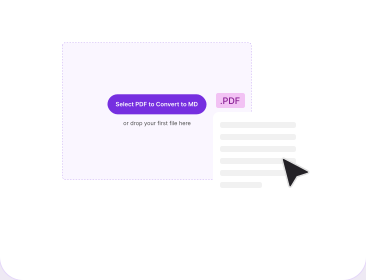
Upload Your PDF
Drag and drop your PDF file into the box above, or click to browse. One PDF per conversion, up to 50 MB and 500 pages. Protected or unreadable files are reported first.
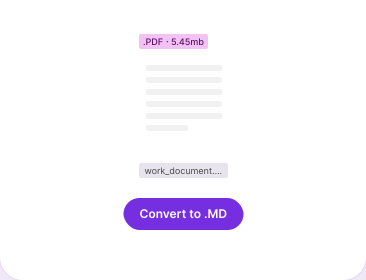
Click Convert to MD
PDFNoob reads the document structure rather than the raw PDF objects, then maps headings, lists, tables, links and captions to Markdown in reading order.
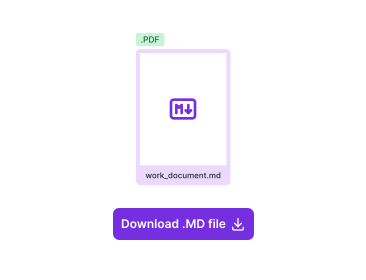
Download Your .md File
Your report.pdf comes back as report.md — a single, self-contained file. Any figures or charts are described in plain text inline, not extracted as separate image files.
Why Use PDFNoob’s PDF to MD Converter?
Most tools that convert a PDF online say structure is preserved “where possible.” This converter says what happens when it isn’t.

Real Heading Hierarchy
Title becomes #, heading ##, subheading ###. Bold becomes **text**, italics *text*, links become [Text](URL).

Tables That Stay Tables
Rows, columns, headers and cell order preserved. Unrelated text beside a table is not swept into a cell.

Complex Tables Never Faked
Merged cells and multi-row headers have no Markdown equivalent. Rather than emit a table that reads wrong, PDFNoob renders it as an HTML table with the original rowspan and colspan intact.

Charts Described, Not Guessed
Captions kept; labels, legends, axes and visible values written out as plain text. A number the chart does not state is never inferred.

Multi-Column Read Correctly
Two-column papers are detected as columns and read in sequence. Sentences are never interleaved across columns.

No Stray Page Numbers
Standalone page numbers are left out. Numbers that are genuine content, like a clause or figure label, are kept.
About Converting a PDF to MD
Converting a PDF to Markdown rewrites the document as plain text plus a few symbols that carry its structure: ## for a heading, a hyphen for a list item, pipes for a table row. What makes it hard is not the words. A PDF stores position, not meaning — it knows a run of text sits at certain coordinates in a certain size, not that the run is a heading. A PDF to MD converter has to infer the structure and reading order rather than read PDF objects in storage order, and that inference is where converters differ.
Is a .md File the Same as Markdown?
Yes — .md is just the file extension for a Markdown file, and "MD" is the same thing written short. A PDF to MD converter and a PDF to Markdown converter are the same tool; only the wording differs. You may also see .markdown, which is the identical format under a longer extension.
Markdown for a Human vs Markdown for an LLM
These are two different jobs, and almost nobody says so. Markdown for a person - Obsidian notes, a docs page, something pasted into Notion - wants clean prose with the page furniture dropped. Markdown for a machine wants the opposite: faithful structure, and every table intact, because a table is usually where the answer lives. Three things follow:
- Headings give a chunker somewhere to cut: Splitting by character count slices tables in half; splitting on heading levels keeps a section whole.
- A table has to stay a table: Flattened to prose, "User A 90 Passed User B 75 Passed" leaves a model guessing which number is a score.
- Noise poisons a chunk: A bare page number between two paragraphs is ugly in a document and harmful in an embedding, because it lands in the same vector as the sentence beside it.
What Happens to Tables, Charts, and Images
Markdown tables are genuinely weak: no merged cells, no nested tables, no header spanning two rows — and those are everywhere in financial statements and research papers. A converter meeting one can emit a table that is structurally wrong, or stop pretending. This one stops pretending: simple tables convert to standard Markdown tables, and anything Markdown cannot express — merged cells, nested tables, multi-row headers — is rendered as an HTML table with the original rowspan and colspan intact, so the structure stays correct instead of reading wrong.
Charts get the same honesty from the other side: the caption and any printed labels, legends, axes and values are transcribed as plain text, but a trend is never read off a line and turned into numbers. An invented data point that looks plausible is worse than a missing one, because nothing downstream can tell it is wrong. No image files are ever extracted — every figure, chart, or diagram is described in plain text inline, so the output always stays a single, self-contained file.
PDF to Markdown vs PDF to Text: Which Do I Need?
Both read the same PDF and disagree about what to keep. PDF to Text returns a .txt file: the words, the paragraph breaks, the reading order, nothing else, so a heading and a table cell arrive as identical lines. Markdown records the shape on top of the words. The only question is whether anything downstream needs to know how the document was organised: pasting a passage into an email, no; chunking it for retrieval, yes.
When a PDF Won't Convert
Two cases stop a conversion, and each is reported rather than returning a half-empty file. A scanned PDF holds no text to read, so it needs OCR PDF first to add a text layer. A file over 50 MB is declined up front, and Compress PDF will usually bring it under. A password-protected PDF doesn't stop the conversion — it's detected up front, and you're prompted for the password right in the same flow, no separate unlock step or re-upload needed.
For other ways to get text out of a PDF, read our guide on how to extract text from a PDF.
Related PDF Tools
Other tools you might need today.


Frequently Asked Questions
Common questions about converting a PDF into a Markdown file.
How Do I Convert a PDF to MD Online for Free?
Upload your PDF and click Convert. PDFNoob writes a .md file with the same headings, lists, tables and links. A report.pdf comes back as report.md — a single file, with any images or charts described in plain text inline.
Does the Converter Keep Tables?
Simple tables become real Markdown tables, with rows, columns, headers and cell order intact. Tables Markdown cannot express — merged cells, nested tables, multi-row headers — become HTML tables with the original rowspan and colspan intact, still valid inside the same Markdown file.
What Happens to Images and Charts?
Text inside an image is extracted into the Markdown with a description and the caption. For a chart, the labels, legends, axes and visible values are transcribed as plain text. Values the chart does not state are never inferred.
Is PDF to Markdown Different From PDF to Text?
Yes — the difference is structure. Plain text extraction gives the words and throws the shape away; Markdown records that shape as syntax. Use PDF to Text for the words alone.
Can I Convert a Scanned PDF to Markdown?
Not yet. A scan is a picture of a page with no text layer inside, and this converter reads text that already exists in the file. Run it through OCR PDF first, then convert. Upload a scan directly and the tool says so rather than returning an empty file.
How Large a PDF Can I Convert?
Up to 50 MB and 500 pages per file. Larger files are declined with a message rather than failing partway through. Over the limit, try Compress PDF first.
Can I Convert More Than One PDF to MD at a Time?
Not currently — it is one PDF per conversion. Because the output filename follows the input, a folder converted one by one still comes out with matching .md names.
Will the Markdown Work in ChatGPT, Claude, or a RAG Pipeline?
That is what the output is shaped for. Headings give a chunker real boundaries, so a section stays whole instead of being cut mid-table, tables survive as tables, and standalone page numbers are left out so stray digits do not land inside a chunk.
Can I Convert a Password-Protected PDF?
Yes. If PDFNoob detects the PDF is password-protected, it asks for the password directly in the same flow — no separate unlock step or re-upload needed. Enter the correct password and the conversion continues from where it left off.
Does the Markdown Include PDF Page Numbers?
No. Standalone page numbers are left out, because a bare 47 between two paragraphs is noise in a document and worse in a retrieval chunk. Numbers that are real content, such as a figure label, are kept.