


The State Bank of India (SBI) RTGS/NEFT form instructs your SBI branch to debit your account and transfer money to a beneficiary through RTGS or NEFT. SBI provides a combined remittance form on its official website, sbi.bank.in. The file name, 010725-RTGS+NEFT+REQUISITION+FORM.pdf, dates this revision to 1 July 2025, so copies on other sites that look different are older.
You can use the form to send money to another bank account by providing the beneficiary's details, including the account number and IFSC, along with your payment instructions.
But do you need separate forms for RTGS and NEFT, and what should you check before submitting one?
This guide explains where to download SBI's official PDF, how to fill it field by field, and what to submit at the branch. It also covers cheque requirements, transfer limits, charges, timings, payment delays, and how to prepare the form on screen before printing it.
What Is the SBI RTGS/NEFT Form?
The SBI RTGS/NEFT form is a branch remittance application used to transfer money from your State Bank of India account to another bank account. You select RTGS or NEFT, enter your account details and the beneficiary's bank information, and sign the form to authorise SBI to debit your account.
The form supports two payment systems regulated by the Reserve Bank of India (RBI):
- RTGS (Real Time Gross Settlement): Used for transfers of ₹2 lakh or more. Each transaction is settled individually in real time, making it suitable for large, time-sensitive payments.
- NEFT (National Electronic Funds Transfer): Has no minimum transfer amount and processes payments in half-hourly settlement batches. It is suitable for both small and large transfers.
The paper form is for a branch transfer. If you send money through SBI internet banking or YONO, you enter the payment details online instead of filling out a physical RTGS/NEFT form.
You may still need the paper form for a large one-off payment, such as a property purchase, vehicle payment, or educational fee, particularly when the amount exceeds your available internet-banking transfer limit.
Are the SBI NEFT and RTGS Forms the Same?
Yes, SBI uses one combined form for both NEFT and RTGS transfers. You simply tick the box for the payment method you want. The combined form is the same, but NEFT and RTGS are different systems for transferring money.
Here's how to choose between them:
| Feature | RTGS | NEFT |
|---|---|---|
| Minimum amount | ₹2 lakh | No minimum |
| Settlement | Individual, real-time settlement | Half-hourly NEFT batches |
| Typical use | Large, time-sensitive payments | Small or large payments that can follow batch processing |
Choose RTGS when you're sending ₹2 lakh or more and want real-time settlement. NEFT works for any amount, including payments below the RTGS 2 lakh minimum.
What if you tick RTGS for less than ₹2 lakh? SBI cannot process that amount through RTGS. The branch may ask you to change the selection to NEFT or submit a corrected form, rather than automatically switching the payment method.
Both payment systems operate 24x7, including weekends and bank holidays, when you transfer money online. If you're submitting the paper form, however, the SBI branch must first accept and process your request during its available service hours.
Where Can You Download the SBI RTGS Form PDF?
You can get the SBI RTGS form PDF from the State Bank of India's official website, sbi.bank.in, or request a printed copy at an SBI branch. The bank's RTGS/NEFT requisition form covers both transfer types, so you don't need separate PDFs.
SBI's current form is here:
Download SBI RTGS/NEFT Requisition Form PDF
You can also visit SBI's RTGS/NEFT Personal Banking page for information about the service.
How do you recognise the revised form? Check that the document comes from the sbi.bank.in domain. Its file name begins with 010725, which dates it to 1 July 2025. The PDF has two pages: the application with its counterfoil, and SBI's terms and conditions.
Older SBI RTGS form downloads may still appear on third-party websites or use the former sbi.co.in address. Because SBI now publishes its banking information at sbi.bank.in, an old link may not work or may lead to an outdated copy. Prefer the bank-hosted document rather than relying on an unfamiliar PDF download site.
Looking for the SBI RTGS form in Word format or Excel? SBI publishes the form only as a PDF. A Word or Excel version shared or sold on another website is not issued by SBI. A document shared or sold in those formats by another website should not be assumed to be an official SBI form.
How Do You Fill the SBI RTGS Form?
To fill the SBI RTGS form, tick RTGS, enter the date and SBI branch details, provide your account number, and write the beneficiary's name, bank, branch, beneficiary account number, and 11-character IFSC code. Enter the transfer amount in figures, add the applicable charges, complete the amount in words, and sign the form as per your bank records before submitting it with the required cheque or payment instruction.
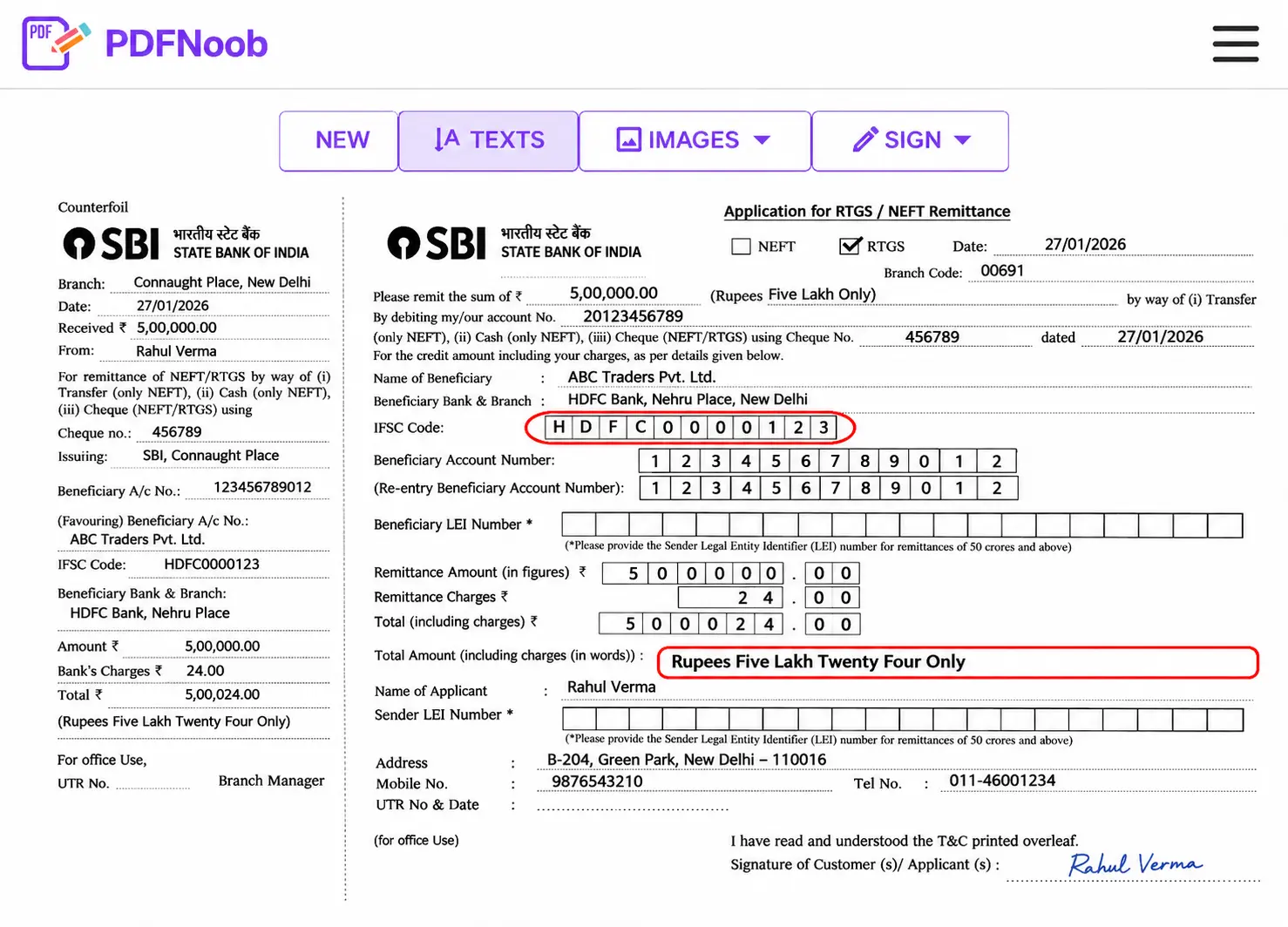
Use SBI's official RTGS/NEFT Requisition Form PDF. The remitter is the person sending the money, while the beneficiary is the person or organisation receiving it.
The following table explains how to complete the fields on SBI's requisition form and which mistakes to avoid.
| Field | What to write | Common mistake |
|---|---|---|
| RTGS / NEFT | Tick the RTGS box for a transfer of ₹2 lakh or more. | Selecting NEFT by mistake or choosing RTGS for less than ₹2 lakh. |
| Branch and branch code | Enter your SBI branch name and code, as applicable. | Entering the beneficiary's branch code instead of the remitting SBI branch. |
| Date | Write the date you are submitting the application. | Using an incorrect or outdated date. |
| Please remit the sum | Enter the amount you want the beneficiary to receive, in figures and words. | Writing different amounts in the two spaces. |
| My/our account number | Enter the SBI account from which the money will be debited. | Entering the beneficiary's account number here. |
| Payment mode and cheque details | Select the applicable mode and enter the cheque number and date when using a cheque. | Selecting a mode marked only for NEFT when requesting RTGS. |
| Name of beneficiary | Enter the recipient's name as provided by the beneficiary. | Misspelling the name or using an informal nickname. |
| Beneficiary bank and branch | Write the receiving bank's name and branch. | Entering your own SBI branch. |
| IFSC code | Enter the beneficiary branch's 11-character IFSC. | Confusing the letter O with zero or using an outdated IFSC. |
| Beneficiary account number | Copy the recipient's account number exactly. | Missing, adding, or transposing a digit. |
| Re-write beneficiary account number | Enter the same account number a second time. | Copying the first entry without checking it against the original account details. |
| Remittance amount | Enter the transfer amount in figures. | Including bank charges as part of the beneficiary's transfer amount. |
| Remittance charge | Enter the applicable SBI charge, including GST where required, as confirmed by the branch. | Using an outdated fee or omitting GST. |
| Total (including charges) | Add the remittance amount and applicable charges. | Repeating the transfer amount without adding the charges. |
| Total amount in words | Write the total, including charges, in words, and close off unused space. | Writing only the transfer amount or leaving gaps where figures could be added. |
| Name of applicant, address, and mobile number | Enter your name, contact address, and working mobile number. | Leaving out the contact details SBI may need for clarification. |
| Sender and beneficiary LEI numbers | Complete these only where the Legal Entity Identifier requirement applies, including qualifying non-individual transfers of ₹50 crore or more. | Treating the LEI fields as mandatory for an ordinary personal RTGS transfer. |
| Customer/applicant signature | Sign as per your SBI account's specimen signature. | Using a signature that does not match bank records or signing in the bank's office-use area. |
Double-check the beneficiary account number before submitting the form. SBI's printed transfer conditions state that credit depends on the account number provided. A valid IFSC does not make an incorrect beneficiary account number safe, and a transfer sent to the wrong account may be difficult to recover.
For the amount in words, distinguish the remittance amount from the total including charges. For example, if you are transferring ₹2,50,000 and the applicable branch charge is ₹20 plus 18% GST, the total debit would be ₹2,50,023.60. Confirm the actual charge with the branch before completing the total.
If you prefer typing the details before printing, open the PDF in PDFNoob's PDF Editor, click where the answer goes and type, then download the edited copy. Delete any unused text box before downloading, since an empty box may appear as “Type text here” in the saved file.
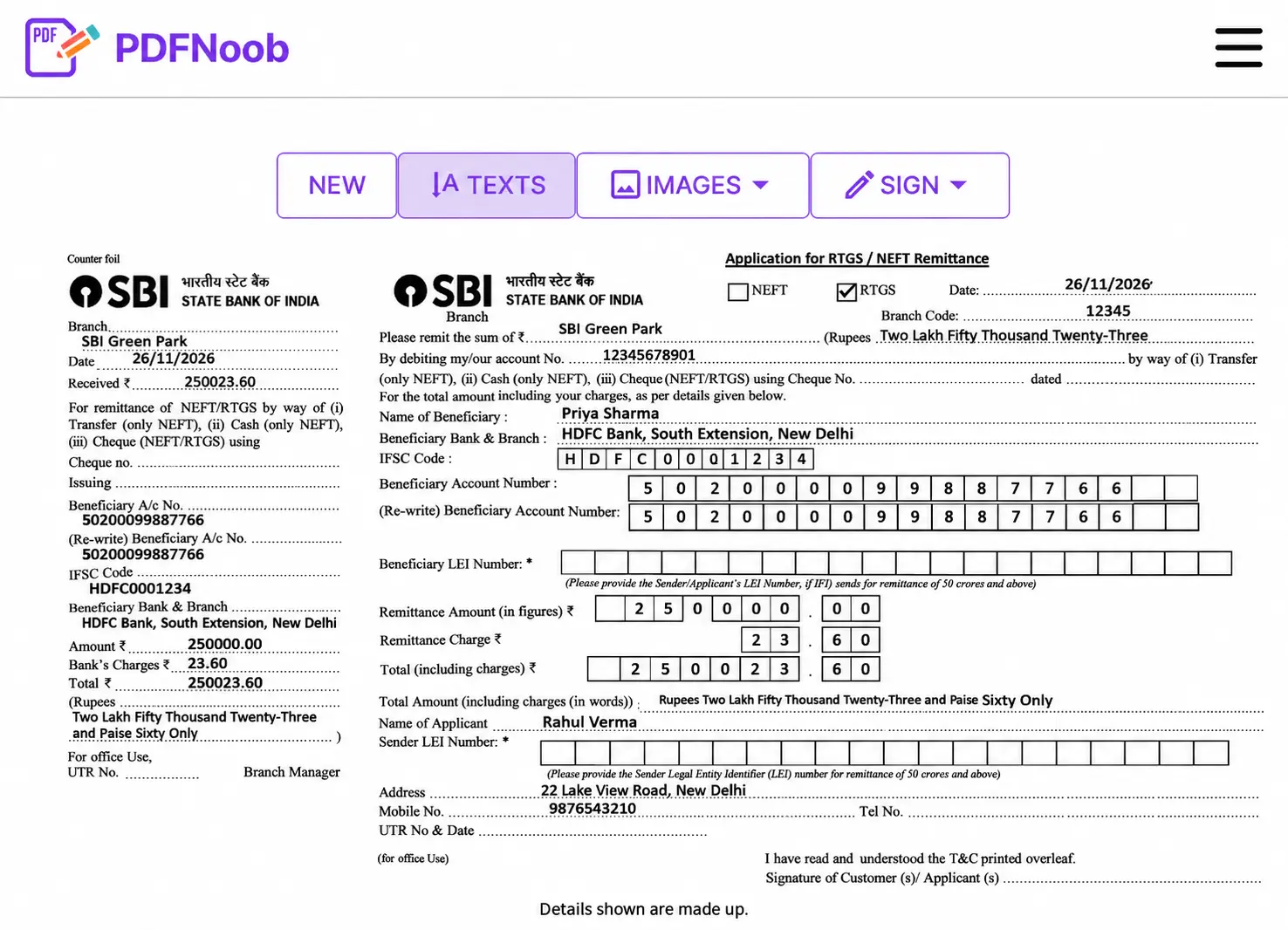
Fill it out on screen, then print and sign. The branch needs the customer's ink signature matching its records. Follow the payment instructions printed on the form, including the cheque details where applicable, and confirm with your SBI branch whether any separate signed debit authority is acceptable for your RTGS request.
What Do You Need to Hand In With the SBI RTGS Form?
To submit an SBI RTGS form at a branch, bring the completed and signed application along with a cheque drawn on your SBI account for the transfer amount plus applicable charges. If your branch permits a separate signed debit instruction, confirm its requirements before visiting. Carry a valid identity document in case the branch asks to verify your identity.
Can you submit cash instead of a cheque? Not for RTGS using SBI's current requisition form. The form specifies cheque payment for RTGS, while cash and direct account transfer are listed as NEFT-only options. RBI permits cash-funded NEFT remittances of up to ₹50,000 per transaction, subject to the required customer information and identification checks. The branch may request your PAN or other identification where applicable, but cash NEFT rules should not be confused with RTGS requirements.
After SBI accepts and processes your request, collect the stamped counterfoil from the application. Check that it records the branch details, date, amount, and beneficiary information. Ask for the UTR number (Unique Transaction Reference), which identifies the transfer and helps the bank trace it.
Keep both the stamped counterfoil and the UTR number until the beneficiary confirms receiving the money. The counterfoil documents your branch submission, while the UTR helps SBI investigate a delayed, disputed, or missing credit.
Can You Do RTGS Without a Cheque in SBI?
Yes, you can make an SBI RTGS transfer without a cheque through net banking or the YONO app. Online transfers do not require a paper RTGS form or a cheque because you authorise the payment electronically. At an SBI branch, however, the bank's RTGS/NEFT requisition form specifies a cheque for RTGS. If you want to use a signed debit authority instead, confirm whether your branch accepts it.
For an online RTGS transfer, sign in to SBI Net Banking or YONO, select the RTGS fund-transfer option, and choose the recipient. If the recipient is new, complete beneficiary registration using their name, account number, bank details, and IFSC before making the payment.
Can you transfer money immediately after adding a beneficiary? Not always. SBI may apply a cooling period or temporary transfer restrictions to newly activated beneficiaries. The waiting period and permitted amount can depend on how the beneficiary was approved, so check the activation message and available transfer limit before scheduling a large payment.
Your online RTGS amount must also fit within your account's per-day transfer limit. By default, SBI sets the daily third-party transfer limit at ₹10 lakh. You can raise it to as much as ₹25 lakh, in steps of ₹1 lakh, under Profile → Define Limit in OnlineSBI. The configured limit also applies to YONO and YONO Lite.
If the payment exceeds your available online limit, contact your SBI branch about a branch RTGS transfer. Bring the completed requisition form and the required cheque, or confirm in advance whether the branch will accept another signed debit instruction.
What Is the SBI RTGS Limit?
The SBI RTGS minimum limit is ₹2 lakh, and the Reserve Bank of India (RBI) sets no maximum amount for RTGS transactions. This means you can request an RTGS transfer of ₹20 lakh at an SBI branch, provided your account has sufficient funds and the bank completes its required checks.
However, the per-day limit for SBI retail internet banking is different from the RTGS system's limit. SBI allows eligible retail customers to configure a daily third-party transfer limit of up to ₹25 lakh for NEFT, RTGS, IMPS, and certain other payments combined, subject to applicable account and transaction restrictions.
| Channel | Minimum | Maximum |
|---|---|---|
| SBI branch RTGS | ₹2 lakh | No RBI-prescribed upper limit; subject to SBI's verification and account requirements |
| SBI retail internet banking | ₹2 lakh | Up to ₹25 lakh per day across eligible third-party transfers, subject to your configured limit |
| SBI corporate banking | ₹2 lakh | Depends on the corporate banking product, transaction permissions, and authorised limits |
Can you transfer ₹20 lakh through SBI RTGS? Yes. You can request this amount at a branch, or through internet banking if your available daily limit and beneficiary restrictions permit it. A ₹20 lakh transfer isn't automatically allowed online just because the RBI imposes no maximum RTGS amount.
To increase your online limit, log in to OnlineSBI and go to Profile → Define Limit → Set Per Day Third Party Transaction Limit. You can choose a higher limit within SBI's permitted range and complete the required authentication. The limit applies to eligible third-party transactions collectively, not separately to each payment method.
For corporate banking, SBI provides different transaction ceilings for products such as Saral, Vyapaar, and Vistaar. Your organisation's configured approval rights and banking arrangement determine the amount it can actually transfer.
What Are SBI's RTGS Charges and Timings?
SBI RTGS transfers through net banking and YONO are free. For transfers submitted at an SBI branch, the bank applies branch charges based on the transaction amount, plus applicable GST. Online 24x7 RTGS is available even on weekends and bank holidays, but paper forms are accepted and processed during the branch's working hours.
According to SBI's schedule of charges on sbi.bank.in (checked 26 November 2026), the standard fees for domestic RTGS transactions are:
| RTGS transfer amount | Branch charge | Online charge |
|---|---|---|
| ₹2 lakh to ₹5 lakh | ₹20 + GST | Free |
| Above ₹5 lakh | ₹40 + GST | Free |
How much does it cost to transfer ₹5 lakh through SBI RTGS? At a branch, the standard charge is ₹20 plus 18% GST (₹3.60), making the total fee ₹23.60. If you're sending ₹5,00,000, your total debit, including this charge, would be ₹5,00,023.60. The same ₹5 lakh RTGS transfer costs ₹0 in transfer charges through net banking or YONO.
Some SBI salary-package and current-account variants qualify for branch fee waivers, so the charge applicable to your account may be lower.
What about RTGS timings? The payment system operates 24 hours a day, seven days a week, but submitting a paper form does not mean SBI sends the transfer immediately. The branch must first accept and process your request.
If you hand in the form after the branch has stopped accepting RTGS requests, it will generally be processed on the next working day, subject to the branch's procedures. Check your branch's submission hours before visiting, especially for a time-sensitive payment.
How Long Does an SBI RTGS Transfer Take?
An SBI RTGS transfer is processed in real time once SBI sends the payment. The beneficiary bank must credit the recipient's account within 30 minutes of receiving the RTGS payment message, according to RBI's guidelines. However, if you submit a paper form at an SBI branch, the total waiting time also depends on how quickly the branch processes your request.
The important distinction is between handing in the form and SBI actually sending the money. Your branch may need to verify the beneficiary details, check the cheque and account balance, and enter the transfer into its banking system. This branch processing time comes before the RTGS settlement process begins.
Is RTGS faster than NEFT? RTGS provides individual, real-time credit processing, while NEFT settles transactions in half-hourly batches. Depending on when SBI sends the payment, an NEFT batch may add waiting time before the receiving bank can credit the beneficiary.
Once SBI processes the RTGS transaction, ask for its UTR (Unique Transaction Reference) number. You or the beneficiary can provide this number to the respective bank to trace the payment if the expected credit does not appear.
What Happens If an SBI RTGS Transfer Fails or Is Delayed?
If an SBI RTGS transfer fails because the beneficiary bank cannot credit the recipient's account, the money must be returned to the originating bank. Under RBI rules, the receiving bank must return an unsuccessful RTGS payment within one hour of receiving it, or before the end of the RTGS business day, whichever is earlier. SBI then needs to credit the returned funds to your account.
A failed transfer may occur when the beneficiary's account is closed, the account details are invalid, or the receiving bank cannot complete the credit. However, an incorrect account number does not always cause rejection. If the number belongs to another valid account, the money may be credited there instead. A beneficiary name mismatch alone does not guarantee that the payment will be returned.
What if the money is not returned on time? RBI's RTGS rules provide for penal interest when the beneficiary bank delays the return of funds. The compensation rate is the prevailing RBI repo rate plus 2 percentage points for the period of delay, with the amount ultimately credited to the originating customer's account.
If your RTGS payment is delayed or the beneficiary has not received the money:
- Ask SBI for the UTR number: Contact the branch that processed your form and request the transaction status and return reason, if any.
- Check the beneficiary details: Compare the account number, bank name, and IFSC on the submitted form with the recipient's actual details.
- Register a grievance with SBI: Use the bank's Grievance Redressal and Escalation Mechanism, providing the UTR, transfer date, amount, and stamped counterfoil.
- Escalate an unresolved complaint: If SBI does not respond within 30 days, or you are dissatisfied with its response, you can approach the RBI Ombudsman through the RBI Complaint Management System, subject to the applicable complaint rules.
If the transfer reached an unintended but valid bank account, report it to SBI immediately and request assistance with recovery. Do not assume the one-hour return rule guarantees automatic recovery of money credited to the wrong person.
How Do You Prepare the SBI RTGS Form on Screen Before Printing It?
Download SBI's official RTGS/NEFT PDF, type the account numbers and other details on screen to avoid unclear handwriting, print the required form page, and sign it by hand before submitting it to your SBI branch. Once the bank accepts your transfer request, keep a copy of the stamped counterfoil as your receipt, since clearly typed account details can help prevent errors or delays caused by illegible handwriting.
Why Won't the SBI RTGS PDF Let You Click Into the Boxes?
SBI's RTGS/NEFT form is a flat PDF. As of 1 October 2026, both pages are scanned images without a text layer or interactive form fields, so you cannot click into the printed boxes and type as you would in a form with fillable fields. Instead, you add text on top of the page using a PDF editor.
This is common with scanned bank and government forms, where the visible boxes are part of the page rather than editable inputs. Text added over those boxes in a PDF editor will appear on the printed form, just like other printed text.
For a fuller explanation of why these documents behave differently from interactive forms, see PDFNoob's guide to flat PDF files.
How Do You Print Only the Form Page From SBI's Two-Page PDF?
To print only the SBI RTGS/NEFT application, open the two-page PDF and choose page 1 in your print dialog under the page range settings. Alternatively, use PDFNoob's Extract PDF pages tool to save page 1 as a separate PDF before printing.
Page 1 contains the RTGS/NEFT application and its detachable counterfoil, including the beneficiary details, transfer amount, IFSC, and signature area. Page 2 contains SBI's terms and conditions covering account-number accuracy, payment delays, returned transactions, charges, and the applicant's agreement.
The form states that the applicant has read the conditions printed on the reverse, so ask your SBI branch whether it requires both pages or the terms and conditions printed on the back before leaving page 2 out.
How Do You Keep the Stamped Counterfoil as a PDF Receipt?
Photograph the stamped counterfoil that SBI gives you after accepting your RTGS form, then use PDFNoob's Image to PDF tool to save the photo as a PDF alongside your transfer records.
Check that the branch stamp, transaction date, and UTR number (if written) are clearly readable before saving the file. Keep this PDF as proof of payment submission to show SBI if the transfer is delayed or disputed, but remember that the receipt alone does not confirm the beneficiary received the money.