


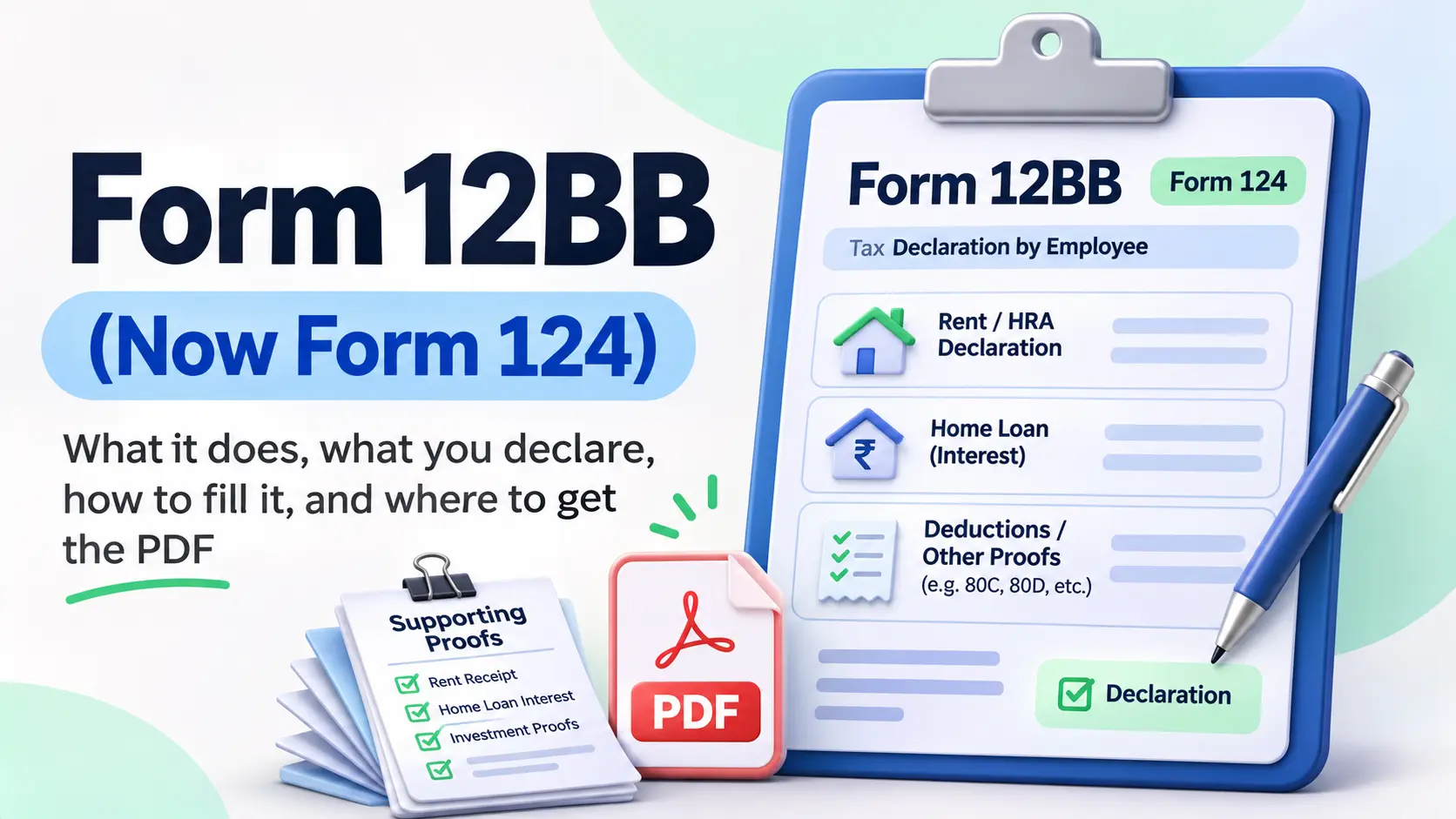
Form 12BB tells your employer which rent payments, travel expenses, home-loan interest, and tax-saving investments to consider before deducting TDS from your salary. By submitting these claims, you can help your employer calculate salary tax deductions based on the exemptions and deductions you are eligible for.
However, Form 12BB was replaced by Form 124 on 1 April 2026 under the Income-tax Rules 2026. The new form serves the same purpose but adds an important HRA detail: you must disclose your relationship with the landlord, if any. If you are preparing an investment declaration for tax year 2026–27 onward, you need the updated form rather than an older Form 12BB copy.
This guide explains what Form 12BB is, why it became Form 124, who needs to submit it, what claims you can declare, and how the new tax regime affects those claims. It also covers when to submit the form, where to download the correct PDF, how to fill it, which proofs to keep, what happens if you skip it, and how it differs from Forms 16 and 12B. Finally, you'll learn how to prepare the completed form and supporting documents as PDFs for submission to your employer.
What Is Form 12BB?
Form 12BB is a statement of claims that a salaried employee submits to their employer to have eligible House Rent Allowance (HRA), leave travel, home-loan interest, and Chapter VI-A deductions considered when calculating TDS on salary. Introduced in 2016 under Rule 26C and section 192 of the Income-tax Act, 1961, it lets the employer account for these claims before deducting tax from the employee's salary.
It is an employee declaration, not an income tax return. The employee fills it, the employer receives and checks the claims and supporting proofs, and the resulting salary TDS is reflected in Form 16. The employer retains the declaration and evidence; the employee does not file Form 12BB separately with the Income Tax Department.
The declaration relates to one financial year. From 1 April 2026, the corresponding declaration is Form 124, which uses the term tax year under the updated income-tax framework.
Has Form 12BB Been Replaced by Form 124?
Yes. Form 12BB was replaced by Form 124 on 1 April 2026, starting with tax year 2026–27. The new form is prescribed under Rule 205 of the Income-tax Rules 2026, read with section 392(5)(b) of the Income-tax Act 2025. Its purpose remains the same: employees submit their tax-saving claims and supporting evidence to their employers so the correct TDS can be deducted from salary. (Rules verified against the Income Tax Department's official website, incometaxindia.gov.in, and Rule 205 of the Income-tax Rules, 2026, on November 23, 2026).
The main changes are the form number, legal references, and terminology. The old Form 12BB used the financial-year label and referred to deductions under Chapter VI-A, while Form 124 uses tax year and references deductions under Chapter VIII. The revised HRA section also asks for your relationship with the landlord, if any, a detail that was not included in the old form.
Here is how the two forms compare:
| Detail | Form 12BB (Before April 2026) | Form 124 (From April 2026) |
|---|---|---|
| Legal basis | Section 192 of the Income-tax Act, 1961; Rule 26C of the Income-tax Rules, 1962 | Section 392(5)(b) of the Income-tax Act, 2025; Rule 205 of the Income-tax Rules, 2026 |
| Year label | Financial year | Tax year |
| Deduction chapter | Chapter VI-A | Chapter VIII |
| HRA fields | Rent paid, landlord's name, address, and tax identification details | Landlord details and rent paid, plus a relationship-with-landlord field |
| Who receives it | Employer | Employer |
For declarations relating to FY 2025–26, Form 12BB was the applicable version. For tax year 2026–27 onward, use Form 124, even if your employer's payroll system still refers to the declaration as Form 12BB.
The change does not mean you must submit both forms. You only need the version applicable to the relevant year, following your employer's declaration process.
Who Needs to Submit Form 12BB?
Any salaried employee who wants their employer to consider eligible tax exemptions or deductions when calculating salary TDS should submit Form 12BB, now called Form 124. This includes employees claiming house rent, leave travel expenses, home-loan interest, or tax-saving investments. If you have no such claims, you generally do not need to submit the declaration.
Form 12BB is not mandatory for every employee. However, if you have eligible claims but do not declare them, your employer may deduct more TDS from your salary because those benefits are not included in the payroll calculation.
The need to submit the form depends on your circumstances:
| Your situation | Should you submit it? |
|---|---|
| Salaried employee paying rent | Yes, if you want your employer to consider an eligible HRA exemption. |
| Employee with a home loan | Yes, if you want eligible home-loan interest considered when calculating salary TDS. |
| Employee claiming tax-saving deductions | Yes, if you have eligible investments or expenses to declare. |
| New-regime employee with no claims | Generally no. Most traditional exemptions and deductions are unavailable under the new regime. |
| Pensioner receiving pension from a former employer | May need to submit the declaration to the pension-paying authority if it considers eligible claims when deducting TDS from the pension. Confirm the authority's process. |
For a pensioner, the relevant question is whether the pension-paying authority handles the pension as salary income for TDS purposes and accepts these declarations. This is different from receiving a family pension or other income that is taxed under a different category.
Employees under the new tax regime usually have fewer deductions to declare, while those using the old regime may need the form for their eligible claims. Not submitting it does not automatically cancel a deduction you can claim in your income tax return, but it may result in higher TDS during the year.
What Can You Declare in Form 12BB?
Form 12BB allows employees to declare four types of tax-related claims: House Rent Allowance (HRA), Leave Travel Concession (LTC) or Assistance, interest on home loan, and eligible tax-saving deductions. The same four categories appear in Form 124, which replaced Form 12BB on 1 April 2026.
Each claim requires specific details and supporting evidence. The table below shows what you need to declare and which documents can support your claim.
| Claim | What the form asks for | Supporting proof |
|---|---|---|
| House Rent Allowance (HRA) | Rent paid, landlord's name and address, landlord PAN where annual rent exceeds ₹1 lakh, and relationship with the landlord, if any, under Form 124 | Rent receipts, rent agreement, and payment records |
| Leave Travel Concession (LTC) | Travel expenditure details for an eligible journey | Travel tickets, booking confirmations, or other evidence of expenditure |
| Home-loan interest | Interest payable or paid, lender's name, address, and PAN details | Interest certificate or statement issued by the lender |
| Tax-saving deductions | Applicable deduction section and the amount claimed | Investment statements, insurance premium receipts, tuition-fee receipts, or other qualifying expenditure records |
Under the earlier Form 12BB, tax-saving claims included section 80C investments such as eligible life insurance premiums, provident fund contributions, and certain tuition fees, along with deductions under sections 80CCC, 80CCD, section 80D, and other provisions of Chapter VI-A.
In the 2026 framework, Form 124 uses the corresponding provisions under Chapter VIII of the Income-tax Act, 2025, so check the current section references rather than copying the old numbers.
For HRA, the landlord's PAN is generally required when the total rent paid during the tax year exceeds ₹1 lakh. Form 124 also includes a landlord-relationship field, which applies regardless of whether the rent crosses that threshold.
Declaring an amount does not automatically make it deductible. Your employer considers the claim against the applicable tax rules and supporting evidence before allowing any exemption or deduction in your salary TDS calculation.
Does Form 12BB Matter Under the New Tax Regime?
Form 12BB, now Form 124, matters much less under the new tax regime. The new tax regime has been the default since 2023–24 and remains the default for tax year 2026–27. It does not allow House Rent Allowance (HRA), Leave Travel Concession (LTC), or most traditional tax-saving deductions. As a result, employees who use this regime usually have little or nothing to declare through Form 124.
Some benefits remain available under the new regime, including eligible employer NPS contribution deductions and certain other permitted claims. These are subject to their own conditions, so employees should check which benefits apply before submitting a declaration.
Your tax regime choice comes first; Form 124 comes afterward. The form does not select or change your tax regime. You must communicate your regime choice separately to your employer for salary TDS calculations. If you choose the old tax regime, you should then declare eligible HRA, LTC, home-loan interest, or tax-saving deductions through Form 124 so your employer can consider them when calculating TDS.
For example, an employee paying rent cannot claim the usual HRA exemption merely by entering rent details in Form 124 while remaining under the new regime. The exemption must be permitted under the chosen tax regime before the declaration can reduce salary TDS.
Neither regime is automatically better for every employee. The value of Form 124 depends on your eligible claims, the regime used for payroll calculations, and the deductions permitted under that regime.
When Should You Submit Form 12BB?
Submit Form 12BB, now Form 124, whenever your employer asks for your tax declaration. Many employers collect a provisional declaration at the start of the tax year, usually around April, and request the final declaration with supporting documents between January and March, before calculating TDS on the last salary payments of the year.
These two stages serve different purposes. The provisional declaration tells payroll which rent payments, home-loan interest, and tax-saving investments you expect to claim, while the final proof submission confirms the amounts with receipts, certificates, or other evidence.
There is no single submission deadline for every employee. Each employer sets its own payroll cut-off, which may fall in January, February, or March, before the financial year end. If you miss that deadline and payroll cannot adjust your TDS in time, you may need to claim the eligible deductions or exemptions in your income tax return (ITR) and recover any excess TDS through a refund.
A job change also requires attention. If you join another employer during the same tax year, submit your eligible claims to the new employer according to its payroll schedule, even if you already made a declaration at your previous workplace.
Where Can You Get the Form 12BB PDF?
You can get the current Form 12BB PDF, now called Form 124, from the Income Tax Department's official website at incometaxindia.gov.in, your employer's HR portal, or your HR or payroll team. On the department's website, look for “Form No. 124 (Earlier Form No. 12BB)” to find the updated form information for tax year 2026–27 onward.
Many employers collect tax declarations directly through payroll software such as Keka or greytHR. In these systems, you may enter your claims and upload supporting proofs without completing a separate PDF. Check your employer's instructions before downloading a form unnecessarily.
Check the form version before using a downloaded copy. Older templates available in Word format, Excel, or PDF may still be based on the pre-2026 Form 12BB. The current version should identify itself as Form 124 and use “Tax Year” in the employee-details section, whereas the older Form 12BB uses “Financial year.”
If your HR portal still labels the declaration as Form 12BB, that alone does not mean the underlying form is outdated. Check the actual fields or confirm with payroll that the declaration follows the 2026 requirements.
How Do You Fill Form 12BB?
To fill Form 12BB, now Form 124, enter your name, address, PAN, and the applicable tax year, then complete the four claim sections for HRA, leave travel, home-loan interest, and eligible deductions. Enter the amounts and supporting evidence or particulars for each claim, leave sections you are not claiming blank, and complete the verification with your signature, place, and date.
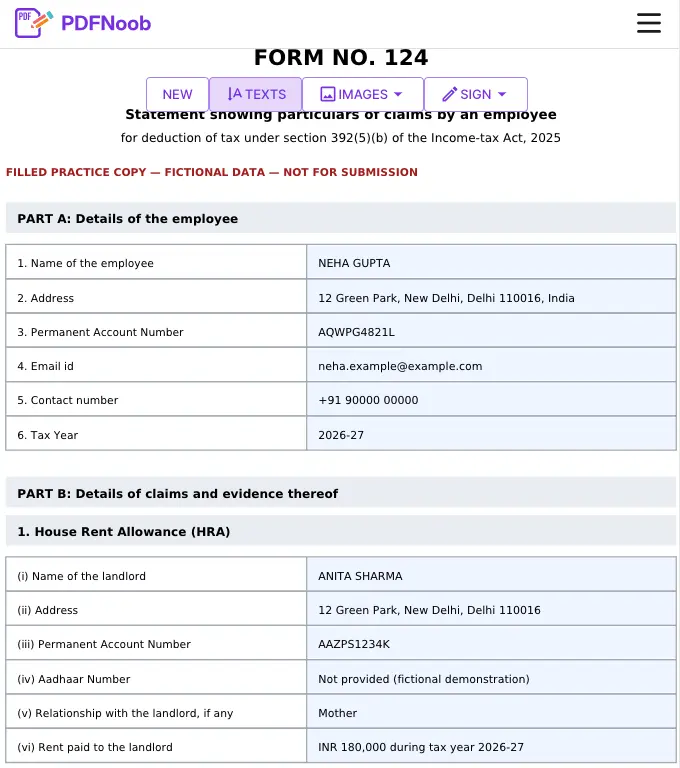
The table below explains what to enter in the current Form 124 and the mistakes to avoid.
| Field | What to write | Common mistake |
|---|---|---|
| Employee details | Your full name, address, PAN, contact details, and tax year, such as 2026–27 | Using the previous financial year's details or entering an incorrect PAN |
| House Rent Allowance (HRA) | Rent paid during the tax year, landlord's name and address, and the required identification details | Entering the monthly rent instead of the total rent for the period being declared |
| Landlord PAN | Provide the landlord's PAN when aggregate annual rent exceeds ₹1 lakh | Leaving the PAN blank when the rent exceeds the threshold |
| Relationship with landlord | State your relationship, if any, such as parent or spouse; otherwise indicate that there is no relationship as appropriate | Skipping the field because the annual rent is below ₹1 lakh |
| Leave Travel Concession (LTC) | Eligible travel expenditure and the relevant supporting details | Entering unsupported travel costs or amounts that do not match the evidence |
| Home-loan interest | Eligible interest amount and the lender's name, address, and PAN | Entering the total EMI instead of the interest component |
| Tax-saving deductions | The applicable deduction section under the current law, amount claimed, and investment or expenditure details | Copying old section numbers from a pre-2026 Form 12BB |
| Evidence / particulars | Details of supporting records, such as rent receipts, travel tickets, the lender's interest certificate, or investment receipts | Entering an amount without identifying the supporting evidence |
| Verification | Confirm the information is correct, then add your signature, place, and date | Forgetting to sign or leaving the date blank |
The landlord relationship field is new from 1 April 2026. Unlike the ₹1 lakh rent threshold for landlord PAN details, the relationship field applies regardless of how much rent you pay. If your landlord is a relative, state the relationship accurately rather than leaving it blank.
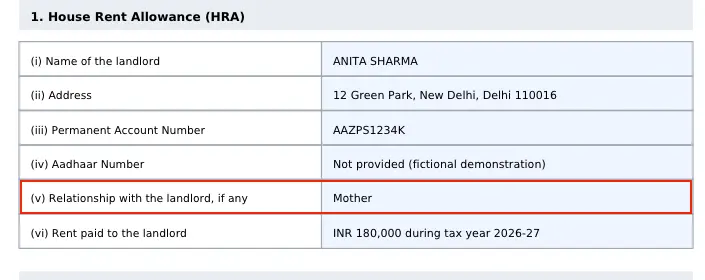
When completing the evidence or particulars entries, identify the documents supporting each amount, such as the relevant rent receipts, travel expenditure records, housing-loan interest certificate, or investment statements. You do not need to enter a claim in every section; leave any block that does not apply to you blank.
If your employer requires a completed PDF, open Form 124 in PDFNoob's PDF Editor, click where the answer goes, and type. Before downloading, delete any unused text box, because an empty text box may be saved with the words “Type text here”.
After completing the claim sections, review the amounts against your supporting documents and sign the verification with the correct place and date before submitting the declaration to your employer.
What Proofs Should You Keep With Form 12BB?
Keep rent receipts or a rent agreement for HRA, travel tickets for Leave Travel Concession (LTC), the lender's interest certificate for home-loan interest, and an investment proof or premium receipt for each tax-saving deduction you claim. These documents help your employer verify the amounts declared in Form 12BB, now Form 124, before calculating salary TDS.
The table below shows which documents to keep and where to obtain them.
| Claim | Proof to keep | Where to get it |
|---|---|---|
| House Rent Allowance (HRA) | Rent receipts, rent agreement, and bank-payment records | Collect receipts from your landlord, retain the signed rental agreement, and download payment records from your bank |
| Leave Travel Concession (LTC) | Travel tickets, booking confirmations, and other eligible travel-expense records | Download tickets or invoices from the airline, railway, or travel-booking provider |
| Home-loan interest | Annual interest certificate and relevant loan documents | Download the interest certificate from your lender's net-banking portal or request it from the bank or housing-finance company |
| Tax-saving investments | PPF statements, ELSS investment statements, life insurance premium receipts, or other applicable investment records | Obtain them from your bank, investment platform, insurer, or fund provider |
| Other eligible deductions | Health insurance premium receipts, eligible tuition-fee receipts, or other relevant expenditure records | Download receipts from your insurer, school, or the organization receiving the payment |
Your employer may initially accept a provisional declaration and request the actual proofs only during the final proof submission period. Keep copies of the supporting documents even after your employer has checked them, because you may need them when preparing your income tax return (ITR) or responding to a later Income Tax Department query.
If you pay rent to a parent or another relative, the rental arrangement must be genuine, with rent actually paid rather than declared only on paper. Keep a written agreement, valid receipts, and preferably pay through a bank transfer so there is a clear record of each payment. Form 124 also asks you to disclose your relationship with the landlord, if any.
What Happens If You Don't Submit Form 12BB?
If you don't submit Form 12BB, now Form 124, your employer generally calculates salary TDS without considering the exemptions and deductions you have not declared. This can result in higher TDS and lower monthly take-home pay, even if you qualify for those tax benefits under the old tax regime.
You can still claim eligible exemptions and deductions when filing your income tax return (ITR). If the final tax calculation shows that more tax was deducted than you owe, you can claim the excess TDS as a refund. However, the money is not returned immediately; the Income Tax Department must process your verified return before issuing any approved refund.
For example, suppose you are under the old tax regime and have ₹2 lakh in combined eligible HRA exemptions and section 80C deductions that you did not declare to your employer. If the entire ₹2 lakh would otherwise reduce income taxed at a 20% marginal rate, the additional TDS could be approximately ₹40,000 before cess.
| Illustrative calculation | Amount |
|---|---|
| Eligible HRA and section 80C claims not declared | ₹2,00,000 |
| Assumed marginal income tax rate | 20% |
| Additional tax deducted before cess | ₹40,000 |
This is only an illustration. Your actual TDS difference depends on your taxable income, applicable slab rates, deduction limits, and whether the full amount qualifies for tax relief.
Submitting your investment proofs after your employer's payroll deadline can have the same effect if the claims are not considered before the final TDS calculation. You may still recover eligible excess tax through your ITR, but the refund depends on return processing.
Do not submit invented investment amounts, false rent receipts, or other unsupported claims to reduce TDS. A false declaration can be questioned by your employer or the Income Tax Department and may lead to additional tax, interest, or penalties, depending on the circumstances.
How Is Form 12BB Different From Form 16 and Form 12B?
Form 12BB, Form 16, and Form 12B serve different purposes in salary tax calculations. Form 12BB is the declaration you give your employer to claim eligible exemptions and deductions. Form 16 is the TDS certificate your employer gives you after the financial year, showing your salary and the tax deducted. Form 12B is used when you change jobs to inform your new employer about salary received and TDS deducted by your previous employer during the same year.
From 1 April 2026, these forms have new numbers under the Income-tax Rules, 2026. Form 12BB is now Form 124, Form 16 is now Form 130, and Form 12B is now Form 122.
Here is how the forms compare:
| Form | Who gives it | To whom | When | New 2026 number |
|---|---|---|---|---|
| Form 12BB | Employee | Current employer | During the year, when declaring eligible exemptions and deductions | Form 124 |
| Form 16 | Employer | Employee | After the year ends, as a salary TDS certificate | Form 130 |
| Form 12B | Employee changing jobs | New employer | After joining a new employer during the same tax year | Form 122 |
| Form 12BA | Employer | Employee | When reporting taxable perquisites and other salary benefits, under the applicable rules | Form 123 |
Form 12BA is a separate statement of perquisites, such as taxable employer-provided benefits and other amounts treated as salary. It accompanies salary tax reporting and gives employees a breakdown of benefits that may not appear as ordinary cash salary. From tax year 2026–27, its corresponding form is Form 123.
The simplest distinction is the direction of the information: you give Form 124 to claim deductions, your employer gives you Form 130 to report salary TDS, and you give Form 122 to a new employer to report earlier salary and tax deductions. These forms serve different purposes, so one does not replace another.
How Do You Get Form 12BB and Its Proofs Ready as PDFs?
To prepare Form 12BB, now Form 124, for submission, turn your rent receipt photos into a PDF, combine the supporting proofs into one file where appropriate, and sign the completed declaration. Since an HR portal may allow only one upload per claim, preparing clear, properly organized files helps you submit the required documents without missing important evidence.
How Do You Turn Rent Receipt Photos Into a PDF?
Place each monthly rent receipt flat in good light, take a clear photo, and upload the images to PDFNoob's Image to PDF tool to combine them into one PDF in month order.
Before converting, check that the landlord's name, rent amount, payment month, and landlord signature are clearly readable on every receipt. If a revenue stamp is required or appears on the receipt, make sure it is also visible and not cut off in the photograph.
Arrange the images from the earliest to the latest month, then download the combined PDF and check that every receipt is complete and readable before submitting it to HR.
How Do You Combine All Your Form 12BB Proofs Into One File?
If your employer asks for one combined proof file, merge your rent receipts, home-loan interest certificate, and investment receipts into a single PDF, keeping the page order the same as the claim blocks in Form 12BB (now Form 124). You can use PDFNoob's Merge PDF tool to combine the documents in that order.
Some HR portals require a separate PDF for each claim, such as one for HRA and another for home-loan interest. Check your employer's upload instructions before merging everything into one file, so you do not have to separate the documents again.
How Do You Sign the Form 12BB Verification Without Printing It?
To sign Form 12BB, now Form 124, without printing it, open the completed PDF in PDFNoob's Sign PDF tool, add your signature image to the verification line, enter the place and date, and save the signed PDF. The verification section is where your signature belongs; you do not need to sign every claim or supporting receipt.
Many employer HR portals accept a typed or uploaded e-signature on the declaration. However, some employers still require a scanned copy with a handwritten wet signature, so confirm your HR team's requirements before submitting a digitally signed form. For the available signing methods, see how to sign a PDF.