


Form 10C lets you ask the Employees' Provident Fund Organisation (EPFO) to either pay an eligible withdrawal benefit from the Employees' Pension Scheme (EPS) or issue a scheme certificate that preserves your pension service for the future.
These are two different requests on the same form. Taking the money ends the pension service covered by that withdrawal, while preserving your service may help you qualify for a monthly pension if you work in an EPFO-covered job again. The important decision is whether to withdraw your EPS benefit now or keep your pension service before filing the claim.
There is also a waiting-period rule to consider. On 13 October 2025, EPFO's Central Board of Trustees approved extending the waiting period for EPS withdrawal benefits from two months to 36 months. The Ministry of Labour and Employment subsequently confirmed that the 36-month waiting period had been introduced. We checked every rule on this page against EPFO's official website and circulars on 22 November 2026.
This guide explains what Form 10C is, when to use it, who is eligible, and how to choose between withdrawal and a scheme certificate. It also covers how the benefit is calculated, how to apply online using your UAN, how to complete the PDF offline, which documents you need, how long settlement takes, why claims get rejected, and whether Form 10C can be submitted alongside Form 19.
What Is Form 10C in EPFO?
Form 10C is the EPFO claim form for the Employees' Pension Scheme (EPS). The scheme started as EPS 1995 and now runs under the Employees' Pension Scheme, 2026. The form itself still carries the 1995 name. It is used to request either a withdrawal benefit, which pays an eligible lump sum for your pensionable service, or a scheme certificate, which preserves your pension service for future pension eligibility.
The EPS contribution comes from your employer's provident fund contribution, not from a separate deduction from your salary. Under the standard contribution structure, your employer contributes 12% of eligible wages, with 8.33% directed towards EPS and the remaining 3.67% going into your Employees' Provident Fund (EPF) account. The pension contribution was generally capped at wages of ₹15,000 per month until 16 September 2026; the statutory wage ceiling increased to ₹25,000 from 17 September 2026.
This is why you may need two different claim forms: Form 19 withdraws your EPF balance, while Form 10C handles an eligible EPS withdrawal benefit or scheme certificate. The pension benefit is calculated under EPS rules, so Form 10C does not simply return every pension contribution as an account balance.
Form 10C also contains claimant provisions for certain cases where a member has died without completing the claim. However, benefits payable to surviving family members depend on the circumstances, and a family pension is generally claimed using Form 10D rather than treating Form 10C as an ordinary pension withdrawal.
When Should You Use Form 10C?
Use Form 10C when you leave an EPFO-covered job with fewer than 10 years of service under the Employees' Pension Scheme (EPS) and want to claim an eligible withdrawal benefit, or when you want a scheme certificate that preserves your pension service for future employment.
The 10-year mark is the main distinction: with less than 10 years of eligible pension service, you may qualify for an EPS withdrawal benefit; with 10 years or more, you generally cannot withdraw that benefit as a lump sum and must follow the pension or scheme-certificate route instead.
| Your situation | What you file |
|---|---|
| You leave employment with less than 10 years of eligible pension service and want the withdrawal benefit. | Form 10C, subject to the applicable waiting period. |
| You leave employment and want to preserve your pension service for a future EPFO-covered job. | Form 10C to request a scheme certificate. |
| You reach age 58 with less than 10 years of eligible pension service. | Form 10C for an eligible withdrawal benefit, subject to the scheme rules. |
| You have completed 10 years or more of eligible pension service. | Form 10D for a monthly pension claim when eligible, or the scheme-certificate route if you are not yet drawing a pension. |
| A member dies, and the surviving spouse, children, nominee, or legal heir needs to claim an EPS benefit. | The claim depends on the circumstances. A family pension generally uses Form 10D; Form 10C has limited provisions for certain claims after a member's death. |
A waiting period also applies to EPS withdrawal benefits. EPFO introduced a 36-month waiting period for these withdrawals following the October 2025 rule changes. This is separate from the 10-year service test and does not mean every scheme-certificate or family-pension claim must wait 36 months.
If you have worked for more than one EPFO-covered employer, check your combined eligible pension service before choosing a form. Your total service, rather than your time at the most recent job alone, can determine whether you qualify for a withdrawal benefit or a future monthly pension.
Who Is Eligible for the Form 10C Scheme in EPFO?
You may be eligible to claim an EPS withdrawal benefit through Form 10C if you have left EPFO-covered employment, have less than 10 years of eligible pension service, and meet the applicable waiting period. Under the updated pension rules, even members with less than 6 months of service can qualify for a withdrawal benefit, provided they have eligible contributory service.
The Central Board of Trustees approved extending the EPS withdrawal waiting period from two months to 36 months on 13 October 2025. Under the Employees' Pension Scheme, 2026, a member who leaves employment before age 58 can generally claim the withdrawal benefit after 36 months from the date the last pension contribution became due, or upon reaching age 58, whichever happens earlier.
| Eligible | Not eligible or not yet eligible |
|---|---|
| You have less than 10 years of eligible EPS service and have completed the applicable waiting period. | You have 10 or more years of eligible EPS service and are seeking a lump-sum withdrawal benefit instead of the pension route. |
| You have contributed to EPS for less than six months, including as little as one completed month, and satisfy the other conditions. | You have no qualifying EPS membership or contributory service recorded. |
| You reach age 58 with less than 10 years of eligible service. | You have not yet completed the 36-month waiting period and have not reached age 58. |
| You have an active UAN, linked Aadhaar, verified bank details, and the required KYC information for an online claim. | Your online claim cannot proceed because the required identity, bank, or membership details are incomplete or inconsistent. |
| Your date of exit is correctly recorded, and your previous EPS service has been accounted for. | Your employment exit is missing, or your combined service makes you ineligible for the withdrawal-benefit option. |
For an online claim, check that your UAN is activated, Aadhaar and bank-account details are linked, and PAN information is updated where required. Your date of exit must also be recorded in EPFO's system; this can be updated by the employer or, where the portal permits, through the member's own exit-marking facility.
Family members are subject to separate rules. If an EPS member dies, a spouse, eligible child, nominee, or other claimant may qualify for a benefit, but the correct application depends on the circumstances. Family pension claims generally use Form 10D, so relatives should not assume that Form 10C is the correct form solely because the deceased member had less than 10 years of service.
What Types of Claim Can You Make Using Form 10C?
Form 10C allows two types of claims under the Employees' Pension Scheme (EPS): a withdrawal benefit or a scheme certificate. A withdrawal benefit pays you an eligible lump sum based on your EPS service, while a scheme certificate pays nothing immediately but preserves your pensionable service for a future pension.
Both options are available through Form 10C, but they have different consequences.
| Withdrawal benefit | Scheme certificate | |
|---|---|---|
| Money now | Pays an eligible lump sum after the applicable waiting period. | No immediate payment. |
| Service kept | The pension service covered by the withdrawal is no longer available for a future pension calculation. | Preserves your recorded pension service for future benefits. |
| Best for | Members leaving EPFO-covered employment who do not expect to return and prefer the eligible payment. | Members expecting another EPFO-covered job who may reach 10 years of total service. |
| Can it be undone? | A completed withdrawal generally cannot be reversed to restore the service already settled. | The certificate preserves service for future use; other permitted claims depend on the applicable EPS rules. |
For example, if you leave a job after seven years of EPS service and expect another job change into EPFO-covered employment, preserving those seven years could help you reach the ten-year pension requirement. Taking the withdrawal benefit instead would settle the service covered by that claim, so you could not simply add those seven years to your next employment period.
A scheme certificate is particularly useful when there is a gap between jobs. When you move directly between EPFO-covered employers, an EPF transfer and the associated EPS service records can help carry forward your previous service without withdrawing the pension benefit. The certificate provides a separate record of the service you want to preserve.
Before selecting an option on Form 10C, check your combined EPS service and whether you expect to work in an EPFO-covered establishment again. The right choice depends on whether you need an eligible lump-sum payment or want to protect your service toward a future monthly pension.
Should You Withdraw Your EPS Balance or Keep It?
Keep your EPS pension service if you expect to work in another EPFO-covered job and could reach 10 years of total eligible service. Consider an EPS withdrawal benefit if you are leaving covered employment permanently, need the money, and meet the withdrawal conditions. The choice is between a one-time lump sum and preserving your eligibility for a future monthly pension.
Under the Employees' Pension Scheme, members who complete at least 10 years of eligible service can generally receive a monthly pension from age 58. A withdrawal benefit, by contrast, is paid once and settles the pension service covered by that claim.
For example, suppose you have completed seven years of EPS service and might work for another three years in an EPFO-covered job.
| Your choice after 7 years | What happens if you work another 3 years? |
|---|---|
| Keep your pension service | Your seven years can be combined with three additional eligible years, potentially bringing you to the ten-year requirement for a monthly pension at retirement. |
| Withdraw the EPS benefit | You receive an eligible one-time payment after satisfying the withdrawal rules, but those seven years are settled. The next three years alone would not ordinarily qualify you for a monthly pension. |
In rupees, assuming ₹15,000 in eligible wages, withdrawing after seven years would provide approximately ₹1,06,950 as a one-time payment, once you meet the withdrawal conditions. Keeping your service and completing ten eligible years could instead provide approximately ₹2,143 per month from age 58 for life, based on the standard EPS pension formula.
Do not expect the withdrawal amount to equal every pension contribution shown in your records. EPS withdrawal benefits are calculated under the scheme's prescribed rules, and the applicable wage ceiling can limit the amount used in the calculation. This is why the payment may be smaller than expected.
Before deciding, open your EPFO passbook and check the pension contribution entries, sometimes referred to as your EPS passbook figure. These entries help you review your contribution history, but they are not a directly withdrawable account balance or a guaranteed Form 10C payment amount.
A completed EPS withdrawal generally cannot be reversed to restore the pension service already settled. If you are uncertain about returning to covered employment, consider the long-term value of preserving service before choosing immediate payment.
How Is the Form 10C Amount Calculated?
The Form 10C withdrawal benefit is calculated by multiplying your eligible wages for EPS withdrawal purposes by a factor based on your completed months of contributory service. Under the earlier EPS 1995, this factor appeared in Table D; the Employees' Pension Scheme, 2026 now lists the corresponding factors in Table IV.
The basic calculation is:
Withdrawal benefit = eligible wages at exit × table factor
Your years of service determine which factor applies, but the calculation now counts completed months rather than rounding service to the nearest whole year. The ₹15,000 wage ceiling applied to standard EPS contributions for earlier periods; following the September 2026 wage-ceiling change, the calculation may need to account for different ceilings across your contribution history.
Below are the withdrawal factors for 1 to 9 years of service, taken from the government's current month-based withdrawal table, Table IV of the Employees' Pension Scheme, 2026, as checked on 22 November 2026. These factors are based on completed months of contributory service.
| Completed service | Factor (current table) |
|---|---|
| 1 year (12 months) | 1.02 |
| 2 years (24 months) | 1.99 |
| 3 years (36 months) | 2.98 |
| 4 years (48 months) | 3.99 |
| 5 years (60 months) | 5.02 |
| 6 years (72 months) | 6.07 |
| 7 years (84 months) | 7.13 |
| 8 years (96 months) | 8.22 |
| 9 years (108 months) | 9.33 |
For example, suppose your eligible wages for the withdrawal calculation are ₹15,000, and you have completed seven years (84 months) of EPS contributions. The factor for 84 months is 7.13, so your estimated withdrawal benefit is:
₹15,000 × 7.13 = ₹1,06,950
This is an illustrative amount, not a confirmed EPFO settlement. A member with seven years and five completed months would use the factor for 89 months, not automatically the seven-year factor shown above.
Pensionable salary for calculating a monthly EPS pension is generally based on the average eligible wages over the relevant final 60-month period. That should not be confused with the wages at exit used for a Form 10C withdrawal benefit, for which the 2026 scheme specifies a weighted calculation across applicable wage-ceiling periods.
You can check recorded pension contributions in your EPFO passbook and track the actual approved amount through your claim status. The amount shown as EPS contributions in a passbook is not itself the amount payable under Form 10C.
How Do You Apply for Form 10C Online?
To apply for Form 10C online, sign in to the EPFO Unified Member Portal using your Universal Account Number (UAN), open Online Services, and select Claim (Form-31, 19, 10C & 10D). After completing bank verification, choose Only Pension Withdrawal (Form-10C) if you are eligible, and submit your claim using the Aadhaar OTP sent to your Aadhaar-linked mobile number.
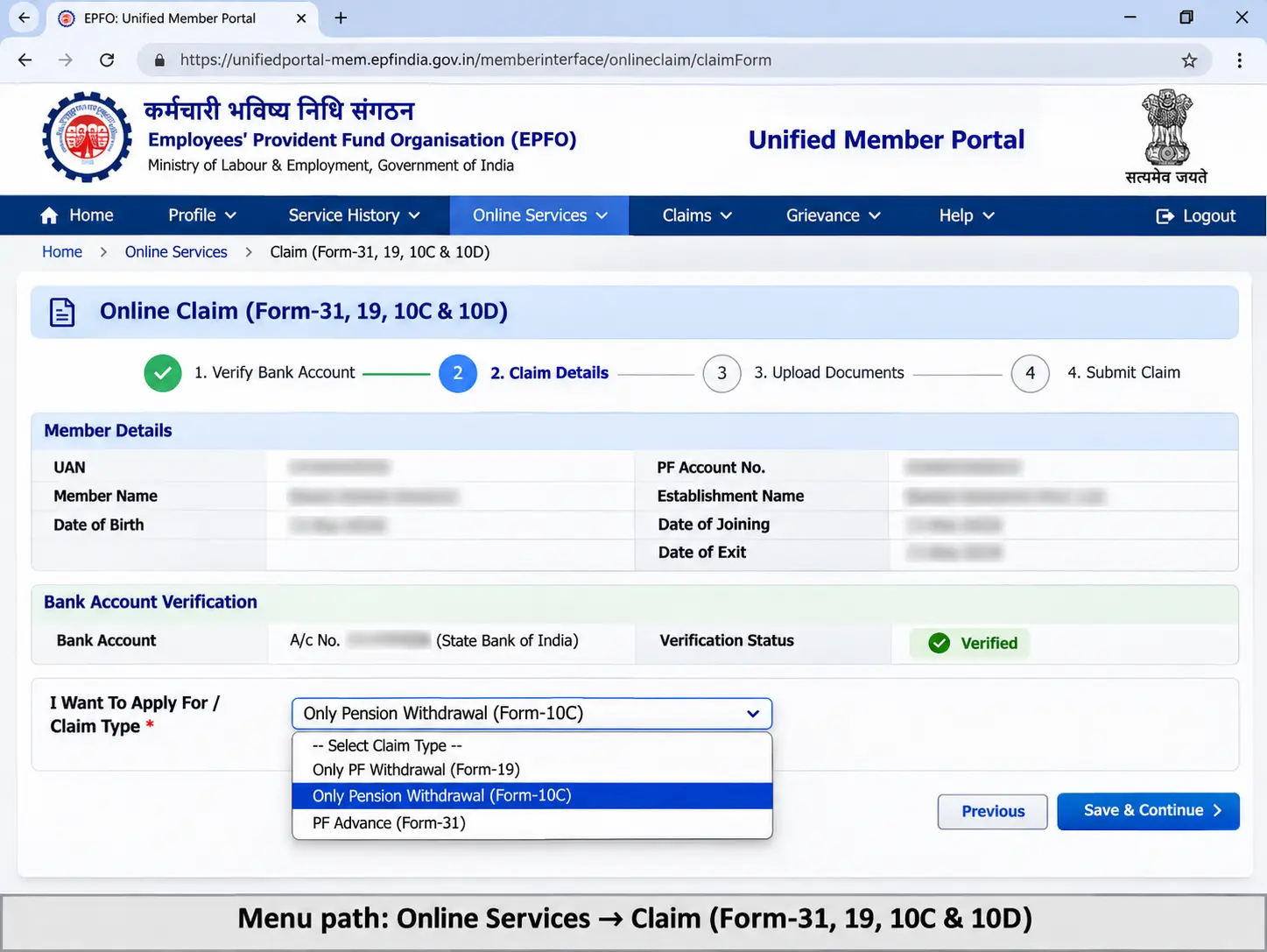
Below are the steps to submit Form 10C online.
- Visit the EPFO Unified Member Portal and complete your UAN login with your password and the displayed verification code.
- Go to Online Services → Claim (Form-31, 19, 10C & 10D).
- Check your personal and KYC information. Enter the requested bank account digits to verify the account linked to your UAN.
- Select Proceed for Online Claim and open the claim-type drop-down menu.
- Choose Only Pension Withdrawal (Form-10C) if the option is available for your membership and claim eligibility.
- Complete the requested details. If the portal asks for supporting documents, upload a clear image of your cancelled cheque or bank passbook, showing the required bank details.
- Review your claim, request the Aadhaar OTP, enter the code received on your Aadhaar-linked mobile number, and submit.
- Save the claim reference number and use Online Services → Track Claim Status, where available, or EPFO's passbook and claim-status service to check the result.
If you want to preserve your pension service instead of withdrawing the benefit, check the scheme-certificate option offered through the applicable claim process. Do not select a pension withdrawal simply because the scheme-certificate option is not visible; EPFO may require a different submission route depending on your circumstances.
The Only Pension Withdrawal (Form-10C) option generally appears only when EPFO's records indicate that you can submit that claim. If it is missing, check the following before trying again:
| Possible reason | What to check |
|---|---|
| Date of exit not recorded | Check whether your last employer's exit date is available in your EPFO service history. |
| KYC incomplete | Confirm that your UAN is active and your Aadhaar and bank details are correctly linked and verified. |
| Waiting period not completed | Check whether you meet the applicable 36-month EPS withdrawal waiting period or qualify under another permitted condition. |
| Service or claim eligibility | Check your combined EPS service. Members with 10 or more years generally follow the pension or scheme-certificate route rather than withdrawing the EPS benefit. |
| Service record mismatch | Review your joining dates, exit dates, previous member IDs, and service transfers for missing or inconsistent information. |
Less than six months of service is not automatically a reason for rejection. EPFO extended withdrawal-benefit eligibility to members with shorter contributory service in 2024. However, the online claim option may still depend on whether the portal has correctly recorded your service and recognizes your eligibility.
If your details are correct but the option remains unavailable, contact EPFO through its official grievance or support channels rather than submitting a different claim type.
How Do You Fill the Form 10C PDF Offline?
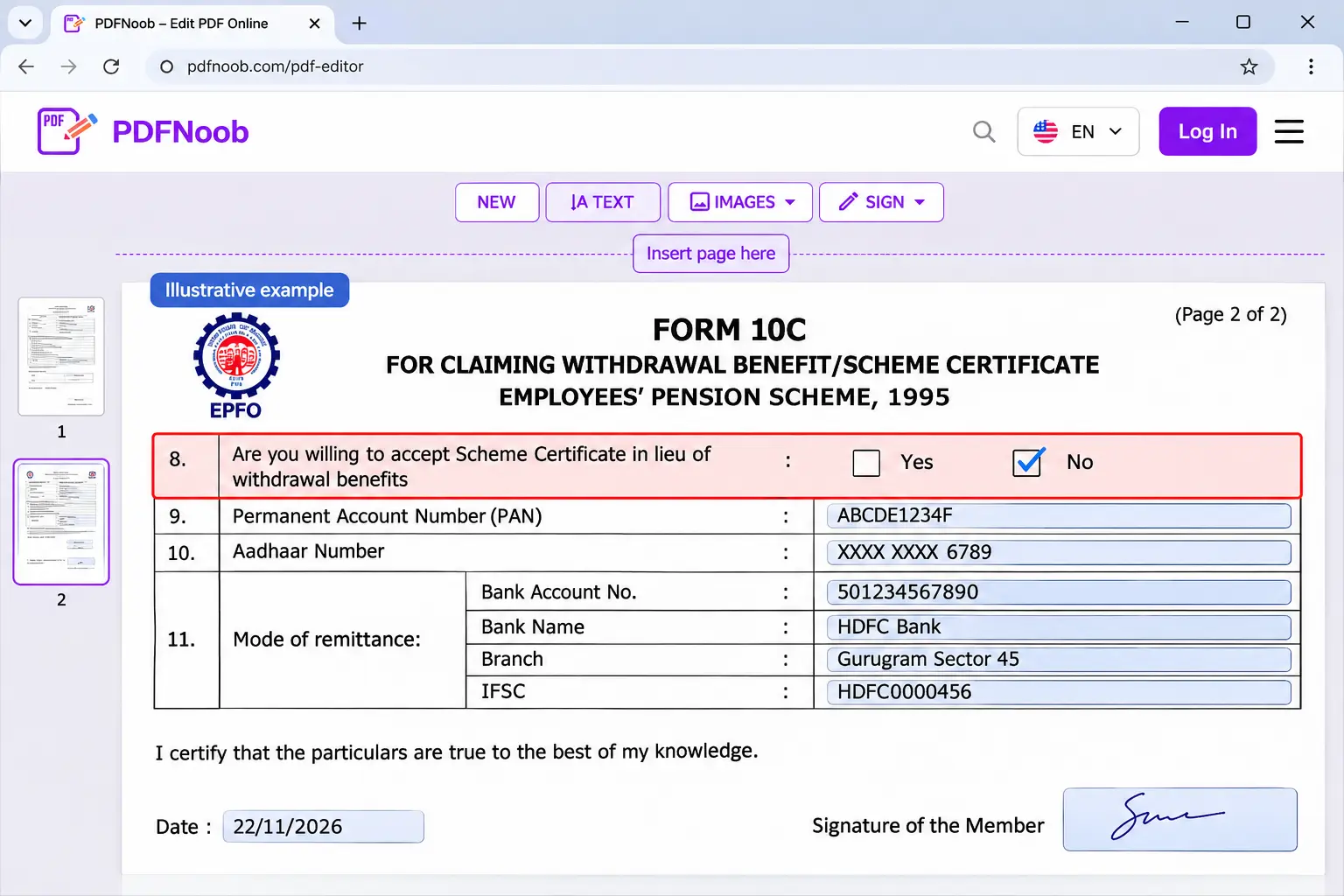
To fill Form 10C offline, download the official Form10C.pdf from EPFO, enter your personal, employment, and bank details, select either a withdrawal benefit or scheme certificate, and sign the completed form. Submit it to the appropriate EPFO regional office, following the employer attestation requirements for the claim form you use.
Offline submission may be necessary if your Aadhaar is not linked to your UAN, the online portal cannot process your claim, or a family member needs to file an applicable claim after a member's death. EPFO also provides Aadhaar and non-Aadhaar versions of the composite claim form, so check which form your regional office accepts before submitting.
Use your EPFO service history, Aadhaar records, and bank documents to complete the form accurately.
| Field | What to write | Common mistake |
|---|---|---|
| 1. Member's name / claimant's name | Enter the member's full name in block letters. Add the claimant's name where applicable. | Using a spelling that differs from EPFO records or entering a relative's name as the member. |
| 2. Date of birth | Enter the member's date of birth in DD/MM/YYYY format. | Using a different date from the EPFO or Aadhaar record. |
| 3. Father's / husband's name | Enter the relevant name as requested on the form. | Entering details that do not match the member's records. |
| 4. Establishment details | Write the name and address of the last employer. | Using an earlier employer's details instead of the last establishment. |
| 5. EPF account details | Enter the region/office code, establishment code, and member account number. | Confusing the full UAN with the separate membership/account details requested. |
| 5A. Date of joining | Enter the date you joined the establishment. | Using the date of UAN activation instead of the employment joining date. |
| 6. Reason and date of leaving | State why employment ended and enter the correct date of exit. | Using the date of final salary payment or an incorrect exit date. |
| 7. Full postal address | Enter your complete address and PIN code. | Leaving out the PIN code or writing an incomplete address. |
| 8. Scheme certificate option | Tick Yes if you want a scheme certificate instead of the withdrawal benefit, or No if you are requesting an eligible withdrawal benefit. | Ticking Yes when you actually want a lump-sum withdrawal, or leaving the choice unclear. |
| 9. Family and nominee details | Complete the family information if you select the scheme-certificate option. Include guardian details for a minor where applicable. | Leaving required family or nominee information blank. |
| 10. Death-related claimant details | Complete the date of death, claimant details, and relationship only where this part of Form 10C applies. | Filling this section for an ordinary member withdrawal, or using Form 10C for a family-pension claim that requires another form. |
| 11. Payment and bank details | Select the applicable payment method and enter your savings account number, bank name, branch and IFSC. | Incorrect account digits, an outdated IFSC, or bank details that do not match the supporting document. |
| 12. Existing EPS pension | Indicate whether you already receive an EPS pension. If yes, provide the PPO details requested. | Leaving the question unanswered or omitting an existing pension reference. |
| Declaration and signature | Sign or provide a thumb impression and enter the date in the claimant's section. | Forgetting the signature or signing an area reserved for the employer or EPFO. |
Check the option in Field 8 carefully. Selecting a scheme certificate means you are asking EPFO to preserve your pension service rather than pay an immediate withdrawal benefit. This is one of the most important choices on the form.
You can complete the PDF on screen using PDFNoob's PDF Editor: upload the document, click where the answer goes and type, and download the completed copy. Delete any unused text box before downloading, since an empty box may appear as “Type text here” in the saved PDF.
The attestation requirement depends on the form and submission route:
- Traditional Form 10C or Composite Claim Form (Non-Aadhaar): Employer verification or attestation is generally required, subject to EPFO's applicable alternative arrangements.
- Composite Claim Form (Aadhaar): Eligible members with an activated UAN and correctly linked Aadhaar and bank details can generally submit the form directly to EPFO without employer attestation.
If your employer has closed or is unavailable, contact the regional office about the permitted alternative verification process rather than leaving an attestation section incomplete.
For an applicable death-related claim, attach the death certificate and any further claimant documents EPFO requires. Ordinary family-pension claims may need Form 10D rather than Form 10C.
Before submitting, compare the member name, date of exit, claim option, bank account number, and IFSC against your official records. The downloadable Form 10C PDF still contains some older eligibility wording, so use EPFO's current requirements rather than relying on every historical instruction printed on the form.
What Documents Do You Need With Form 10C?
For a Form 10C claim, keep your bank account details, identity information, and supporting documents ready. An offline claim generally requires a cancelled cheque or bank passbook copy in your name, along with the identity proof and verification documents requested by EPFO. For online claims, Aadhaar and bank details are usually already linked to your UAN, so fewer documents may need to be uploaded.
A cheque or passbook image is not mandatory for every online claim. EPFO relaxed this requirement in May 2024 for eligible claims where the bank and identity details have already passed the prescribed verification checks. If the portal still asks for bank proof, upload a clear image showing your account number, account holder's name, and IFSC.
Documents for online and offline Form 10C claims.
| Online claim | Offline or death claim |
|---|---|
| Identity: Aadhaar-linked UAN and verified KYC details are generally used electronically, without a separate identity-proof upload. | Identity: A completed, signed claim form and the identity proof or verification documents required for the filing route. |
| Bank details: Verified bank account information linked to your UAN. | Bank details: A cancelled cheque or bank passbook copy showing the claimant's name, account number, and IFSC. |
| Cheque or passbook image: Upload only if the portal requests it. Eligible verified claims may be exempt. | Employer verification: Attestation may be required for a traditional or non-Aadhaar claim form. |
| Additional documents: Submit any specific evidence requested during claim verification. | Death-related claim: A death certificate, claimant and family details, and a guardianship certificate when a minor's claim requires one. |
Check the bank document before submitting it. The account number and IFSC must be readable, and the printed account holder's name should match the member or claimant information recorded with EPFO. A blurred or cropped image may prevent EPFO from verifying the payment details.
A name mismatch between your bank account and UAN records can also delay processing or cause the claim to be returned for correction. Check the spelling of your name and confirm that the account belongs to the correct claimant before uploading any bank proof.
For a claim following a member's death, the required documents depend on the benefit and the relationship of the person applying. Surviving family members should confirm whether they need Form 10C or the separate Form 10D family-pension process before preparing their paperwork.
How Many Days Does a Form 10C Claim Take to Settle?
EPFO's standard claim settlement period for Form 10C is 20 calendar days from receiving a complete claim. Many straightforward online claims may be processed sooner, sometimes within two weeks, while offline applications and claims involving a member's death may take longer because of additional verification.
The claim settlement time depends on whether your service records, eligibility, bank details, and supporting documents are correct. The 20-day period is a processing standard, not a guarantee that every claim will be approved or paid within that time.
You can check your claim status through the EPFO Member Portal or the UMANG app:
- Sign in to the EPFO Unified Member Portal using your UAN and password.
- Open Online Services → Track Claim Status, where available.
- Select your Form 10C claim and review the latest status. You can also use the EPFO Member Passbook and Claim Status service.
- Alternatively, open the UMANG app, select EPFO services, and look for the claim-tracking option.
You may see the following updates:
| Claim status | What it means |
|---|---|
| Under Process | EPFO has received the claim, but verification or processing is still underway. |
| Approved / Settled | EPFO has approved or settled the claim. If it is a withdrawal benefit, payment is generally sent to the verified bank account. |
| Rejected / Returned | The claim could not be processed as submitted. Check the recorded reason and correct the issue before applying again. |
An approved withdrawal benefit is paid to the bank account verified for the claim. However, approval and bank credit are not always simultaneous. Allow for the payment transfer to be completed and check your bank statement before reporting that the money has not arrived.
If your complete claim is still pending on day 21, check the latest status and raise a grievance through EPFiGMS.
Select the appropriate member category, explain that your Form 10C claim remains pending, and include your UAN, claim ID, submission date, and relevant status details in the designated secure fields. Save the grievance registration number so you can track EPFO's response.
If EPFO has already returned the claim for corrections, address the stated objection rather than submitting a delay grievance alone. A complete, accurate claim is the best way to avoid unnecessary processing delays.
Why Is a Form 10C Claim Rejected?
A Form 10C claim rejection commonly happens when the member's name, date of birth, or bank account details do not match the records linked to Aadhaar and UAN. A KYC mismatch, missing exit date, incomplete service records, or failure to meet the EPS withdrawal eligibility conditions can also prevent EPFO from approving the claim.
The good news is that many record-related problems can be corrected. Before applying again, check the rejection reason in your EPFO claim status and fix the specific issue.
| Rejection reason | How to fix it |
|---|---|
| Name or date of birth mismatch | Compare your Aadhaar, UAN, and EPFO records. Correct the inconsistent details through the applicable member-profile correction process. |
| Bank account or IFSC mismatch | Check the account number, IFSC, and account holder's name against your bank records. Update or verify the correct bank KYC before resubmitting. |
| Date of exit not updated | Check your EPFO service history. Ask your employer to update the exit date or use EPFO's member exit-marking facility if available. |
| Less than six months of service | Check whether the rejection relies on an outdated service rule. EPS withdrawal benefits were extended to eligible members with less than six months of contributory service in June 2024. If you have qualifying service, request a review of your eligibility. |
| Withdrawal waiting period not completed | Check whether you meet the current 36-month waiting requirement or another applicable eligibility condition before filing the withdrawal claim. |
| Blurred cancelled cheque or passbook image | If bank proof is required, upload a clearer image showing your name, account number, and IFSC. Eligible verified online claims may not require this image at all. |
| EPS service of 10 years or more | A lump-sum withdrawal benefit is generally unavailable once you qualify for the pension route. Check whether you should apply for a pension or scheme certificate instead. |
| Incomplete or inconsistent service history | Review your previous EPFO member IDs, dates of joining and leaving, and transferred pension service. Request correction of missing records before filing again. |
To resubmit a rejected Form 10C claim:
- Sign in to the EPFO Unified Member Portal and open Online Services → Track Claim Status, where available.
- Read the rejection remarks and identify the exact problem.
- Correct the relevant KYC, service, bank, or eligibility details.
- Wait for the corrected information to appear in your EPFO records before attempting resubmission.
- Submit a fresh Form 10C claim only when the portal permits it, and the underlying issue has been resolved.
Do not keep submitting the same information without correcting the rejection reason. If your details are accurate but the claim is repeatedly returned, raise a grievance through EPFiGMS and include your claim reference and the rejection remarks.
A rejected claim does not automatically mean that you have lost your EPS entitlement. It means EPFO could not approve that particular application as submitted, although the underlying eligibility requirements must still be met.
Can You Apply for Form 19 and Form 10C Together?
Yes, you can apply for Form 19 and Form 10C together after leaving an EPFO-covered job, provided you qualify for both claims. Form 19 is used for PF final settlement, while Form 10C is used for an eligible EPS pension withdrawal benefit. EPFO's online claim system provides these as separate claim options, commonly labelled “PF Withdrawal (Form-19)” and “Pension Withdrawal (Form-10C).”
You can request both benefits through the applicable EPFO claim process, including a composite claim where supported. However, they are processed as separate claims, with separate claim IDs and potentially different settlement dates. This means your PF payment may be approved before your pension withdrawal, or the other way around.
The two benefits also have different waiting rules. Under the changes introduced in 2026, premature final EPF settlement generally requires a 12-month waiting period, while an eligible EPS withdrawal benefit generally requires 36 months. Therefore, being eligible to submit Form 19 does not automatically mean you can withdraw your EPS benefit through Form 10C at the same time.
For example, if you have been unemployed for 12 months and meet the requirements for Form 19, your PF final-settlement claim may be eligible even though your Form 10C withdrawal benefit is not yet available. You may still need to wait longer or choose the appropriate scheme-certificate route to preserve your pension service.
If TDS applies to the PF settlement, the relevant declaration requirements are explained in our Form 15G / Form 121 guide; those tax rules should not be confused with the EPS withdrawal-benefit calculation.
When you apply, check the eligibility and claim status of each benefit separately instead of assuming that submitting both requests means both will be settled together.
How Do You Get Your Form 10C Paperwork Ready as PDFs?
Preparing your Form 10C paperwork as PDFs involves four small tasks: signing the completed form, keeping only the pages you need, converting a cancelled-cheque photo into a clear PDF, and reducing the size of scanned documents. These steps help you prepare readable files for submission and avoid common problems with signatures, supporting documents, and upload limits.
How Do You Sign the Form 10C PDF Without Printing It?
To add an e-signature to your Form 10C PDF, open the completed form in PDFNoob's Sign PDF tool, draw, type, or upload your signature, place it in the member's signature box, and download the signed file. Check that the signature is clearly visible and positioned correctly before saving; for the different signing methods, see how to sign a PDF.
If you are submitting Form 10C offline at an EPFO regional office, you should still prepare a printed, signed copy and confirm the office's requirements before relying on an electronically signed PDF. For an eligible online claim through the EPFO Unified Member Portal, the submission is authenticated using an Aadhaar OTP. So you generally do not need to upload a separately signed Form 10C PDF.
How Do You Keep Only the Form 10C Pages From a Combined PDF?
If your Form 10C paperwork is part of a larger PDF, you can extract the pages you need into a new PDF without changing the original file. EPFO also provides a composite claim form covering Form 10C, Form 19, and Form 31, so check whether your download contains a single shared form or additional pages before selecting a page range.
Use the page numbers shown in your PDF viewer to select the correct pages, then check the extracted file before submitting it. For detailed instructions on selecting and saving pages, see how to extract pages from a PDF.
How Do You Prepare the Documents Submitted With Form 10C as PDFs?
Photograph your cancelled cheque or passbook page on a flat surface in good light, then use PDFNoob's Image to PDF tool to convert the photograph into a single PDF file for submission.
Before converting, check that your bank account number, IFSC, and printed name are clearly readable. If you write CANCELLED across the cheque, make sure it does not cover these details, as EPFO needs them to verify your bank information.
How Do You Reduce a Scanned Form 10C to the Upload Size?
If the EPFO portal rejects your scanned form because of its file size, use PDFNoob's Compress PDF tool to make the file smaller before uploading it again. A Form 10C scanned using a phone can be several MB because each page is stored as an image rather than ordinary digital text.
Check the upload limit shown on the submission screen, and make sure the form's text, bank details, and signature remain readable after compression. For future claims, filling the PDF directly on screen instead of scanning printed pages can help you avoid unnecessarily large files.