


OCR a PDF Online and Free
Turn scanned PDFs into searchable, selectable text in seconds. The engine supports 100+ languages and keeps layout intact. No sign-up. No watermark. Make your PDF searchable.
- Free PDF OCR. No account required.
- 100+ languages, layout preserved, batch processing.
- Works on Mac, Windows, iPhone, and Android in any browser.

Drop your scanned PDF here
Up to 100 MB per file · Free forever
Files deleted in 1 hour. We don't index your content or use it for AI training.

Files Deleted Within 1 Hour
HTTPS encryption in transit. We never train AI on your file contents.

Searchable in Under 2 Minutes
Most documents process in seconds. Long scans run in batch.

No Sign-Up, No Watermark
Free. No trial. No email gate. No page limits.

Layout Preserved
A text layer overlays the original image. Columns, tables, and headings stay where they were.
How To OCR a PDF Online
Three steps. No installs. No accounts. No hidden limits.
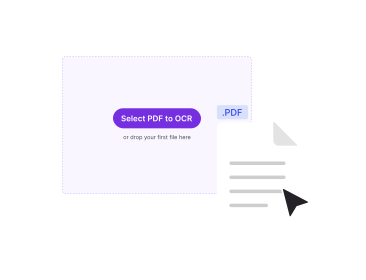
Upload Your Scanned PDF
Drag the file into the box above, or click to browse. PDFNoob detects which pages are images.
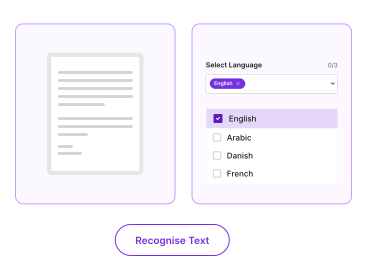
Pick the Document Language
Choose the language so the OCR engine can recognise text from images. The tool supports 100+ languages.
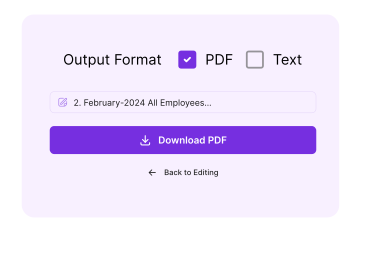
Download the Searchable PDF
Click OCR. PDFNoob builds an invisible text layer over the original pages. Your searchable PDF downloads with no watermark.
Why Make PDFs Searchable With PDFNoob?
100+ languages, layout preserved, batch processing. The OCR workflow paid tools charge for.

100+ Languages
Latin, Cyrillic, Greek, Arabic, Hebrew, Chinese (Simplified and Traditional), Japanese, Korean, Hindi, Tamil, Thai, Vietnamese, and many more.

Layout-Preserved Output
The text layer sits over the original page image. Columns, tables, and headings stay where they were in the scan.

Searchable Output
Once the engine finishes, you can Cmd/Ctrl-F to find any word in the PDF. You can copy text and select passages like any digital document.

Batch Processing
Drop a 200-page scan. PDFNoob runs character recognition on every page in one job. No per-page click-through.

No Upload to AI
The OCR engine runs on isolated processing nodes. It is not a model that learns from your data. Files delete within one hour.

Works on Photo Scans
Phone-camera photos of receipts, contracts, or whiteboards process alongside flatbed scans. Same engine. Same accuracy.
About OCR for PDFs
OCR stands for optical character recognition. The technology reads text from images. The image could be a scan, a photo, or a screenshot. When you scan a paper contract on a flatbed, the resulting PDF stores each page as a picture. The text on those pages is just pixels. You can't search it. You can't copy it. Screen readers can't read it. OCR processes the image. The engine detects characters. The output is a text layer that lives invisibly on top of the page.
The result is the best of both worlds. The visual page looks exactly like the original scan. Cmd/Ctrl-F now finds words. You can highlight and copy passages. The PDF works with accessibility tools. PDFNoob runs a modern Tesseract-class engine. The engine supports 100+ languages. It handles multi-column layouts, tables, and mixed-script documents. The text layer aligns to the underlying glyphs.
OCR PDF vs. PDF to Text: Which Do I Need?
This is the question that trips most people up. If you copy text from a PDF and get nothing, the PDF is image-only. You need OCR first to make it searchable. If copying works fine but you want the text dumped into a .txt file, you don't need OCR. Use PDF to Text instead. A quick test: open the PDF and try to select a word with your cursor. If the word highlights, it is digital text. If you can only draw a marquee box, it is an image. That is OCR territory.
What Affects OCR Accuracy
- Scan quality: 300 DPI flatbed scans produce the best results. Below 200 DPI accuracy drops fast.
- Lighting and skew: Photo scans need even lighting and roughly square framing for high accuracy.
- Language match: Pick the correct document language. Accuracy on French in English mode (or vice versa) is much lower.
- Font and script: Standard print fonts are easiest. Handwriting and decorative scripts are hardest.
For a full walkthrough, read our guides on how to OCR a PDF and what a searchable PDF is.
Related PDF Tools
Other tools you might need today.


Frequently Asked Questions
Common questions about OCR and making PDFs searchable.
What Does OCR Do to a PDF?
OCR (optical character recognition) reads text from images in a scanned PDF. The engine produces an invisible text layer overlaid on the page. The visual output looks identical to the original scan. You can now search, copy, and select text. Screen readers can read it aloud.
How Do I Make a PDF Searchable for Free?
Upload your scanned PDF to PDFNoob. Pick the document language. Click OCR. A searchable PDF downloads in seconds. No account is required. The output carries no watermark.
What Is the Difference Between OCR PDF and PDF to Text?
OCR is for scanned PDFs or photos. Those are images of text with no actual text data in the file. PDF to Text is for digitally-created PDFs where text already exists and just needs to be pulled out as a string. If you copy text from a scanned PDF and get nothing, you need OCR first.
Which Languages Does the OCR Engine Support?
100+ languages. The list covers English, Spanish, French, German, Italian, Portuguese, Dutch, Russian, Polish, Turkish, Arabic, Hebrew, Chinese (Simplified and Traditional), Japanese, Korean, Hindi, Tamil, Thai, Vietnamese, and more. Pick the document language before you scan text for best accuracy.
Is It Safe to OCR a PDF Online?
Yes. Files travel over an encrypted HTTPS connection. We delete them within one hour. We don't index your file contents. We never use them to train AI. The engine runs on isolated processing nodes. No human review takes place.
Does OCR Change the Appearance of the PDF?
No. The original page images stay intact. OCR adds an invisible text layer on top so search and copy work. The page still looks identical to the scan you uploaded.
Will the Engine Detect Characters on Photo Scans?
Yes, with caveats. Sharp, well-lit photo scans of text work fine. Blurry, skewed, or low-light photos produce lower accuracy. The tool also handles scanned multi-page documents and mixed photo or scan PDFs in a single batch.
Does the OCR PDF Have a Watermark?
No watermark, ever. PDFNoob is genuinely free. We never brand your output.