



Form 15G tells a bank or the Employees' Provident Fund Organisation (EPFO) not to deduct tax at source (TDS) from eligible income, such as interest on a fixed deposit or a provident fund withdrawal, when the person's estimated tax liability for the year is nil. From 1 April 2026, the same purpose is served by Form 121 under the Income-tax Act 2025.
If you are looking for Form 15G to prevent a TDS deduction during the tax year 2026–27, you now need Form 121 instead. The new form combines the earlier Form 15G and Form 15H into a single declaration, covering both eligible individuals below 60 and senior citizens.
The underlying purpose remains the same. You provide a self-declaration that you meet the applicable conditions for receiving specified income without TDS. The form number, layout, and some reporting requirements have changed, but the basic eligibility principles continue to apply.
Here is how the old and new forms compare:
| Form 15G (up to financial year 2025–26) | Form 121 (from 1 April 2026) |
|---|---|
| Who uses it: Eligible resident individuals below 60, Hindu Undivided Families (HUFs), and other qualifying persons. | Who uses it: Eligible resident individuals, HUFs, and other qualifying persons, including senior citizens. |
| Age distinction: Individuals below 60 used Form 15G, while those aged 60 or above used Form 15H. | Age distinction: One form covers both age groups, with an age-related question within the declaration. |
| Year label: Previous year. | Year label: Tax year. |
| Tracking number: A Unique Identification Number (UIN) was allotted by the payer under the earlier reporting system. | Tracking number: A 26-character UIN is allotted by the payer under the new reporting framework. |
| Where to submit: To the bank, EPFO, or other applicable payer. | Where to submit: To the bank, EPFO, or other applicable payer, through its supported submission process. |
Understanding this change is important because older Form 15G PDFs are still available online. A form downloaded from a bank's website or found through a search engine may belong to the previous tax framework.
This guide explains what Form 15G was used for, how Form 121 has replaced it, who is eligible to submit a declaration, and how Form 15G differed from Form 15H. It also covers when to submit the declaration, where to download the correct PDF, how to fill Part I of the old form, how to use a declaration for PF withdrawal, and how online submission works.
You will also learn what happens if you do not submit the declaration and how to prepare, fill, sign, and submit the appropriate PDF without unnecessary printing or scanning.
What Is Form 15G?
Form 15G was a self-declaration under section 197A of the Income-tax Act, 1961. It allowed an eligible resident individual below 60 years of age, or a Hindu Undivided Family (HUF), to ask a bank, EPFO, or another payer not to deduct tax at source (TDS) when the person's estimated total tax liability for the year was nil.
The form was commonly used to prevent TDS on interest income from fixed deposits and recurring deposits. Depending on the applicable provisions, it could also cover certain EPF withdrawals, dividend payments, interest on bonds and other securities, rent, and insurance commission.
For example, if you earned interest from a bank fixed deposit but your estimated total income resulted in no income-tax liability, you could submit Form 15G to the bank before the relevant interest payment, provided you met the declaration's eligibility conditions.
Form 15G stopped TDS, not tax. The income still counted toward your taxable income and had to be reported in your income tax return wherever filing was required. Submitting the form did not make the deposit interest or other income tax-free.
A Form 15G declaration applied only to the relevant financial year. If you continued to qualify, you needed to submit a fresh declaration for the following year rather than relying on the previous form.
Form 15G was used for declarations relating to financial year 2025–26 and earlier. From 1 April 2026, Form 121 replaces Forms 15G and 15H for new declarations under the Income-tax Act, 2025.
Has Form 15G Been Replaced by Form 121?
Yes. From 1 April 2026, Form 15G and Form 15H have been replaced by a single Form 121 under section 393(6) of the Income-tax Act, 2025 and Rule 211 of the Income-tax Rules 2026. If you are submitting a declaration to prevent TDS for tax year 2026–27 or later, you must use Form 121 instead of the older forms.
The change combines two declarations that previously served different age groups. Form 15G was generally used by eligible individuals below 60 and certain other taxpayers, while Form 15H was intended for eligible senior citizens. Form 121 brings both groups into one form, although their applicable eligibility conditions still matter.
The old forms remain relevant when referring to declarations submitted for financial year 2025–26 or earlier. You do not need to replace a historical Form 15G or Form 15H simply because the new form has been introduced.
The main changes are straightforward:
- One form instead of two: Eligible taxpayers no longer need to choose between Form 15G and Form 15H based on age.
- New year terminology: The earlier term previous year is replaced by tax year under the new law.
- Updated form sections: The declarant section, Part A, contains the information you provide. The payer section, Part B, is used by the bank or other payer to report declarations received.
- Declaration tracking: A 26-character Unique Identification Number (UIN) is allotted to each Form 121 declaration by the payer. The previous Forms 15G and 15H also had a UIN reporting system, so tracking numbers are not entirely new.
For bank deposit interest, the declaration continues to serve the same purpose: asking the bank not to deduct TDS when you meet the applicable conditions. The same change in form number applies to eligible provident fund withdrawal declarations handled by EPFO, subject to its current claim procedure.
The most important point is that Form 121 does not automatically exempt your income from tax. Like the earlier declarations, it is used to request non-deduction of TDS when your estimated tax liability meets the legal requirements.
Form 121 has its own fields and reporting instructions, which are covered separately in a dedicated Form 121 guide.
Verified on 18 November 2026: For new declarations relating to tax year 2026–27 onward, use Form 121 rather than downloading and submitting an outdated Form 15G or Form 15H.
Who Is Eligible to Submit Form 15G?
Form 15G was available to a resident individual below 60 years of age, a Hindu Undivided Family (HUF), or another qualifying resident taxpayer, provided their estimated income-tax liability for the year was nil. For the specified income covered by the declaration, an additional condition generally required the aggregate amount not to exceed the applicable basic exemption limit.
A person could not qualify simply because the bank interest or provident fund payment was small. They also had to calculate their estimated total income, including the income covered by the declaration, and establish nil tax liability for the year.
Here is who could and could not submit the earlier Form 15G:
| Eligibility | Who qualifies or does not qualify |
|---|---|
| Eligible | A resident individual below 60, an HUF, or another permitted resident entity, such as a qualifying trust, if the applicable income conditions are satisfied and estimated tax liability is nil. |
| Not eligible | A non-resident Indian (NRI), company, or firm; an individual aged 60 or above who should have used Form 15H; or anyone who does not satisfy the applicable income and nil-tax conditions. |
Suppose a resident individual below 60 has:
- Annual salary income: ₹2,80,000
- Annual fixed deposit interest: ₹60,000
- Combined income before applicable deductions: ₹3,40,000
- The person must consider the full ₹3,40,000, not just the ₹60,000 bank interest.
For financial year 2025–26, the basic exemption limit for an individual below 60 was ₹2,50,000 under the old tax regime and ₹4,00,000 under the new tax regime. Since the declared interest is ₹60,000, it is below either threshold. If the person's final estimated tax liability is also nil after applying the relevant tax provisions, they could satisfy the income conditions for Form 15G.
This example assumes there are no other income sources or special circumstances affecting eligibility. A nil tax bill alone does not remove the separate limit on the income covered by Form 15G.
What about senior citizens? A senior citizen aged 60 or above used Form 15H instead. Its income test was more flexible: eligible senior citizens could submit the declaration even when the specified income exceeded the basic exemption limit, provided their estimated tax liability for the year was nil.
From 1 April 2026, Form 121 replaced both forms. Eligible resident individuals, HUFs, and certain other qualifying entities now use the unified declaration, with age and taxpayer status addressed within the same form. The underlying income and nil-tax conditions still need to be checked for the relevant tax year.
Verified on 18 November 2026: For new declarations relating to tax year 2026–27, check your eligibility under Form 121 rather than submitting the discontinued Form 15G.
What Is the Difference Between Form 15G and Form 15H?
The main difference between Form 15G and Form 15H was age 60. Form 15G was for eligible resident individuals below 60 and certain other taxpayers, while Form 15H was for a resident senior citizen aged 60 or above. Both forms were used to request non-deduction of TDS when the applicable conditions were met.
The two forms also had different income eligibility rules.
| Form 15G | Form 15H | Form 121 |
|---|---|---|
| Age: Resident individuals below 60. | Age: Resident individuals aged 60 or above. | Age: One form covers eligible individuals in both age groups. |
| Other applicants: An eligible HUF, trust, or other qualifying resident taxpayer could use it. | Other applicants: Only eligible resident senior citizens could use it, not HUFs or trusts. | Other applicants: Eligible resident individuals, HUFs, trusts, and other qualifying taxpayers can use the unified form. |
| Income condition: Estimated tax liability had to be nil, and the applicable aggregate income covered by the declaration generally could not exceed the basic exemption limit. | Income condition: Estimated tax liability had to be nil, but the declared income could exceed the basic exemption limit. | Income condition: The relevant eligibility conditions continue to depend on the taxpayer's status and age. |
For example, an eligible senior citizen could submit Form 15H even if their annual deposit interest exceeded the basic exemption limit, provided their estimated income-tax liability was nil after applicable deductions and rebates. A person using Form 15G also had to satisfy the separate limit on the specified income covered by the declaration.
You no longer need to choose between Form 15G and Form 15H. From 1 April 2026, both have been replaced by Form 121 for new declarations. The declaration still requires you to meet the relevant income and tax-liability conditions, but the old age-based choice between two forms has been removed.
When Should You Submit Form 15G?
You should submit Form 15G at the beginning of the financial year, ideally in April, or when opening a new fixed deposit or making an eligible PF withdrawal claim. The important rule is to submit it before the payer credits or pays the income, because submitting the declaration afterward generally cannot undo TDS already deducted.
For example, if your bank credits fixed deposit interest in June, submit the declaration before that interest credit, rather than waiting until the end of the year. If you are making a provident fund withdrawal, provide the required declaration before the payment is processed.
Keep these timing rules in mind:
- Submit a fresh declaration each year: An earlier declaration does not automatically cover the following year.
- Submit separately to each payer: If you have deposits with two different banks, each bank needs the appropriate declaration.
- Submit before the relevant payment or credit: A late declaration may prevent TDS on future eligible payments, but it does not cancel tax already deducted.
If TDS has already been deducted, submitting the form later will not normally make the bank or other payer return that amount. Instead, you can claim credit for the deduction and request a TDS refund through your income tax return, if your final tax calculation shows that you paid more tax than you owed.
From 1 April 2026, the same timing principle applies to Form 121, which replaced Forms 15G and 15H. For tax year 2026–27 onward, submit Form 121 before the relevant income is credited or paid rather than using the discontinued forms.
Where Can You Download the Form 15G PDF?
You can find the Form 15G PDF on the Income Tax Department website, your bank's forms page, or through EPFO resources for provident fund withdrawals. However, for declarations relating to tax year 2026–27 onward, you should download Form 121 instead, as it replaced Forms 15G and 15H on 1 April 2026.
The safest places to get the correct form are:
- Income Tax Department: Visit the official Form 15G/15H/Form 121 page to find the government's form resources and current guidance.
- Your bank: Check its forms or download centre for Form 121. Banks may provide the prescribed government declaration with their own branding or submission instructions.
- EPFO: If you need a declaration for a provident fund withdrawal, check the official EPFO member portal and its current claim instructions to confirm which document to upload.
Be careful with older PDFs in search results. Some bank and government websites still provide Form 15G downloads, but those files belong to the earlier tax framework and should not be used for a new declaration for tax year 2026–27.
Before completing a PDF download, open the document and check its first page. The current declaration should identify itself as Form No. 121 and refer to the applicable tax year, rather than showing Form 15G or Form 15H with the older previous year terminology.
You may not need to download a PDF at all. Some banks allow eligible customers to submit Form 121 directly through net banking or a mobile banking app, without filling and uploading a separate file.
How Do You Fill Part I of Form 15G?
Part I of Form 15G is completed by the person making the declaration. Enter your name as shown on your PAN, taxpayer status, residential status, address, contact details, income information, and investment or account details. Then add your signature. Part II is completed by the bank or other payer, so leave that section blank.
These instructions apply to the older Form 15G used for declarations relating to financial year 2025–26 and earlier. For new declarations from 1 April 2026, Form 121 replaces Form 15G.
Use the following table to complete Part I without mixing up the income fields.
| Field | What to write | Common mistake |
|---|---|---|
| Name and PAN | Enter your full name as recorded against your PAN and your valid 10-character Permanent Account Number. | Using a nickname, entering the wrong PAN, or leaving it blank. A Form 15G declaration without a valid PAN is invalid. |
| Status and previous year | Select your applicable status, such as Individual or HUF, and enter the financial year for which the declaration applies. | Entering the assessment year instead of the previous year. |
| Residential status | Enter your residential status for income-tax purposes. | Assuming that Indian citizenship automatically means resident status. |
| Address and contact details | Provide your address, PIN code, email address, and telephone or mobile number as applicable. | Leaving required contact details incomplete. |
| Whether assessed to tax | Select Yes if you were assessed to income tax in any of the six assessment years preceding the year of declaration. Otherwise, select No. If Yes, enter the latest applicable assessment year. | Assuming that this question asks only whether you paid tax this year. If you have never filed a return and have never been assessed, select No. |
| Estimated income for which this declaration is made | Enter the income on which you are requesting non-deduction of TDS, such as the estimated interest from the relevant fixed deposit. | Entering your entire annual income instead of the income covered by this declaration. |
| Estimated total income | Enter your estimated total income for the year, including the income covered by this declaration and your other income sources, after applicable deductions. | Enter only the fixed deposit interest and leave out salary or other income. |
| Other Form 15G declarations | Enter the number of other Form 15G declarations already submitted during the year and their aggregate declared income. Enter zero if there were none. | Counting only declarations submitted to the same bank instead of all earlier declarations for the year. |
| Investment or account details | Enter the investment or account identification number, the nature of the income, the relevant tax provision, and the amount of income covered by the declaration. | Providing only the bank's name without identifying the account or investment. |
| Verification and signature | Check the declaration, complete the verification details, and sign as required. | Signing before checking the income figures or leaving the verification incomplete. |
The two amounts that readers most often confuse are estimated income for which this declaration is made and estimated total income.
Suppose you expect to receive ₹25,000 in fixed deposit interest and earn ₹2,00,000 from other income sources during the same financial year.
You would enter:
- Estimated income for which this declaration is made: ₹25,000
- Estimated total income: ₹2,25,000, assuming there are no applicable deductions or other income adjustments.
The first amount covers the payment for which you want to prevent TDS. The second is your estimated income from all relevant sources for the year. Both matter when determining whether you qualify to submit the declaration.
If you have a flat Form 15G PDF, open it in PDFNoob's PDF Editor, click where the answer goes, and type. Position each answer over the appropriate space, check the alignment, and add your signature.
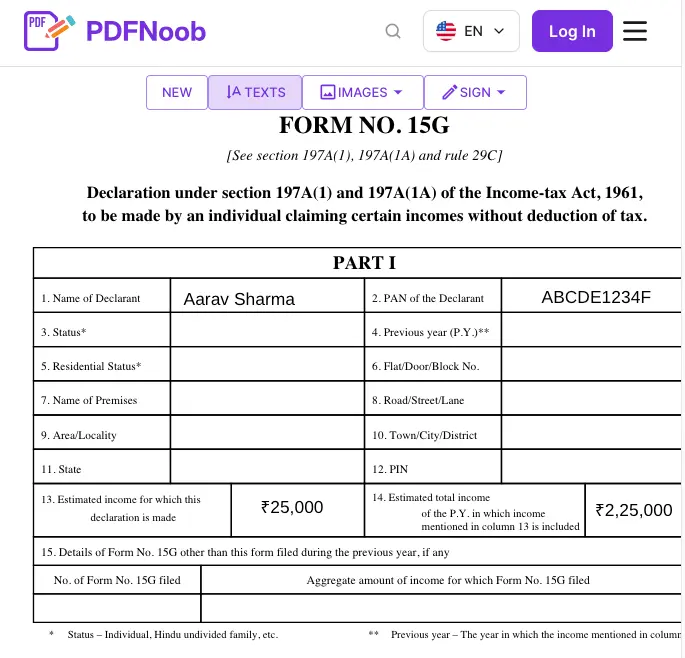
Before downloading, remove any unused text boxes. An empty box may be saved with the placeholder “Type text here” rather than disappearing from the document.
Note: Form 121's Part A requests similar taxpayer and income information, but its field layout differs from the old Form 15G. Use the current form and instructions for declarations relating to tax year 2026–27 onward.
How Do You Use Form 15G for PF Withdrawal?
Form 15G was used to request non-deduction of tax when withdrawing money from the Employees' Provident Fund (EPF) before completing five years of continuous service. If your taxable PF withdrawal exceeded ₹50,000 and you were eligible to declare nil estimated tax liability, you could submit Form 15G during the online claim process to prevent the usual 10% TDS on PF.
From 1 April 2026, Form 121 replaces Form 15G and Form 15H for eligible declarations relating to tax year 2026–27 onward.
Check these two conditions before submitting a declaration:
| Condition | Your situation | Is a declaration needed to prevent TDS? |
|---|---|---|
| 1. Continuous service | You have completed five years or more of qualifying service. | No. TDS generally does not apply to a qualifying withdrawal after five years of continuous service. |
| 2. Withdrawal amount | You have worked for less than five years, but your taxable withdrawal is ₹50,000 or less. | No. The withdrawal is below the TDS threshold. |
| Both conditions for possible TDS apply | You have worked for less than five years, and your taxable withdrawal exceeds ₹50,000. | Possibly. TDS may apply. Submit the applicable declaration only if you meet its eligibility conditions. |
For example, suppose you leave your job after three years of service and withdraw ₹80,000 from your EPF account. Since the withdrawal exceeds ₹50,000 and your continuous service is under five years, TDS may apply. If you have a valid PAN and do not qualify for non-deduction, the usual historical TDS rate was 10%.
A missing PAN can result in a higher TDS rate. Under the earlier rules, the rate was generally 20% instead of 10% when PAN was not provided.
Also remember that a declaration is not based on the PF amount alone. You must include the taxable portion of your PF withdrawal when calculating your estimated total income for the year. A nil-tax declaration is appropriate only when you satisfy the applicable eligibility requirements.
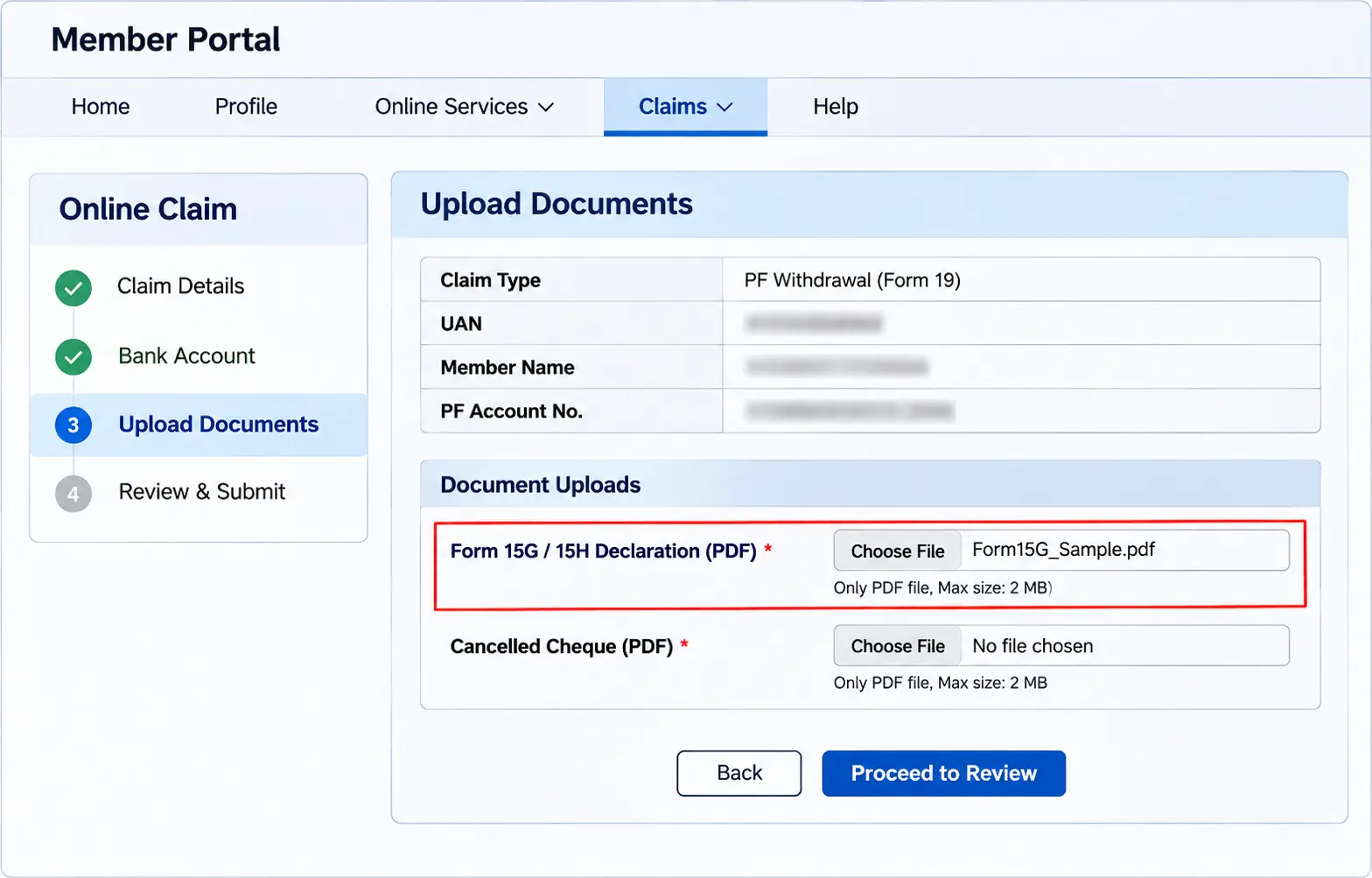
To submit the declaration during an online PF claim, follow the steps below.
- Sign in to the official EPFO Unified Portal using your UAN and account credentials.
- Open the online claim section and select the applicable EPF final-settlement claim.
- Check the claim details and any declaration instructions shown by EPFO.
- If the portal requests a non-deduction declaration and you qualify, prepare the applicable form, sign it, and upload the PDF using the designated document-upload field.
- Complete the claim submission and retain the acknowledgement for your records.
For current declarations, use Form 121 rather than an old Form 15G PDF. The exact upload option may differ depending on EPFO's current claim process.
The separate EPS pension withdrawal process, including Form 10C, has different requirements and is not covered here.
Can You Submit Form 15G Online?
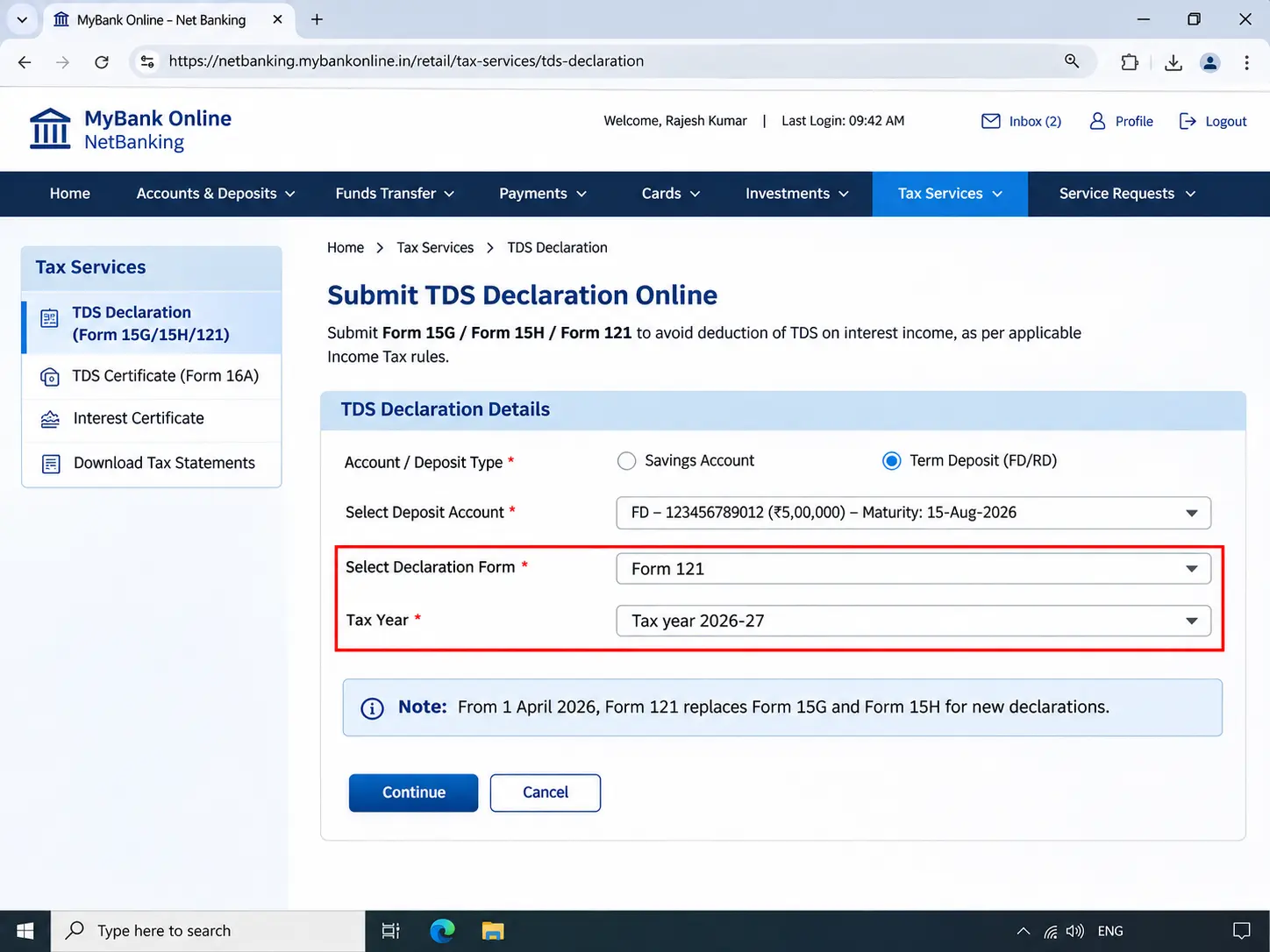
Yes. You can submit Form 15G online through many banks' net banking services or mobile apps, without visiting a branch. From 1 April 2026, Form 121 replaced Forms 15G and 15H, so eligible customers now submit the new declaration through their bank's supported online service.
Submitting the declaration online depends on your bank, but the process works as follows:
- Sign in to your bank's net banking portal or mobile banking app.
- Look for the TDS declaration, tax services, or Form 121 submission option.
- Verify your PAN and enter the requested income and account details.
- Review the declaration, complete any required OTP verification, and submit it.
- Save the submission confirmation or acknowledgement for your records.
You can also submit the applicable declaration to EPFO during an eligible online provident fund claim when the portal requests it. Follow the current claim instructions to determine whether a signed PDF upload is required.
Keep proof of your submission. Save the acknowledgement number, submission date, and a copy of the completed declaration. The bank or other payer is responsible for allotting a Unique Identification Number (UIN) to Form 121 declarations, but the UIN may not appear immediately in every customer's online confirmation.
If you submit declarations to more than one bank, complete the process separately for each bank. Online submission to one institution does not automatically cover deposits held with another.
You can still use branch submission where your bank accepts signed paper declarations. Take the completed form to the branch and ask for an acknowledgement or stamped copy.
Whether you submit online or at a branch, keep the acknowledgement until you have confirmed that the relevant payment was processed without an unexpected TDS deduction.
What Happens If You Don't Submit Form 15G?
If you do not submit Form 15G, your bank or other payer may deduct tax at source (TDS) from eligible payments when the applicable deduction threshold is exceeded. The usual TDS rate is 10% on fixed deposit interest and certain taxable early EPF withdrawals, provided the relevant conditions are met and a valid PAN is available.
Not submitting the form does not automatically mean you owe income tax. It means the payer may withhold part of your payment before you receive it.
For example, suppose your bank credits ₹60,000 in fixed deposit interest and deducts TDS at 10%. That means ₹6,000 is withheld. If your final income-tax liability for the year is nil, you can claim the excess deduction as an income tax refund.
You can check the tax deducted against your PAN through Form 26AS and the Annual Information Statement (AIS) on the Income Tax Department's e-filing portal. If the deduction is correctly reported, claim the TDS credit when filing your income tax return.
The refund is not immediate. The Income Tax Department must process your return, and the money may take weeks or months to reach your bank account, depending on verification and processing.
Submitting a false declaration is more serious than not submitting one. If you declare that your estimated tax liability is nil when you know it is not, the false declaration can lead to a penalty or prosecution under the applicable income-tax provisions. An honest error is not automatically treated as a deliberate false statement, but the information you submit must be accurate.
From 1 April 2026, Form 121 replaces Forms 15G and 15H for new declarations. The practical distinction remains the same: not submitting an eligible declaration may delay access to money through TDS and a later refund; knowingly submitting a false declaration can create legal consequences.
How Do You Get the Form 15G PDF Ready to Submit?
To prepare your Form 15G PDF form for submission, check whether it is fillable, enter your information on screen, add your e-signature where accepted, and make sure the completed file meets the payer's upload requirements. You can complete these steps without printing or scanning the document, then submit the PDF instead of a Word copy, provided you are using the correct form for the relevant year, which is Form 121 for new declarations from 1 April 2026.
Is the Form 15G PDF a Fillable Form?
Usually not. Most downloadable bank and income-tax copies of Form 15G are flat PDFs rather than fillable PDFs, meaning they lack clickable form fields; to check, click an answer box and see whether a typing cursor appears, and if it doesn't, you will generally need to place text on top of the page instead, which is why some people look for a Word version. To understand how a flat PDF differs from an interactive form, read PDFNoob's guide to flat vs layered PDF.
How Do You Fill a Form 15G PDF Without Printing It?
Open the Form 15G PDF in PDFNoob's PDF Editor using your browser, then click where the answer goes and type, using zoom to align each answer with the correct space on the page instead of tabbing between fields on a flat PDF. Before you download the completed file, delete every unused text box, because an empty box may appear as “Type text here” on your submitted form.
How Do You Sign the Form 15G PDF?
Open the completed Form 15G in PDFNoob's Sign PDF tool, draw, type, or upload your e-signature, place it in the signature box in Part I, and download the signed PDF. A signed PDF upload is accepted by many banks and payers, including applicable EPFO claim workflows, but check your recipient's requirements before submitting it. If you submit the declaration directly through net banking, your login and OTP verification may authenticate the submission without a separate handwritten signature; for the different signing methods, see how to sign a PDF.
How Do You Make the Form 15G PDF Small Enough to Upload?
If the submission portal rejects your completed Form 15G PDF because of its file size, check the upload limit shown on the screen and use Compress PDF to reduce the file before uploading it again; forms filled digitally are usually small, while a scanned copy made from photographs of printed pages can be much larger. After compression, check that the text, income details, and signature remain clear and readable, although filling the form on screen in the first place can help you avoid this size problem.
Should You Submit Form 15G as a PDF or a Word File?
Submit the completed Form 15G in PDF format when your bank or other payer requests a document, because the official form is available as a PDF and its layout stays consistent when opened on another computer. A Word file found online may be an unofficial, retyped copy of the older form, and its text can reflow or move answers out of their boxes, so check the form's version and save any completed Word copy as a PDF before submitting it. For declarations relating to tax year 2026–27 onward, use Form 121 instead of the old Form 15G, and read PDF vs image vs Word for a broader comparison of document formats.