


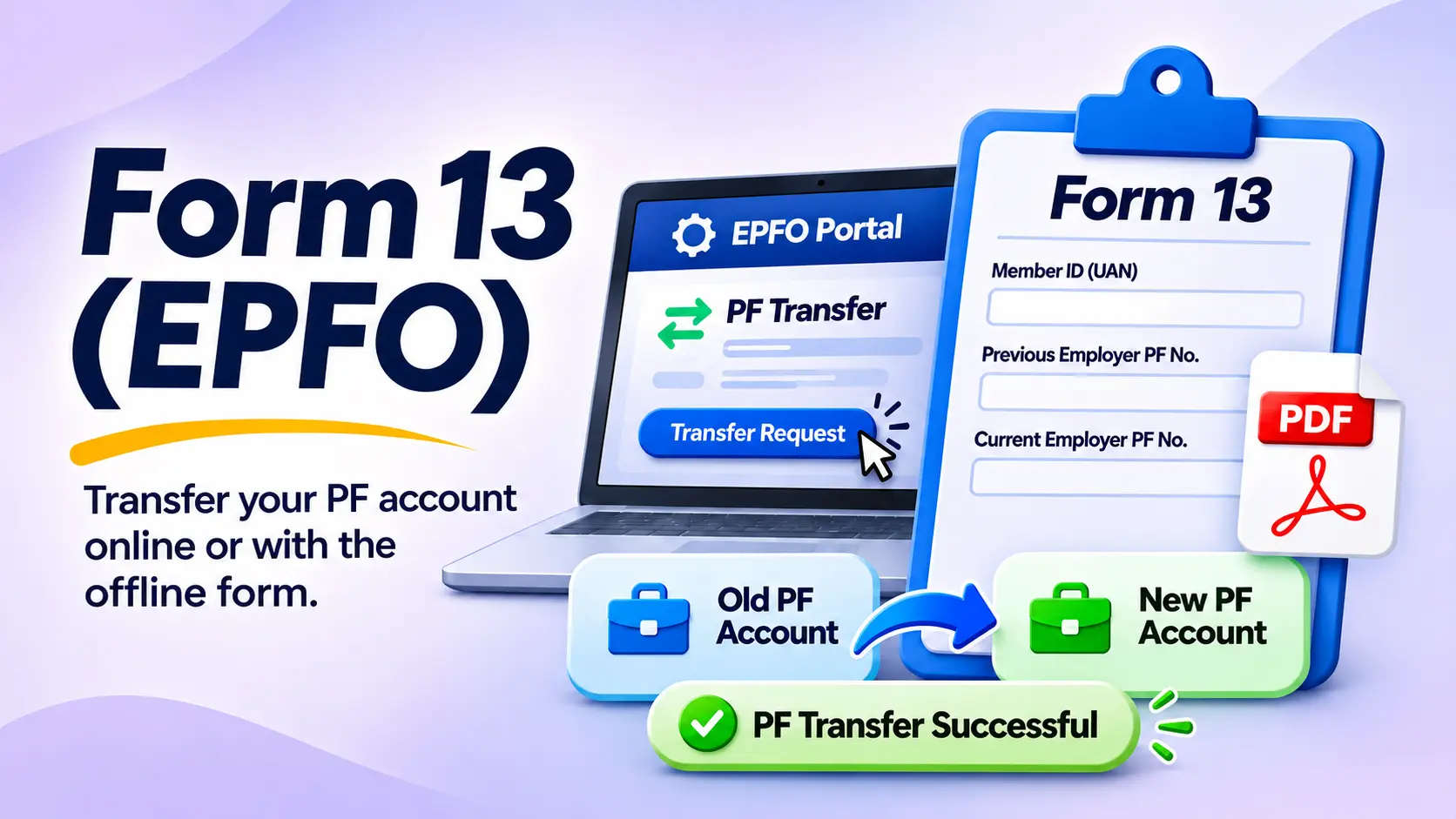
Form 13 helps move your provident fund balance and pension service history from your previous employer's PF account to your present employer's account, keeping your employment records connected under one Universal Account Number (UAN).
But before filing a PF transfer request, check whether you actually need one. In January 2025, the Employees' Provident Fund Organisation (EPFO) simplified transfers by removing employer approval for most eligible online claims. Some transfers happen automatically, while others still need a request. A further change announced in April 2025 removed destination-office approval, allowing funds to be credited immediately after the source office approves the transfer.
So, how do you know which process applies to you?
This guide explains what Form 13 does, when a transfer happens automatically, and why transferring your PF may be preferable to withdrawing it. You'll also learn what details to check before applying, how to submit a request through the EPFO Member Portal, and which employer to choose for attestation when approval is required.
For cases that need paperwork, we'll cover where to download Form 13 (Revised), how to complete the offline PDF, and how to submit it through your employer. You'll also find guidance on transfer timelines, checking claim status, fixing rejected requests, and preparing a signed, readable PDF for HR.
The EPFO rules and official guidance referenced in this guide were checked on 25 November 2026.
What Is Form 13 in EPFO?
Form 13 is an EPFO transfer claim form used to move your Employees' Provident Fund (EPF) balance and Employees' Pension Scheme (EPS) service record from your previous employer's PF account to your present one. It is prescribed under para 57 of the EPF Scheme 1952, which provides for transferring provident fund balances when a member changes employment.
A Form 13 transfer claim covers two important records: your accumulated EPF money and your EPS service history. The EPF balance moves to your present account, while your eligible pension service is carried forward in EPFO's records rather than paid to you as a separate cash balance.
Why does the pension service record matter? Generally, you need at least 10 years of eligible EPS service to qualify for a regular monthly member pension, subject to the scheme's age and other conditions. Preserving your earlier service can help those years count toward that requirement when you change jobs.
You can request the transfer online through “One Member - One EPF Account (Transfer Request)” on the EPFO Member Portal, where an application is required. For a paper-based application, EPFO provides Form 13 (Revised), which records your personal details and the PF accounts of your previous and present employers.
When Do You Need Form 13, and When Does PF Transfer Automatically?
You need Form 13 when your previous PF account has not been transferred to your current account under the same Universal Account Number (UAN). However, you may not need to file a request yourself. If both employers have linked your accounts to the same UAN, your Aadhaar and employment details are verified, and your new employer has started contributing, EPFO may initiate an auto transfer.
Before applying, log in to the EPFO Member Portal and check your passbook. Look for your previous and present member ID under the same UAN, then check whether the old account shows a transfer-out entry and the current account shows the corresponding transfer-in amount. Having two member IDs under one UAN does not automatically mean the money has already moved.
| Transfers automatically | Needs Form 13 |
|---|---|
| Your previous and present PF accounts are correctly linked to the same UAN, and EPFO's automatic-transfer conditions are satisfied. | Your previous PF balance remains in the old account, and no automatic transfer has been initiated or completed. |
| Your Aadhaar and relevant member details are verified, allowing EPFO to identify your employment records. | Your old PF account is not linked to your current UAN or its details require correction. |
| Your new employer has started depositing contributions, and EPFO generates an eligible transfer request automatically. | Your previous account was maintained by an exempted PF trust, which may require a separate Form 13 and trust-level processing. |
| You can see the completed transfer in your passbook without having submitted a separate claim. | You have two UANs that need to be resolved before your previous funds and service details can be transferred correctly. |
If you have two UANs, contact your employer or EPFO to resolve the duplicate records before proceeding with the transfer. EPFO may deactivate the earlier UAN after verification and require a transfer claim to move the remaining funds and service history to your active account.
The transfer approval process also changed in 2025. In January 2025, EPFO removed the requirement for employer approval in most eligible online transfer cases. On 25 April 2025, it announced a further change: destination-office approval was removed, allowing the funds to be credited to the present account immediately after the source EPFO office approves the transfer.
These changes make transfers simpler, but they do not mean every transfer is automatic. Check your passbook and transfer status first. If your old balance is still outstanding and EPFO has not already initiated the transfer, you may need to submit Form 13.
Should You Transfer Your PF Instead of Withdrawing It?
Transferring your PF generally makes more sense if you're continuing in an EPFO-covered job. It keeps your savings invested, allows compounding interest to continue, and preserves your continuous service record. Withdrawing gives you access to cash, but it settles the withdrawn balance and may interrupt the service continuity that matters for pension benefits and tax exemptions.
The key tax difference is five years of service. A withdrawal from a recognized provident fund is generally tax-free once you complete at least five years of continuous eligible service. When you transfer your PF to a new employer instead of withdrawing it, the eligible service completed with your previous employer counts toward that five-year requirement.
For example, suppose you worked for one employer for three years and then joined another EPFO-covered company. If you transfer your PF and complete another two years of eligible service, the combined five years can satisfy the service requirement for a tax-exempt withdrawal. If you withdraw the earlier balance after just three years, that payment may be taxable because you have not yet completed five years of service.
An early withdrawal can also attract TDS on PF withdrawal when the applicable conditions and payment threshold are met. Exceptions exist, including certain cases where employment ends because of ill health, an employer's business closure, or circumstances beyond the employee's control. Also, completing five years does not automatically exempt every component of PF interest from tax.
If you need to withdraw your benefits rather than transfer them, the relevant claims are Form 19 for eligible EPF final settlement and Form 10C for eligible EPS withdrawal benefits or a scheme certificate, subject to their respective rules.
Ultimately, transferring helps retain retirement savings and eligible service continuity, while withdrawing provides money for immediate needs when permitted. Consider your current financial requirements and the tax consequences before choosing.
What Do You Need Before Filing Form 13?
Before filing Form 13, make sure your UAN is active, your Aadhaar, PAN, and bank details are correctly recorded under KYC, and you have your previous member ID or PF account number. You should also check that your old employer has recorded your date of exit and that you can receive the required OTP on your Aadhaar-linked mobile number.
Use this pre-filing checklist to find and verify each detail before starting a transfer request.
| Item | Where to check it on the portal |
|---|---|
| Active UAN | Sign in to the EPFO Unified Member Portal using your UAN and password. If you cannot access your account, resolve the activation or login issue first. |
| Aadhaar KYC | Open Manage → KYC and check that your Aadhaar is linked and verified. |
| PAN details | Check Manage → KYC for the PAN recorded against your UAN and correct any mismatch. |
| Bank account and IFSC | Check Manage → KYC to confirm that your bank details are correctly recorded and verified. |
| Previous member ID or PF account number | Open View → Service History to identify your previous employer's member ID and compare it with your PF records. |
| Date of exit | Check View → Service History for the leaving date recorded against your previous employment. If it is missing, check the available Manage → Mark Exit option or contact your previous employer. |
| Aadhaar-linked mobile | Confirm that the mobile number registered with Aadhaar is active and can receive an OTP. Check the registered number through UIDAI if needed. |
| Employer establishment details | Check your previous and present employers' information in Service History and use EPFO's Establishment Search to verify an establishment's registration details. |
Check your personal details before submitting anything. Your name and date of birth should match across your Aadhaar, UAN profile, and previous PF records. If they differ, request the appropriate correction first rather than risking a rejected or delayed transfer.
For an online claim, the relevant employer establishment and old member ID must be available in EPFO's records. If the previous account cannot be located or the transfer service does not accept it, contact your employer or EPFO to establish whether an offline claim is required.
If you need the offline Form 13 (Revised), collect the previous and present employers' names, addresses, PF account numbers, and relevant EPFO office or PF trust details. The paper form also needs your signature and the attestation required from the employer handling the request.
How Do You Fill Form 13 in EPFO Online?
To fill Form 13 online, log in to the EPFO Member Portal with your UAN and password, open Online Services, and select “One Member - One EPF Account (Transfer Request).” Check your personal and employment details, retrieve your previous PF account using Get Details, select the employer for attestation if the portal asks you to, and submit the transfer request using the Aadhaar OTP.
Before starting, check whether EPFO has already initiated a transfer. Since the 2025 reforms, many eligible PF transfers no longer require separate employer approval, and some are generated automatically.
Steps to Submit an Online Form 13 Transfer Request:
- Sign in to the Member Portal: Visit the EPFO Unified Member Portal and log in using your UAN and password.
- Open the transfer service: Under Online Services, select One Member - One EPF Account (Transfer Request) to start a claim.
- Review your details: Check your name, UAN, personal information, and present employment details. Resolve any significant discrepancies before continuing.
- Retrieve your previous PF account: Select Get Details to display your previous employment information. Check the old PF member ID, establishment details, and service dates. If the old account does not appear, use the manual previous-member-ID entry option where available. If the portal cannot locate the record, contact your former employer or EPFO.
- Choose the attesting employer, if required: If your claim requires employer verification, select your previous or present employer, according to the options available on the screen. Eligible claims may proceed without this step under EPFO's simplified process.
- Authenticate and submit: Review the information, request the Aadhaar OTP where prompted, enter the code received on your Aadhaar-linked mobile number, and submit the claim. Save the acknowledgement or reference number.
- Download the request: If the portal generates a transfer request PDF or completed Form 13 acknowledgement, download and keep it for your records. Check whether the portal requests any additional action or employer submission.
Submission does not always mean your PF balance has already been transferred. The next steps depend on whether your claim requires employer attestation.
- Employer approval, if required: The selected previous or present employer verifies and digitally approves the request. Many eligible transfers now bypass this stage.
- Source EPFO office processing: The office responsible for your previous PF account examines and approves the claim, where office approval is required.
- Transfer credit: Under the revamped Form 13 process announced in April 2025, destination-office approval is no longer required. The accumulated PF amount can be credited to your present account immediately after source-office approval.
Check the claim status and your updated EPF passbook to confirm that the transferred amount has appeared in the destination account. If the transfer remains pending, the status will help you identify which stage requires attention.
Which Employer Should Attest Your Form 13?
Either your previous employer or your present employer can attest Form 13 when EPFO requires employer approval. Choose the employer most likely to verify your details and respond quickly, usually your present employer if you can easily contact its HR team. However, many eligible online PF transfers no longer require employer attestation following EPFO's January 2025 reforms.
If the Member Portal asks you to choose an employer, consider which company can access and verify the relevant PF records. The employer handling the approval must have an authorized signatory with a registered digital signature certificate (DSC) or another EPFO-supported authentication method available through the employer portal.
What if your previous employer has shut down? If the portal offers a choice, select your present employer instead of waiting for approval from the closed company. Your current HR team can help verify your employment details, although EPFO may still need to resolve missing previous-account records before completing the transfer.
If you don't see an employer-selection or approval step, that does not necessarily mean something is wrong. EPFO removed employer approval for most eligible transfer claims in January 2025, so some Aadhaar-verified UAN transfers proceed directly to EPFO without either employer attesting the request.
Where Can You Download the Form 13 PDF?
You can download the official Form 13 (Revised) PDF from the Employees' Provident Fund Organisation (EPFO) website, where it is provided among the EPFO downloads. If you have already filed an online transfer request, you may also be able to download the generated Form 13 PDF from the Member Portal.
For the blank paper form, use EPFO's official Form 13 (Revised) PDF. The document is titled Transfer Claim Form and includes sections for your personal information, previous PF account, present PF account, and employer attestation.
You may find copies of Form 13 hosted on other websites, including SPMCIL, government department pages, and university websites. Although some reproduce the EPFO form, their layouts or instructions may be older. Compare the form title, account-detail fields, and instructions with the official EPFO copy before filling it out.
Looking for Form 13 in Word format? EPFO provides the official form as a PDF; an official editable Word download could not be verified. Avoid relying on a third-party Word template simply because it is easier to type into.
The offline form is mainly useful when the Member Portal cannot handle your transfer, such as certain exempted PF trust cases or unresolved account-record issues. If your transfer can be completed online or has already happened automatically, you generally do not need to download and submit a separate paper Form 13.
How Do You Fill the Offline Form 13 PDF?
To fill the offline Form 13 (Revised), enter your personal details, your previous employer's PF account information, and your present employer's account details. Check the printed instructions requesting the transfer of your PF balance and pension service, sign the member declaration, and submit the completed form to the employer handling your attestation for forwarding to the appropriate EPFO office.
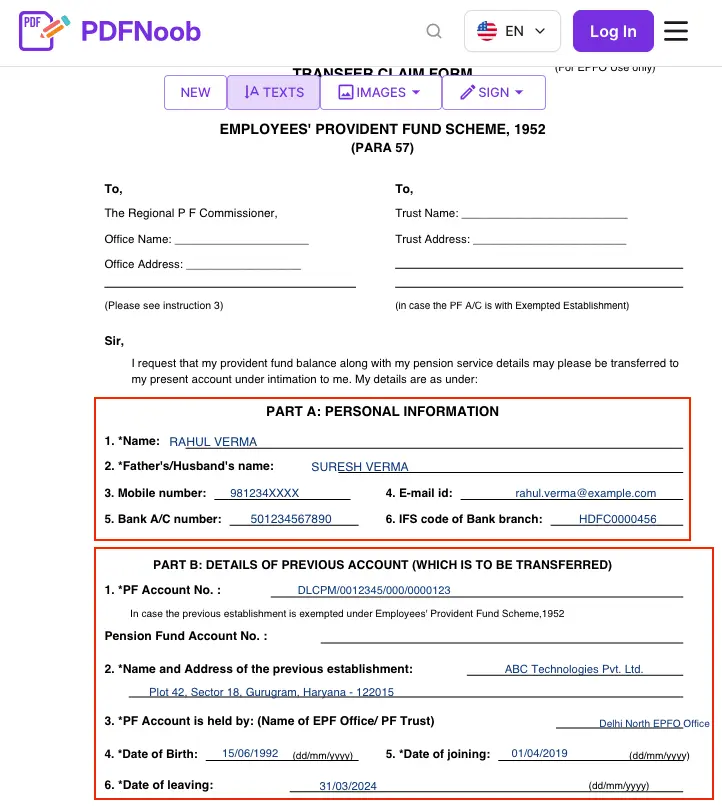
The official form has three main sections: Part A (Personal Information), Part B (Previous Account), and Part C (Present Account). Use the table below to identify where each detail belongs and avoid common mistakes.
| Field | Where you find it | Common mistake |
|---|---|---|
| Member's name and father's/husband's name | Part A; check your Aadhaar and EPFO member records | Entering a name that differs from your existing EPFO records |
| Mobile number and email address | Part A; use your current contact details | Providing an inactive number that prevents you from receiving updates |
| Bank account number and IFSC | Part A; refer to your bank records | Entering an old account number or incorrect IFSC |
| Previous PF account number | Part B; find it in your EPFO passbook, UAN Service History, or previous employer's records | Entering only the establishment code instead of the complete PF account number |
| Previous employer's name and address | Part B; check your old payslip or employment records | Using the wrong establishment name or incomplete address |
| Previous EPFO office or PF trust | Part B; check which office or trust maintained the old PF account | Entering the present employer's office or trust instead |
| Date of birth, joining, and leaving | Part B; compare your Aadhaar and previous employment records | Mixing up dates or using a format other than DD/MM/YYYY |
| Present PF account number | Part C; find it in your current EPFO Service History or payslip | Repeating the previous PF account number |
| Present employer's name, address, and date of joining | Part C; check your current employment records | Using an incorrect joining date or establishment name |
| Present EPFO office or PF trust | Part C; confirm with your current HR team | Confusing the previous and present PF account administrators |
| Exempted trust details, if applicable | Parts B and C; obtain pension account, trust name, and employee code details from the relevant employer or trust | Leaving required trust information blank or filling fields that do not apply |
| Member signature and date | Below Part C, in the member declaration | Forgetting to sign or entering the wrong date |
| Employer signature and stamp | Attestation section below the member declaration | Submitting the form without the required employer signature, date, or employer stamp |
Pay particular attention to the PF account numbers and employment dates. The previous and present accounts must be identified correctly, and dates should match the available EPFO service records. If an old account is missing from your UAN, your previous employer maintained an exempted PF trust, or the Member Portal cannot process your transfer request, check with the employer or EPFO whether the offline procedure applies.
The transfer instruction is already printed on Form 13, so you do not need to calculate a transfer amount or invent a separate amount field. The form asks EPFO to transfer your accumulated PF balance along with the relevant pension service details.
To complete the form on your screen, upload the official PDF to PDFNoob's PDF Editor, click where the answer goes and type, then save the completed copy. Before downloading, delete any unused text box you did not type in, as it may otherwise appear in the saved document as “Type text here”.
Finally, sign the member declaration and send the form to the previous or present employer responsible for attestation, as applicable. That employer must sign and stamp its section, and the completed claim must reach the appropriate EPFO regional office or PF trust according to the official submission instructions. Confirm the required submission route with HR before sending it.
How Long Does a Form 13 Transfer Take?
A Form 13 PF transfer typically takes a few days to a few weeks, depending on the approvals and account verification required. If employer attestation is needed, that approval may take several days. Once the previous EPFO office, known as the source office, approves an eligible transfer, the money can now be credited to your present PF account immediately.
EPFO's prescribed settlement time for a complete Form 13 claim is 20 days. Its Citizens' Charter also sets a more ambitious service target of seven working days for PF transfers. These are service standards, not guarantees that every claim will be completed within those periods.
The important change is that one approval stage has disappeared. Before April 2025, transfers between EPFO offices involved both the source office and the destination office. Under the revamped Form 13 process, destination-office approval is no longer required. For claims that still need employer attestation, the two main waits are employer approval and source-office processing; many eligible claims now bypass the employer stage altogether.
Offline transfers may take longer because signed paperwork, employer verification, and processing by an exempted PF trust or EPFO office can add time. Incorrect account details or incomplete documents may delay the transfer further.
Your eligible PF balance continues to earn interest during the transfer process, subject to EPFO's applicable interest rules. Transferring the account does not, by itself, mean you lose the interest already earned on your savings.
How Do You Check Your PF Transfer Status?
To check your Form 13 PF transfer status, log in to the EPFO Member Portal using your UAN and password, open Online Services, and select Track Claim Status. You can also check your claim through EPFO's Member Passbook & Claim Status service or the UMANG app.
Find your transfer request and read its current status. The wording may vary depending on the claim and processing stage, but the following table explains what the common updates mean and what to do next.
| Status | What it means | What to do |
|---|---|---|
| Pending with employer | Your transfer request is waiting for verification or attestation by the selected employer. This stage applies only when employer approval is required. | Contact the HR team of the employer selected for attestation and ask them to check the pending request. |
| Under process | EPFO is reviewing or processing your transfer. The claim has not yet been marked as completed. | Continue monitoring the status. If it remains unchanged beyond the expected processing period, contact EPFO for clarification. |
| Settled | EPFO has marked the transfer claim as processed. | Open your updated passbook and check whether the transferred PF amount appears in your present account. |
| Rejected or returned | The claim could not proceed because of a reported error, mismatch, or missing information. | Read the rejection reason, correct the issue, and follow EPFO's instructions before submitting another request. |
A “Settled” status is not the only check you should make. Open the passbook for your present member ID and look for the transferred-in amount. Compare it with the transfer-out record in your previous account, keeping in mind how EPFO records contributions and interest. This helps confirm that the transfer has reached the correct PF account.
You can also use UMANG to check the progress of your claim. Open the app, find EPFO under Employee Centric Services, and select the claim-tracking option available for your account.
If your transfer remains pending for an unusually long time or shows as settled without the expected passbook entry, raise a grievance through the official EPFiGMS portal. Select PF Member, verify your details, describe the Form 13 issue, and provide your UAN, claim reference, and relevant supporting information. Keep the grievance registration number so you can track EPFO's response.
Why Is a Form 13 Transfer Rejected?
A Form 13 transfer is usually rejected because of mismatched personal details or incomplete employment records. Your name, date of birth, or father's name may differ between your previous and present PF accounts or Aadhaar records. A missing date of exit from your previous employer can also prevent EPFO from processing the transfer.
Other possible causes include a KYC mismatch, two UANs that have not been resolved, or a previous employer's establishment or PF account that EPFO cannot identify.
The table below explains common reasons for claim rejection and how to fix them before submitting another request.
| Reason for rejection | How to fix it |
|---|---|
| Name mismatch | Compare your Aadhaar, UAN profile, and previous PF records. Request a correction through the applicable EPFO member-details correction process, involving your employer where required. |
| Date of birth mismatch | Check the date recorded against both member IDs and Aadhaar. Correct the inaccurate record using the supporting identity documents required by EPFO. |
| Father's name mismatch | Compare the family details in your previous and present employment records. Ask the relevant employer or EPFO office to correct the discrepancy. |
| Missing date of exit | Open View → Service History on the Member Portal. Ask your previous employer to update the exit details, or use the available member exit-marking facility if you are eligible. |
| KYC not verified | Check Manage → KYC for pending, unverified, or incorrect details. Complete the required verification or correction before applying again. |
| Two UANs not merged | Report both UANs to your employer or EPFO and follow the duplicate-UAN resolution process. Transfer the outstanding PF balance and service details once the records have been regularized. |
| Previous establishment or PF account not found | Verify the old establishment code and complete PF member ID against payslips or previous employment records. Ask your former employer or the relevant EPFO office to confirm the account details. |
Check the rejection reason before filing Form 13 again. Sign in to the Member Portal, open Online Services → Track Claim Status, and review the rejected claim and any available remarks. Those remarks can help you identify whether the issue is with your personal details, employment records, or account information.
After correcting the problem, confirm that the updated details appear in your EPFO records before attempting resubmission. If the reason remains unclear or the correction is not reflected, contact EPFO through its grievance system rather than repeatedly submitting the same claim.
How Do You Prepare the Offline Form 13 Paperwork as PDFs?
To prepare your offline Form 13 paperwork, sign the completed form, turn the employer-attested copy into a clear PDF scan, and keep the file small enough to send as an email attachment. Since offline transfers often involve exchanging documents between you, HR, and EPFO, a readable, properly prepared PDF helps prevent missing details and unnecessary requests for another copy.
How Do You Sign the Form 13 PDF Before Sending It to Your Employer?
To sign the completed Form 13 PDF without printing it, open the file in PDFNoob's Sign PDF tool, draw, type, or upload your signature, place it on the member signature line, and download the signed PDF.
Your signature and the employer's signature belong in different places. Sign the member's declaration yourself, but leave the employer attestation section for the previous or present employer handling your transfer. That employer must complete the applicable signature and stamp requirements.
Some employers or EPFO offices may require a paper original with a handwritten signature, even if you have prepared an electronically signed PDF. Confirm with HR whether a signed PDF is acceptable or whether you need to provide a wet-signed original before submitting the form.
How Do You Scan the Attested Form 13 Into One Clean PDF?
Place each page of your attested copy of Form 13 on a flat surface, photograph it in good light, and use PDFNoob's Image to PDF tool to combine the photos into a single PDF in the correct page order.
Before converting, check that the employer's signature and stamp are clear, with no shadows, blur, or cropped edges. Make sure both the previous and present PF account numbers are fully readable, so HR or EPFO can identify the accounts without asking you to scan the form again.
What If the Scanned Form 13 Is Too Large to Email to HR?
A scanned form can be several MB per page because phone scans contain high-resolution photos, so check the file size before sending it as an email attachment. Use PDFNoob's Compress PDF tool to reduce the file size, then open the compressed copy to make sure the employer's stamp and handwritten details are still readable.