


HDFC Bank sends an e-statement to your registered e-mail address, but the attached PDF may ask for a password before showing your transactions. That password usually points back to personal or account details the bank already holds, such as your Customer ID or date of birth. The difficulty is knowing which details your particular statement requires.
Search for the HDFC statement password format, and you will find conflicting instructions. Some guides suggest a Customer ID; others use a birth date or a combination of name and account details.
Rather than treating one formula as universal, the safer approach is to check the password hint in your original statement email first, then test the relevant published formats if no clear instruction is available.
Another source of confusion is that an HDFC account statement and a credit card statement are different documents. Their password rules may differ, even though both come from the same bank. A formula that opens one does not necessarily work for the other.
This guide explains which password an HDFC account statement may require, why published formats disagree, and how to find the correct instructions in your statement e-mail. It also covers the separate credit-card password rules, where to locate your Customer ID, how to download statements through NetBanking and other official channels, and why a password may be rejected.
You'll also learn how to remove the PDF open password from a statement you can already access, what to do with the document afterward, how long to keep it, how to combine monthly statements, and when to send a password-free copy to a lender.
Which Password Does an HDFC Bank Statement Ask For?
The HDFC Bank statement password depends on the account type and how the PDF was generated, so not every statement should be opened using the same formula. For a regular account statement downloaded through NetBanking, HDFC officially identifies the Customer ID as the password. Other formats appear in published guides, but you should only use them when the instructions accompanying your particular e-statement support them.
Try these password candidates in order:
| Candidate | What it looks like | Where to find it |
|---|---|---|
| Customer ID (try first) | Your complete numeric Customer ID, entered without spaces. For example, 12345678. | Your HDFC welcome letter, passbook, cheque book, or NetBanking account details. |
| Date of birth (DDMMYYYY) | Your registered date of birth in eight digits. For example, 15 August 1990 becomes 15081990. | Your bank records or the password instructions in the statement e-mail, if this format is specified. |
| First four letters of your name + last four digits | A name-and-number combination, such as RAHU1234. The source of the final four digits must match the instructions supplied with the PDF. | The statement e-mail or its accompanying password instructions. Do not assume the digits come from your account number. |
Start with your Customer ID because HDFC's official NetBanking guidance confirms it for downloaded account statements. The bank also identifies this password in the note shown when you select PDF as the download format and in the download confirmation message.
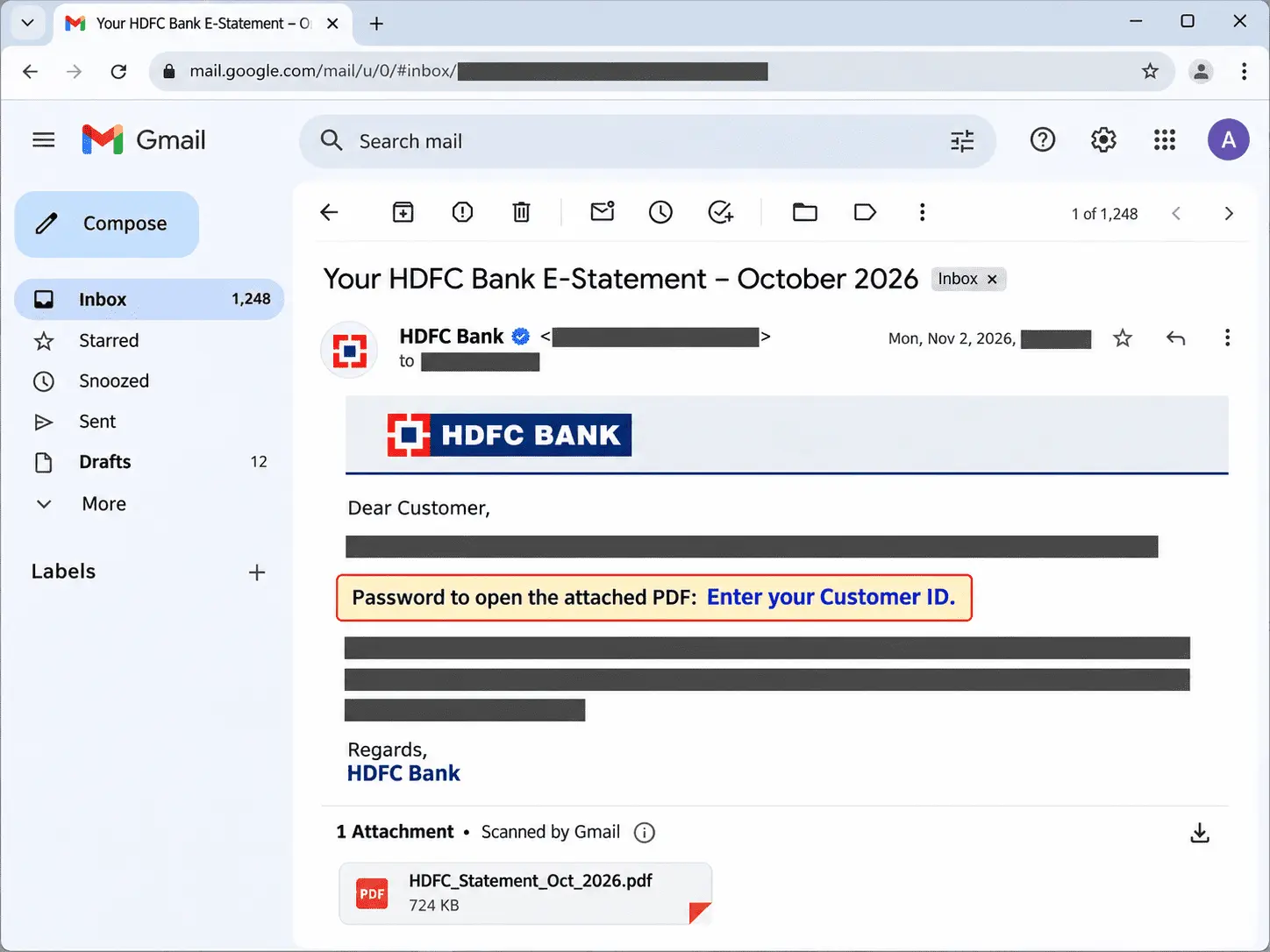
If your statement arrived by e-mail, check its subject line and password instructions before trying another combination. Some published guidance reports that the subject line contains the last three digits of the Customer ID.
If your e-mail includes those digits and they match the end of your Customer ID, that gives you a useful way to identify the correct number before entering it into the PDF. The matching digits are a clue, however, not independent proof that every HDFC statement uses that password.
The DDMMYYYY and name-plus-digits formats are alternatives reported online, not universal HDFC account-statement rules. If your original e-mail specifies neither, do not keep guessing different combinations. Confirm the password instructions with HDFC or obtain a fresh statement through NetBanking.
Why Do HDFC Statement Password Formats Differ Between Sources?
HDFC statement password formats differ across websites because the instructions often refer to different documents, account types, or older statement formats without identifying which one they apply to. A rule that opens one person's PDF may fail for another, especially when an account statement is confused with a credit card statement.
The disagreement goes beyond the password itself. Some sources use the Customer ID without any letters, while others combine part of the account holder's name with a date of birth or card number. Even those combinations vary: the name may be uppercase or lowercase, and the date may mean the four-digit day and month (DDMM) or the full eight-digit birth date (DDMMYYYY).
These are the main differences you'll encounter:
| What the rule says | Which document it fits | How to tell if it is yours |
|---|---|---|
| Customer ID only | HDFC savings account, current account, and other account statements downloaded through NetBanking | HDFC's official NetBanking instructions confirm this format for downloaded account-statement PDFs. |
| Date of birth in DDMMYYYY | Reported for some account statements in third-party guides | Use it only if the password instructions accompanying your statement specify the complete birth date. |
| First four name letters + DDMM | Reported for certain account or card statements | Check whether your statement e-mail requests the name and only the day and month of birth. |
| First four name letters + last four card digits | Commonly reported for credit card statements | Check whether the document is a card statement and whether its e-mail identifies the card-number format. |
| First four name letters + last four account digits | Reported for some account-statement formats | Confirm that the accompanying instructions specifically refer to the account number rather than the card number. |
An HDFC salary account is generally a type of savings account, but that does not mean every salary-account statement, older PDF, or e-mailed document necessarily follows instructions published for a current NetBanking download. The document's source and the bank's accompanying password note matter more than the account label alone.
HDFC Bank officially confirms the Customer ID as the password for account statements downloaded as PDFs through NetBanking. Other websites publish additional combinations, sometimes presenting them as universal rules without identifying the documents or statement versions they describe. Those conflicting claims should not be treated as equally authoritative.
Rather than choosing whichever password format appears most frequently online, check the instructions provided with your own statement. They are more relevant to that file than a formula copied from another document type or an older guide.
How Do You Get the Password for an E-Statement E-mail?
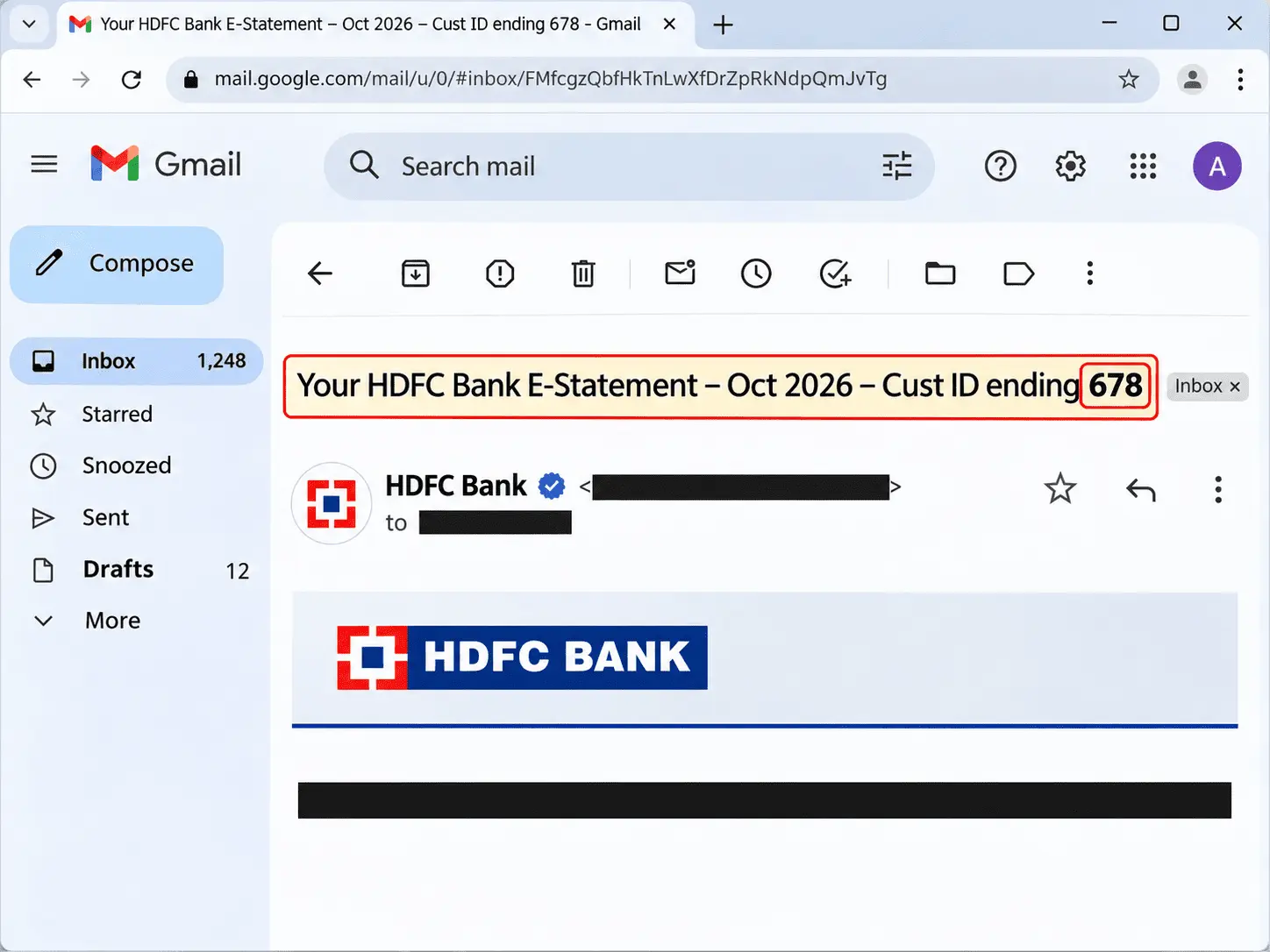
Check the original HDFC statement e-mail for its password instructions before trying a formula from another website. An e-statement may include a password hint in the message, and that information is more relevant to your particular PDF than a general rule published online.
Start with these three places, in order:
- Subject line: Read the full subject line of the e-mail. HDFC’s statement e-mail shows the last three digits of your Customer ID there, as in the screenshot above. If those digits match the end of the Customer ID you have, that is the number to try as the PDF password, and you can confirm it before typing anything.
- E-mail body: Look at the message above the PDF attachment, including any note about opening the statement. The bank may provide the required format or explain which account detail to enter. Follow those instructions rather than combining different password formulas found online.
- Covering note in the PDF: If the document opens or provides an accessible introductory page, check for any password-related instructions there. A PDF that asks for an open password before displaying anything cannot reveal a note on its first page until it has been opened.
The statement should arrive at your registered e-mail address from an authentic HDFC Bank communication channel. Check the sender's full address, not just the displayed name, before trusting the message. A missing password hint does not automatically mean the e-mail is fraudulent, but an unexpected sender, unfamiliar attachment, or request for banking credentials deserves closer inspection.
If the original e-mail has been deleted or forwarded without its instructions, look in your inbox archive, Trash, or other folders for the original message. If it is no longer available, download a fresh account statement through HDFC NetBanking or the official mobile app. HDFC's current NetBanking instructions identify the numeric Customer ID as the password for statements downloaded in PDF format.
Do not reply to a suspicious e-mail with your Customer ID, banking password, or other sensitive information. If you cannot confirm the message's authenticity or the statement's password instructions, contact HDFC Bank through its official website or customer support channel rather than following links in the questionable message.
Which Password Does an HDFC Credit Card Statement Ask For?
An HDFC credit card statement is different from a bank account statement, and the two may require different passwords. The Customer ID used to open a NetBanking account statement should not be assumed to work for a credit card PDF. For card statements, published guides commonly suggest combining the first four letters of the cardholder's name in uppercase with the last four digits of the card number, but you should confirm the exact rule in the original statement e-mail.
For example, if your name is RAHUL SHARMA and your credit card ends in 4521, the name-and-card-number format produces RAHU4521. Another reported format combines the same four letters with your birth day and month in DDMM order. Someone named RAHUL who was born on 15 August would use RAHU1508 if the e-mail specifically instructs them to use that format.
The distinction is easier to see when the two documents are compared:
| Document | Password format to check | Where to confirm it |
|---|---|---|
| Account statement | Customer ID for PDFs downloaded through HDFC NetBanking | The NetBanking download instructions or account statement e-mail |
| Credit card statement | Reported formats include the first four uppercase name letters plus the last four card digits, or the same letters plus DDMM | The credit-card statement e-mail and its password instructions |
A co-branded card, such as a Swiggy HDFC Bank Credit Card, is still issued by HDFC Bank. It does not automatically require a separate password formula supplied by the co-brand partner. Check the instructions accompanying the HDFC card statement rather than searching for a password unique to the partner's name.
Credit-card statements also arrive through card-related communications, which may use a different sender address from ordinary account e-statements. Check the complete sender address and the password instructions in the message before opening the attachment. The name, card digits, or birth-date combination required for your particular PDF should come from those instructions, not from an unrelated account-statement guide.
If neither reported card format works, avoid trying random combinations. Request a fresh statement through an official HDFC card service or contact the bank to confirm the instructions for that specific file.
How Do You Find Your HDFC Customer ID?
You can find your HDFC Customer ID in your NetBanking profile, the HDFC Bank app, your welcome letter, passbook, or cheque book. If you already have access to NetBanking or the mobile app, check there first. Otherwise, the first page of your account documents usually provides the quickest way to locate it.
Here are the places to check, starting with the most convenient:
- NetBanking profile: Sign in to HDFC NetBanking and check your account or profile details for the Customer ID associated with your banking relationship.
- HDFC Bank app: Open the app and look under My Profile or the Customer ID selection area. The app supports viewing and managing Customer IDs linked to your login.
- Welcome letter: Check the welcome kit HDFC sent when you opened your account. Your Customer ID is listed among the account-opening details.
- Passbook or cheque book: Look on the first page, where HDFC prints the Customer ID alongside other account information.
- Previous account statement: If you have an earlier statement that you can already open, check its first page for the Customer ID.
Your Customer ID is not the same as your account number or a personalized NetBanking user ID. The account number identifies a particular bank account, while the Customer ID identifies you within HDFC's banking system.
A personalized user ID may be used for signing in, but it should not replace the actual Customer ID when a statement specifically requires that number. Customer IDs are numeric, and you should enter all the digits shown in your bank records rather than assuming a fixed length.
If you cannot access NetBanking and no longer have your physical documents, use HDFC's official Get Customer ID option on the NetBanking login page. You can retrieve the ID by providing your registered mobile number and the requested PAN or date-of-birth details, followed by OTP verification. This also works as a recovery route when you cannot remember the ID needed to sign in.
Before entering the number into your statement PDF, compare its last three digits with the subject line of your statement e-mail (see the section above). If they match, you have the right Customer ID, and you didn’t need to log in anywhere to check it.
Use the complete Customer ID when opening an HDFC account statement PDF downloaded through NetBanking. HDFC identifies that number as the password for those statements, so you do not need to substitute your account number or NetBanking login password.
How Do You Download an HDFC Bank Statement PDF?
You can download your HDFC account statement through NetBanking, the HDFC Bank app, or request it using WhatsApp banking. A newly downloaded PDF may be password-protected, just like an emailed e-statement. For statements downloaded through NetBanking or the bank's app, HDFC identifies your numeric Customer ID as the password.
Choose whichever of these three routes is most convenient:
- NetBanking: Sign in to HDFC Bank NetBanking and look for Get Statement on the home screen, or open Accounts and select Account Statement. Choose your account and the required date range, then download the statement in PDF format or request it by email.
- HDFC Bank app: Open the app and look for Statement on the home screen, or find View Statement under your account details. Select the statement period and download the PDF. Depending on the app version, the available options and downloaded filename may differ from those in NetBanking.
- WhatsApp banking: HDFC offers account statement requests through its official ChatBanking service. Send "Hi" to the bank's verified WhatsApp number, 7070022222, and follow the available account statement options. The service may require you to verify your registered mobile number before processing the request.
Before requesting an older statement, check how far back the selected channel allows you to go. HDFC's mobile banking guidance supports requesting statements older than five years through its Email Statement option, although the period available for direct download may be different. NetBanking also provides predefined periods and custom date ranges, subject to the records available for your account.
The downloaded file may also have a different name depending on whether it came from NetBanking, the app, or an emailed request. Check the account details and statement period inside the document rather than relying on its filename to identify the correct PDF.
If your statement opens with a password prompt, use the instructions associated with that particular download. For a NetBanking account-statement PDF, HDFC confirms that the Customer ID is the password.
Why Is Your HDFC Bank Statement Password Not Working?
An HDFC Bank statement password refused error usually means you are using the wrong password rule for that particular PDF, not that you have mistyped the correct one. Before trying another combination, confirm whether you have an account statement or a credit card statement, then check these possible causes in order.
- You are using the account-statement password on a credit-card statement: HDFC account statements downloaded through NetBanking use the Customer ID as their password, while credit-card PDFs may follow different instructions. Check the document type and the password hint in its original e-mail before trying another format.
- The capitalization does not match: If your statement requires letters from your name, follow the exact uppercase or lowercase format specified in the e-mail. For example, RAHU4521 and rahu4521 are different passwords. This check matters only when the required format contains letters.
- You entered your account number instead of your Customer ID: These are different banking identifiers. If your NetBanking statement requires the Customer ID, entering the account number, even its last few digits, will not open it. You can find your Customer ID in your welcome letter, passbook, cheque book, or NetBanking account details.
- You used the wrong part of your birth date: Some published password formats refer to the full date of birth in DDMMYYYY, while others use only the day and month in DDMM. For someone born on 15 August 1990, those values are 15081990 and 1508. Use only the format specified for your statement instead of assuming one applies to every HDFC PDF.
- The statement belongs to someone else: A forwarded statement from a family member, employer, or another account holder does not adopt your password details when it reaches your inbox. Its password remains tied to the original account holder's information or the instructions issued with that document. If you are authorized to receive it, ask the original recipient to confirm the password instructions through a secure channel rather than entering your own details repeatedly.
- The PDF download is incomplete or damaged: An interrupted download may produce a file that refuses to open even when the password is correct. If you suspect a corrupted download, obtain a fresh statement from HDFC NetBanking or another official banking channel and try again.
If the original e-mail provides a password hint, follow that instruction before testing formats from other websites. For an account statement downloaded through NetBanking, HDFC officially confirms the numeric Customer ID as the PDF password.
If the correct details still do not work with a fresh file, try a PDF reader that supports password-protected documents. If the problem continues, contact HDFC Bank through an official support channel to confirm the instructions for that specific statement.
How Do You Remove the Password From an HDFC Statement PDF?
You can remove the password from your own HDFC Bank statement by opening it with the password you already know and saving a separate unlocked copy. The original statement remains protected, while the new PDF opens without asking for a password. You must know the existing password before removing it.
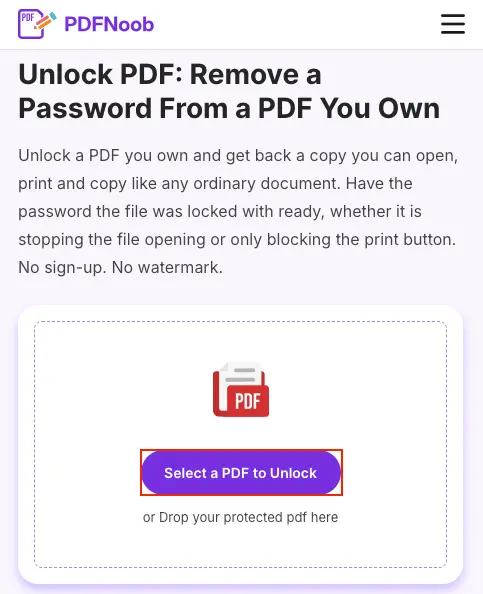
➤ Open PDFNoob’s Unlock PDF tool and click Select a PDF to Unlock to upload your password-protected HDFC Bank statement.
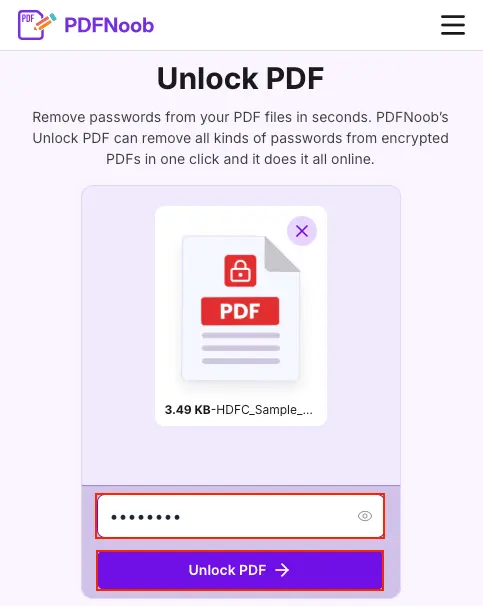
➤ Enter the statement’s current password in the password field and click Unlock PDF.
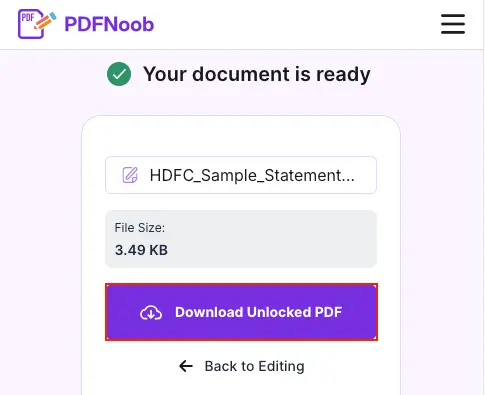
➤ Once your document is ready, click Download Unlocked PDF to save the password-free copy.
Open the downloaded PDF to confirm that your HDFC Bank statement opens without asking for a password.
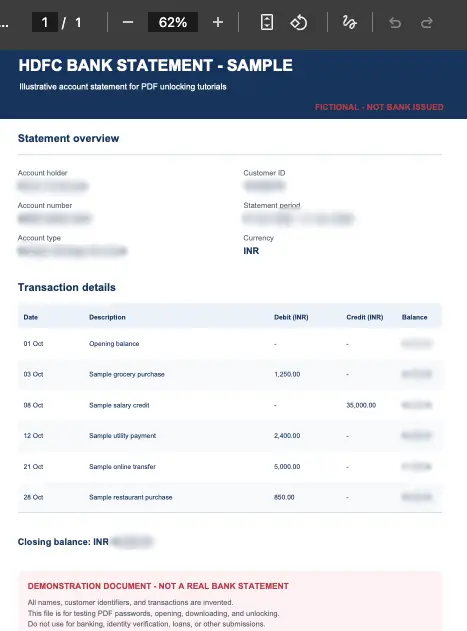
Keep the downloaded file separate from your original HDFC account statement. Removing password protection creates a more accessible document, but it does not mean the new copy is suitable for every submission.
Some banks, lenders, and verification services prefer the original password-protected statement because they need to establish that it came from the bank and has not been altered. A lender portal may therefore reject an unlocked PDF even though it opens correctly. Removing the password does not automatically mean a statement has been edited, but the receiving institution may require the original file or another verifiable version.
The safest approach is to keep your locked original unchanged and use the password-free copy only when the recipient specifically requests one. If a lender accepts the original statement, submit that version rather than removing its protection unnecessarily.
That way, password removal helps when you need a more accessible file without replacing the bank-issued document you may need for future verification.
What Do You Do With the HDFC Statement PDF Once It Opens?
Once your HDFC statement PDF opens, check what you need it for before changing or sending the file. A bank statement is commonly requested for a loan application, KYC verification, a visa application, a rental agreement, or an accountant reviewing your finances. Opening it solves the password problem, but the document still needs to meet the recipient's requirements.
Before submitting the statement, confirm three things: the recipient can read the file, it covers the required statement period, and you have kept the original bank-issued copy.
For example, a lender may ask for six consecutive months of transactions rather than one monthly statement. A visa application may require statements covering specific dates, while an online upload form may impose a file size limit. Check the requested period and format before preparing your PDF.
The important distinction is between making a statement accessible and changing what it contains.
| Submit | Do not submit |
|---|---|
| An original HDFC statement covering the requested dates | A statement missing one or more required months |
| A password-free copy when the recipient specifically requires one | A locked PDF when the upload system cannot process it |
| A complete, readable document within the stated file-size limit | A cropped, incomplete, or unreadable statement |
| A bank-issued statement with its transaction details unchanged | A statement with transactions highlighted, covered, deleted, or edited |
Never alter a bank statement you intend to submit, even to highlight a transaction you want the reviewer to notice. Adding annotations or changing the displayed content can raise document integrity concerns because the recipient may no longer be able to treat the file as an unchanged bank-issued record.
If you need to explain a particular payment, keep the original statement untouched and prepare a separate annotated copy for your own reference. For a formal submission, provide the unmodified statement and put your explanation in a separate document or message, unless the recipient specifically instructs otherwise.
Keep the original HDFC PDF after submission, even if you created a password-free copy for uploading. You may need the bank-issued version again for another application, a later verification request, or your own records.
How Long Should You Keep Your Bank Statements?
Keep your HDFC bank statements for at least six years as a practical starting point for financial recordkeeping, and longer if they support income tax records, an ongoing dispute, or another legal requirement. For business or professional records covered by India's income-tax bookkeeping rules, the prescribed period can be six years from the end of the relevant assessment year. Your locked original is the version worth preserving.
For a loan application or visa file, the immediate requirement is usually much shorter. A lender may ask for three to six months of transactions, while a visa authority may require the latest three or six months. Keep those statements throughout the application and until any related verification is complete. The exact period depends on the institution requesting them.
It is also worth keeping a personal statement archive rather than relying entirely on HDFC's online download history. Older statements may fall outside the date range available for direct download. If a statement is no longer accessible through NetBanking or the app, contact HDFC Bank to request a historical copy.
A password-protected statement does not need to be stored unlocked just because it is old. For HDFC account statements downloaded through NetBanking, the password is derived from your Customer ID rather than a separate password you choose for each PDF. An older statement that follows the same rule should therefore remain openable with the Customer ID associated with it, even years later.
Save the original PDF securely, keep a backup, and retain the relevant password instructions alongside your records. Create an unlocked copy only when you actually need one, rather than leaving years of sensitive financial documents permanently accessible.
How Do You Combine Multiple Bank Statements Into One PDF?
To combine your HDFC statements, first remove the password from each monthly statement using the password you already know, then arrange the unlocked copy of each file in date order so the final merged PDF covers the complete statement period without missing months. If even one statement remains password-protected, the merge may fail or exclude that month without clearly explaining the problem, so check that every file opens before combining them and keep your original monthly PDFs unchanged.
For more details, check out this tool to merge PDF files.
How Do You Send an HDFC Statement to a Lender Without the Password?
Send an unlocked copy of your HDFC bank statement only if the lender's upload form cannot accept a password-protected PDF. Otherwise, keep the locked original and follow the lender's instructions for submitting it. Never send the statement and its password together in the same e-mail, because anyone who obtains that message could access both.
If you see an error such as “Password-protected files are not supported” or “Unable to read encrypted PDF,” the lender portal may require a password-free version. Unlock a copy of your statement with the password you already have, then upload that copy without changing its transactions, dates, or other bank-issued information.
An online form is not the only place this problem occurs. A human reviewer processing your loan application may receive the locked statement but be unable to open it, leaving the application pending without an obvious upload error. If the lender requests access, ask whether it accepts the original PDF through a secure channel or specifically needs an unlocked version.
When a password-free statement is required, send it through the lender's official upload system rather than attaching it to an ordinary e-mail. If the lender requires the original protected PDF, provide the password separately through an approved secure channel instead of including both in the same message.
Once the lender confirms that the upload has been accepted, delete any temporary unlocked copies from your device and download folders. Keep the original HDFC statement securely stored in case the lender requests it again for verification.