


N-Up PDF: Multiple Pages Per Sheet
Fit 2, 4, 6, 8, 16 or 32 PDF pages on a single sheet to save paper, print handouts or make mini copies. No sign-up. No watermark.
- Free, with nothing uploaded: it runs in your browser.
- 2-up to 32-up, on A0 to A6 or Letter paper.
- All pages, or a range like 1-10, 15-20.

Drop your PDF here
One PDF up to 50 MB · Runs in your browser · Free
Your file never leaves your browser. Nothing is uploaded, stored or used to train AI.

Nothing Leaves Your Device
Runs in your browser. Nothing is uploaded.

Six Layouts, 2 to 32 Up
Side by side or in a full grid.

Any Pages You Choose
All pages, or just the ranges you type.

Preview Before Download
See every finished sheet first.
How To Put Multiple PDF Pages on One Sheet
Four steps from a long PDF to an N-up file ready to print.
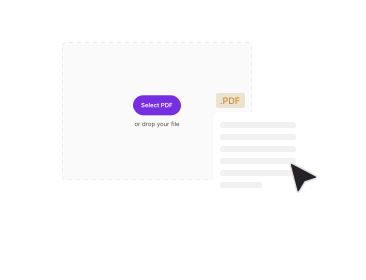
Add Your PDF
Drop it in the box above or pick it from your device. PDFNoob reads the page count and shows a preview of every page.
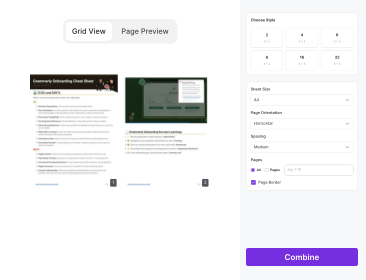
Choose the Pages
Keep All Pages, or choose Pages and type a range such as 1-10, 15-20.
Pick Layout and Paper Size
Choose 2-up, 4-up, 6-up, 8-up, 16-up or 32-up, then the output paper from A0 to A6 or Letter. A4 is the default.
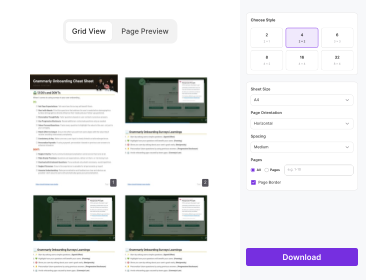
Preview, Then Download
Check the arranged sheets, go back to editing if something looks off, then download your N-up PDF.
Why Use PDFNoob To N-Up a PDF?
More pages per sheet, without fighting a printer dialog.

Six Layouts, From 2-Up to 32-Up
2 pages side by side, 4 in a 2×2 grid, then 6, 8, 16 and 32 per sheet.

Every Paper Size From A0 to A6
Lay pages out on A0, A1, A2, A3, A4, A5, A6 or US Letter. Big sheets suit 16-up and 32-up.

Page Ranges or the Whole File
Type 1-10, 15-20, or keep every page. Only the active method counts.

See the Sheets Before You Commit
The preview shows the final arrangement. Back to Editing keeps every setting you chose.

Mixed Page Sizes Handled
Portrait, landscape and odd-sized pages are each scaled to fit their own cell, in proportion.

Your File Never Leaves Your Browser
Nothing is uploaded, stored or used to train AI.
About N-Up PDFs and Multiple Pages Per Sheet
N-up means N original pages share one sheet: a 4-up PDF puts four pages on each sheet, so 40 pages print on 10. Print shops call it imposition or N-up printing; most people search for multiple pages per sheet. This tool places several pages onto a single sheet and saves the result as a normal PDF.
2-Up to 32-Up: Which Layout to Pick
2-up suits reading copies and A5 booklets on A4. 4-up (2×2) and 6-up (3 columns × 2 rows) suit slides, notes and handouts. 8-up (4 × 2) gives a quick overview. 16-up (4×4) and 32-up (8 × 4) work best for proofs or on A3 and larger paper.
2 Pages in One Page PDF: Side by Side
Side by side suits portrait pages such as notes. Add Small, Medium or Large spacing so the pages do not look cramped.
Choosing Pages and Page Ranges
Use All Pages, or type ranges such as 1-10, 15-20. Pages always keep their original order, overlaps count once, and a range past the last page, such as 1-30 in a 20-page file, is stopped with “This PDF contains 20 pages.”
Mini Copies of ID Cards (Micro Xerox)
For a micro xerox of an Aadhaar, PAN card or certificate, add the PDF and choose 16-up or 32-up on A4. Use 4-up if the text must stay easy to read.
N-Up PDF vs the Pages Per Sheet Print Setting
You can print multiple pages per sheet from a print dialog, but that only changes one print job. An N-up PDF is a file you can send to a print shop or print from a phone, and it comes out the same everywhere.
Related PDF Tools
Other tools you might need today.


Frequently Asked Questions
Quick answers about putting multiple PDF pages on one sheet.
What Does N-Up Mean in a PDF?
N original pages are shrunk and placed on one sheet. A 4-up PDF has four pages per sheet.
How Do I Set 2 Pages Per Sheet in a PDF?
Choose 2-up to place two pages side by side on each sheet.
How Do I Print 4 Pages on 1 Sheet From a PDF?
Choose 4-up for a 2×2 grid, download the file and print it at 100% scale.
How Can I Create a PDF With 8 Pages Per Sheet?
Choose 8-up: 4 columns, 2 rows. On A4 pages are small, so A3 reads better.
Can I N-Up Only Some Pages?
Yes. Choose Pages and type ranges like 1-10, 15-20.
What if My Pages Don’t Fill the Last Sheet?
Empty cells get a light dashed outline and pages are never repeated. 20 pages at 8-up give 3 sheets.
Which Paper Sizes Can I Use?
A0, A1, A2, A3, A4, A5, A6 and Letter. A4 is the default.
Is There a File Size Limit?
Yes. One PDF up to 50 MB.
Can I Use a Password-Protected PDF?
Not directly. Unlock it first with Unlock PDF, then add it here.
Is It Safe to N-Up a PDF Online?
Yes. It runs in your browser, so your file is never uploaded or stored.